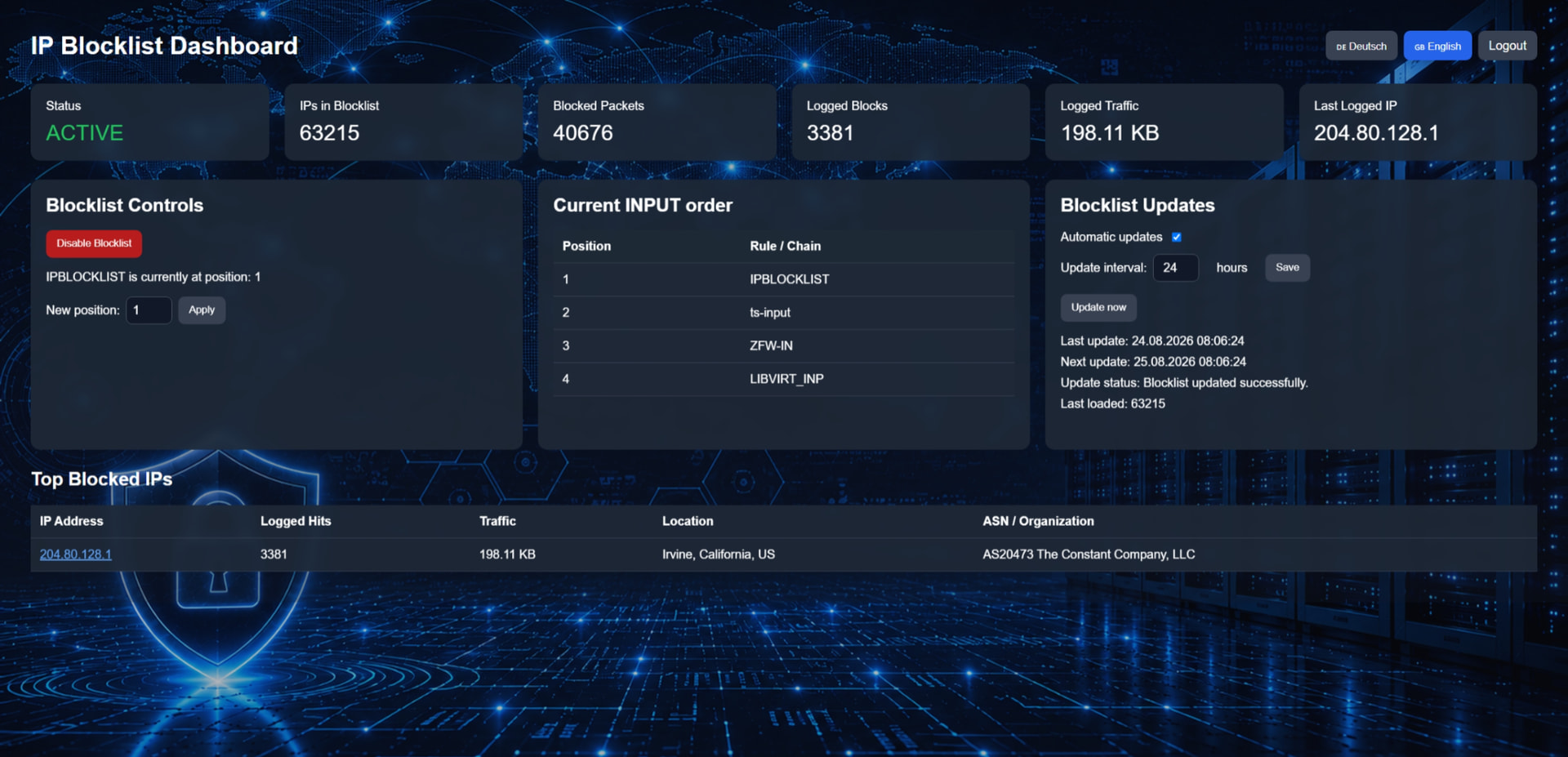
IP Blocklist Dashboard – Project Overview
I would like to briefly introduce a project I have been working on: the IP Blocklist Dashboard.
The idea behind this project is to provide a simple way to manage and monitor an IP blocklist directly from a web-based dashboard.
The system uses ipset and iptables to maintain a list of blocked IP addresses and block unwanted connections. In addition to the actual blocking functionality, the dashboard provides statistics and information about blocked traffic.
Current features
The dashboard currently shows:
-
Blocklist status – whether the IP blocklist is currently active or disabled
-
Number of IPs in the blocklist
-
Blocked packets – the number of packets blocked by the firewall
-
Logged blocks – how many blocked connections have been recorded
-
Logged traffic – the amount of traffic associated with logged blocked connections
-
Last logged IP address
-
Top blocked IP addresses – including the number of logged hits and traffic
-
Geographical location of logged IP addresses
-
ASN and organization information associated with the IP address
Blocklist controls
The dashboard also allows the blocklist to be managed directly from the interface.
Current controls include:
-
Enable or disable the IP blocklist
-
Change the position of the
IPBLOCKLISTchain -
Display the current order of the
INPUTchain -
Check where the blocklist is currently positioned in relation to other firewall chains
This is particularly useful when the system is running alongside other firewall or network components.
Blocklist updates
The project also includes an update system for the blocklist.
The dashboard can:
-
Enable or disable automatic updates
-
Configure the update interval
-
Run a manual update
-
Display the last update time
-
Display the next scheduled update
-
Show the update status
-
Show how many IP addresses were loaded into the blocklist
Technical side
The project is containerized with Docker Compose.
One of the goals was to avoid unnecessary system-specific configuration. For example, the container is designed to use the host system’s timezone instead of depending on a fixed timezone such as Europe/Berlin.
This should make the project easier to run on systems in different regions and timezones.
Current development status
The main functionality and dashboard are already working.
At the moment, I am working on the visual and branding side of the project:
-
Main dashboard logo
-
App/CMS icon
-
Web icon
-
Browser favicon
-
Simplified versions for smaller sizes
-
Transparent versions where appropriate
After that, the next step will be to integrate these elements properly into the dashboard, including the page title, branding and responsive layout.
The remaining work will focus on:
-
Simplifying the Docker Compose setup for other users
-
Removing unnecessary personal paths or configuration
-
Creating installation and update documentation
-
Testing fresh installations
-
Testing container and system restarts
-
Testing automatic and manual updates
-
Testing the German and English interface
-
Testing different timezones
The goal is to turn this into a reasonably simple and self-contained project that allows users to manage an IP blocklist, monitor blocked traffic and view useful information about blocked connections from one central dashboard.
The project is still under development, but the core functionality is already in place. I wanted to share the current state and get some feedback before moving on to the final integration, testing and documentation.