My internal memory (500 GB) is almost full. My dockers don’t use that much memory (5GB). How can I check what exactly has been using up so much memory on the internal storage? I would be happy to receive ideas for cleaning up the internal memory.
i did a prune on non used docker images and it cleaned up some space. also i’ve migrated all the apps files (appdata folder) using the system, to my RAID and so far no trouble.
to prune the non used docker images you will need to access the system terminal or via ssh (not my case)
the you will need to login and enter the following command
 docker image prune -a

WARNING! This will remove all images without at least one container associated to them.
Are you sure you want to continue? [y/N] y
Hi, @ilmanuel, have you used victor’s method to check the possible reason?
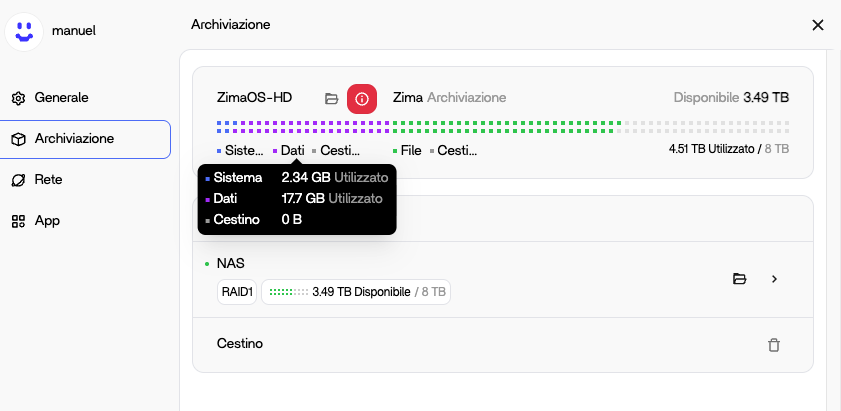
This has all happened since the most recent update, 1.5.0.
I came home today to my server running at 100% fan. I looked at the dashboard and it was claiming the system eMMC was full of 100GB of data in the Data part of the drive. I looked thru all of the docker images, etc and couldn’t really find anything matching the claimed 100GB but deleted unused docker images.
Your poorly written update could have killed my server, or potentially even caused a fire. I don’t understand how there is a partition of the drive which we have no access to at all, which seemingly takes up space uncontrollably.
This needs to be solved NOW before people have catastrophic system failures from their servers running at 100% because of full disk usage.
At the end i have reinstalled ZimaOS but before read this: Rebuilding RAID after reinstalling the system | Zimaspace Docs
I understand why this feels alarming. Seeing the system report 100 GB used on the eMMC and the fans ramping up would make anyone think the update had done something dangerous. But from looking closely at how ZimaOS 1.5.0 is built and checking my own system, what’s happening isn’t the OS secretly filling 100 GB of inaccessible space.
ZimaOS keeps the core operating system on a read-only squashfs image. That partition is fixed and can’t silently grow. On top of it there’s a very small writable overlay the system uses for configs and logs, but user data and containers are meant to live on the /DATA drive. On most installs, mine included the root stays a few gigabytes and never grows, only /DATA changes as apps use space.
If the dashboard is showing 100 GB used on the system disk, it’s almost certainly one of two things, either a reporting issue in the new 1.5.0 dashboard (the storage widget can mis-attribute space that’s actually on /DATA to the system device) or a container/log accidentally writing into the small overlay because a volume wasn’t mapped correctly. That’s rare but can happen if an app was deployed without a proper /DATA bind.
Either way it doesn’t mean the update is destroying the eMMC or causing a fire risk. The base OS remains read_only and isn’t expanding. The fan spike you saw was most likely the system reacting to a perceived “disk full” condition or high CPU from containers, not the flash filling.
If you can share the real disk layout along with the dashboard screenshot, the dev team can tell right away whether something is genuinely writing to the overlay or if the UI just needs correcting. That will help them fix the scare factor in the storage display and catch any mis-mounted apps.
I know the experience was worrying, but it doesn’t look like 1.5.0 is physically harming hardware More likely a misreport or a single misconfigured app rather than a dangerous system_wide change.
Every time I try to use backup it fills up my built in storage. I know I found on here awhile back a command to run to clear this memory issue, but now I can find it again. I have migrated all my data to my RAID drives. If I look into the file system of the internal storage it doesn’t so any files. Any idea?
Thank you,
Jeff
I have found that using backup app to google drive will cause the hdd to fill, I have resorted to duplicati to an s3 bucket until this is fixed.
I did find a script on here for cleaning cache that seemed to clear hdd after running script and rebooting.
I came up with this topic because i have the same problem.
Please refer to this thread.
I’m at 1.43 version, and my /dev/root is full, meaning ZimaOS-HD is full.
I never got a warning.
I follow some scripts to free some space but that didn’t help.
I managed to update to 1.50 somehow, and now i got a warning. But the system is already become unstable. I wonder where ZimaOS-HD is, and how to fix it.
More is in the thread mentioned above.
Similar issue here. There is 100gb showing on my OS drive that is unaccounted for. I have no idea what it is or where its located. I cant find it in any folder in the files app.
Hi,
Somehow i did managed to get to 1.50 and the to 1.52.
I did a very good cleaning on cache etc, but the dev/root stays 100% full.
When i was on 1.43, there was never a warning. When i was on 1.50, a warning appear, but migration was only possible from back-up files to the ZimaOS-HD. The other way around.
So leaving me with a system thats broke, i can only reinstall it, wich i did.
Have the same issue. New install and /dev/root = 100%
root@ZimaOS:/root ➜ # df -h
Filesystem Size Used Avail Use% Mounted on
/dev/root 1.2G 1.2G 0 100% /
devtmpfs 24G 0 24G 0% /dev
/dev/nvme0n1p7 85M 219K 78M 1% /mnt/overlay
overlayfs 85M 219K 78M 1% /etc
tmpfs 24G 0 24G 0% /dev/shm
tmpfs 9.4G 5.0M 9.4G 1% /run
tmpfs 24G 1.9M 24G 1% /var
tmpfs 24G 0 24G 0% /tmp
SOLUTION:
When deleting files; at least on the MacOS smb connection; I think it places the files into a “ .trash ” folder located in “ /DATA/.trash/smb “ directory which ZimaOS can’t see because it’s a hidden directory.
So after enabling SSH Access located in settings:
General / Developer mode / SSH Access
You now can click on “Web-based terminal” and login with your user.
(I’m assuming you won’t type the quote marks when typing in the terminal screen)
(I’m not using any raids so I don’t know if this will also work with raid configurations, I think it should although the data could be in another location)
Now I also logged into root using “ sudo -s ”, I don’t know if that necessary but as a mac guy I’m used to Terminal.
So now we need to change into that directory “ cd /DATA/.trash/smb/ ” and if you do a “ ls -l ” you’ll see lots of files and if you ask the computer to do a summary of the directory “ du -sh * ” you can see how large each directory is.
Now let’s delete the files in that directory, make sure your in the directory by typing “ pwd ” and you should see “ /DATA/.trash/smb ”, if not try changing into that directory again otherwise the next command will wipe everything out, including possibly connected drives and network shares.
Type “ rm -Rfv * ” and press return and you should see all the stuff displayed as it is being deleted. I’m not deleting the “ smb “ directory just in case it’s needed for the system.
Now type “ ls -l “ and it should only show the two paths dot and double dot. Lets sync the changes by typing “ sync ; sync “ and we are done.
Log out by pressing “ cntl d ” (control-d) twice and now close that browser window and go back in the Developer mode settings and you can turn off SSH Access for more secure ZimoOS.
Reboot your system by clicking the power button icon in the window and choose restart.
Disk space should now be available and you can continue. I’m sure they will figure this out and fix it for future versions of ZimaOS.
Have fun, Joe