Intel N150 iGPU not supported

I’ve bought a GMKtec NucBox G3 Plus tiny PC.
I’m experiencing issues with hardware acceleration in Plex, iGPU not being recognized.

I did some research:

lspci | grep VGA
Shows: 00:02.0 VGA compatible controller: Intel Corporation Alder Lake-N [Intel Graphics]
intel_gpu_top
Result: No device filter specified and no discrete/integrated i915 devices found

This indicates that while the hardware is present, the system is not properly recognizing or initializing the GPU, making hardware acceleration impossible in Plex.Has anyone else encountered this issue or found a solution for enabling hardware acceleration on ZimaOS with Alder Lake integrated graphics?

I have the same problem, I installed ZimaOS on Beelink EQ14, which also comes with an Intel N150 CPU, the system runs smoothly but it has a hgiher CPU usage.

I’m reading all around that Ubuntu 24.04.1 LTS works just fine, which means the ZimaOS kernel doesn’t support yet the N150 i915 driver.

You can install CasaOS on Ubuntu 24.04 instead of running ZimaOS.

I tried both KDE Neon and Linux Mint 22 (both based on ubuntu 24.04 but no success, now installed kernel 6.12.3 via de mainline ppa and now at least the gpu works.
That being said, I’m using my G3+ to host Jellyfin and I’m still getting dropped frames when watching something in the browser with transcoding. It is also noticeably nog smooth in parts, which seems odd considering my synology nas with much less powerfull hardware does not have that.

This cpu is too new to be supported at the moment, it will be considered in subsequent iterations.

Was there an update to support the N150 iGPU? I tested ZimaOS 1.4 but couldn’t find any drivers in /dev/dri. Any suggestions or workarounds?

Driver testing for the N150 iGPU is currently underway, and we still need a lot of testing to ensure stability. If nothing else, it should be supported in version 1.4.2.
1 Like

Is there any estimated release date for ZimaOS 1.4.2 ? Will it support Intel N150 hardware acceleration for iGPU?

Or perhaps there is a workaround available for version 1.4.1?

In these two weeks.

1 Like

Now that 1.4.2 is out, any update here?
I still dont have any luck.

Works for me, since 1.4.2 beta1.

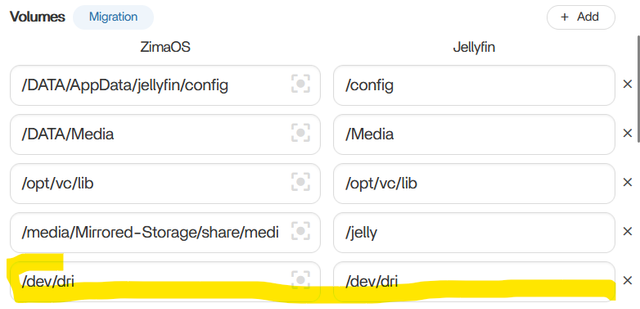
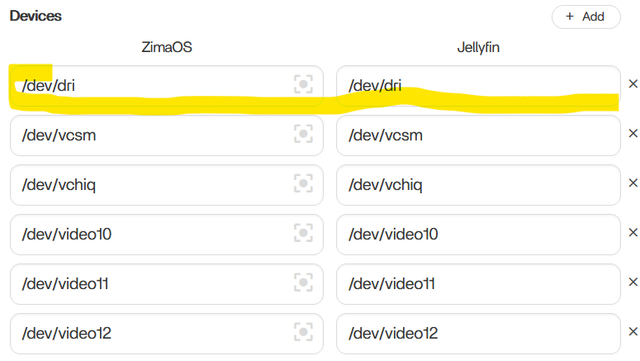
If you using it for e.g. in Jellyfin, you need to have /dev/dri set up in volumes and devices.

ls /dev/dri
by-path  card0  renderD128

1 Like