I’d like to report a critical issue I encountered while installing ZimaOS on the NVMe SSD of a ZimaBlade, which completely broke the boot process — even though the system was previously working perfectly.
Setup:
ZimaBlade with onboard eMMC
NVMe SSD (PCIe 3.0) connected via PCIe slot
2x SATA HDDs configured in RAID1
What worked perfectly before:
ZimaOS was installed on the eMMC and worked without issues
I had Proxmox installed on the SSD
The BIOS allowed switching boot devices:
Boot from eMMC (ZimaOS)
Boot from SSD (Proxmox)
This dual-boot setup worked without a problem.
What caused the problem:
After installing ZimaOS on the SSD, the system:
Installed without errors
But stopped booting entirely
Even booting from the eMMC (which previously worked) no longer worked
Only by physically disconnecting the SSD and reinstalling ZimaOS on the eMMC was I able to recover functionality.
This issue is specific to ZimaOS installs on SSD — Proxmox installed on the same SSD worked fine and did not interfere with eMMC boot.
Additional context:
I tested the installation with multiple versions of the ZimaOS image, including v1.4.1 and v1.4.2-beta1 — all resulted in the same boot failure.
My goal was to use ZimaOS installed on the SSD as the main OS, to take advantage of better performance, as I realized it was sufficient to run all the services I need natively, without virtualization: NAS, Home Assistant, WireGuard, OpenVPN, MQTT, and a few others.
No need for Proxmox or VMs — ZimaOS would have been perfect if the SSD install didn’t break boot entirely.
This took me an entire day to recover — and I’m still restoring parts of the setup.
If anyone else ran into this or has a supported method to install ZimaOS on an SSD without breaking boot, I’d love to hear it.
Thanks in advance — and I hope this helps others avoid the same issue.
The Blade can provide a limited amount of power, and your combination may exceed the power supply capacity of the original power supply. You can search for such questions on our Discord.
Yes — I actually tested the installation with both HDDs disconnected (no SATA devices at all).
The only storage devices connected were:
the onboard eMMC
and the NVMe SSD
I repeated the test using different versions of the ZimaOS installer, and the result was always the same:
Installation completed But after reboot, neither SSD nor eMMC would boot, until I physically disconnected the SSD.
This clearly points to a bootloader or installer logic issue, not a power-related one.
Also, when running Proxmox on the SSD and ZimaOS on the eMMC (before attempting to install ZimaOS on SSD), the system ran perfectly stable, with all storage devices connected and operating under load.
So I believe this is not related to power limits — it’s about how ZimaOS handles bootloader installation and disk selection during install, especially on the ZimaBlade.
Thank you for the detailed reply and the article link.
Yes, I’ve already read that guide thoroughly and followed every step carefully as outlined:
Used Balena Etcher to flash the .img file
Verified the SHA256 checksum
Booted in UEFI mode (Legacy BIOS is not used)
Secure Boot is disabled
Running on official hardware: ZimaBlade
SATA mode configuration is not applicable (ZimaBlade uses NVMe/eMMC with no configurable SATA/AHCI options — AHCI is the default)
Tested with three versions of ZimaOS: 1.4.2-beta1, 1.4.1, and also the older 1.3.1-1
Tried multiple clean installations on different drives (SSD and eMMC)
Used known-good SSD (previously running Proxmox without issues)
Tried installations both with and without HDDs connected — no difference
To clarify: Installing ZimaOS on the eMMC works normally even with the SSD connected. Installing ZimaOS on the SSD results in a broken system — boot fails immediately after the installation completes and reboots.
Here are two screenshots that illustrate the issue:
After the first reboot post-installation, the system fails to identify the correct overlay mount and throws errors related to missing devices and read-only filesystem:
At the moment I don’t have another NVMe SSD available for testing.
Would it make sense to try doing a full wipe of the SSD before attempting the ZimaOS installation again?
I’m wondering if a previously installed bootloader (from Proxmox) might be interfering with the ZimaOS boot process.
Another cause may be the existence of both systems on the EMMC and the SSD. So, try to wipe the FS in the EMMC and reinstall ZimaOS on the SSD. Look forward to your reply.
Omg there’s hope. I’ve been running into the same problem. How did you wipe the emmc? Also did you change any settings in the bios or left is as it came from factory?
Completely wiped both the SSD and the eMMC (‘wipefs -a /dev/nvme0n1’ and ‘wipefs -a /dev/mmcblk0’ to remove all partition tables and boot sectors).
Installed ZimaOS fresh on the SSD only (with the eMMC completely blank).
After that, the system booted normally from the SSD and has been working fine since.
So, if you have another bootable OS or previous ZimaOS installation on another storage device (like eMMC), I recommend doing a full wipe of all storage drives before installing. This ensures the installer writes a clean ESP and bootloader without conflicts.
 Setup:
 What worked perfectly before:
 What caused the problem:
 Additional context:
 Installation completed
 But after reboot, neither SSD nor eMMC would boot, until I physically disconnected the SSD.
 Installing ZimaOS on the eMMC works normally even with the SSD connected.
 Installing ZimaOS on the SSD results in a broken system — boot fails immediately after the installation completes and reboots.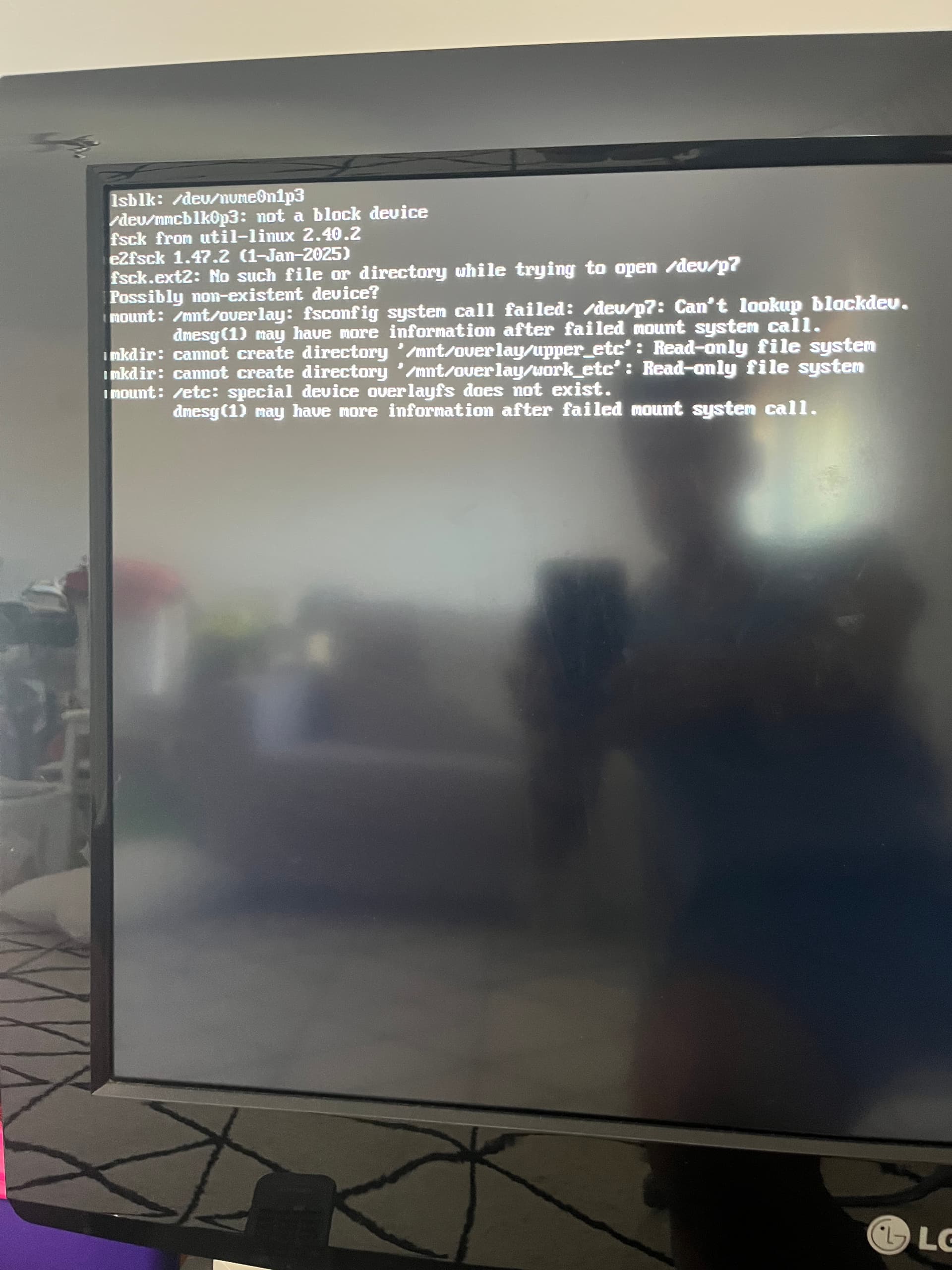
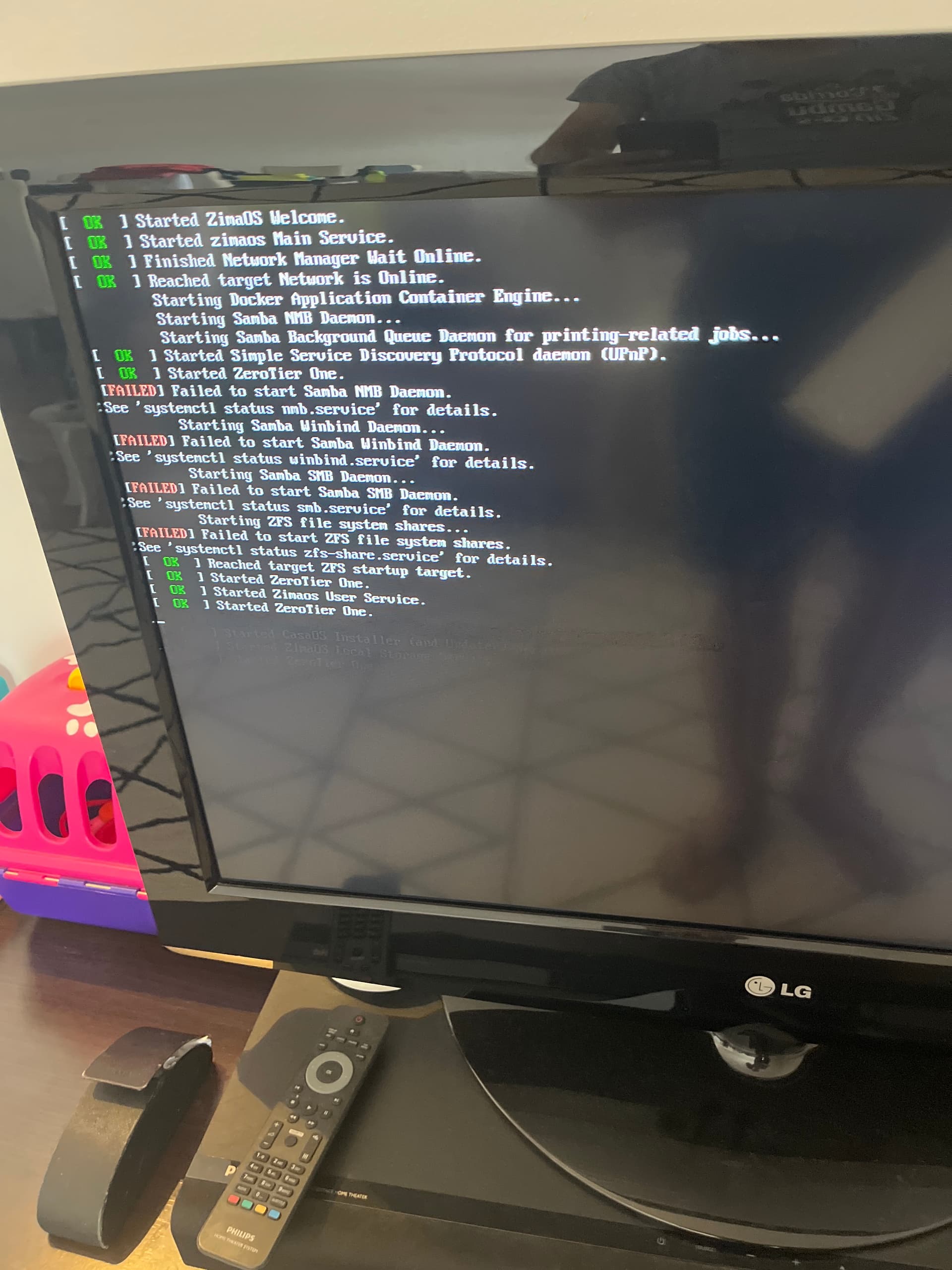
 SSD used: