Installing a Containerised Application

Hey folks.

I’m brand new to all of this and so far. Loving ZimaOs, I’ve set up a home media server, have music, movies, TV all added and working… I just have a problem. I like a lot of Asian based movies, mainly things Japanese and Korean and that’s led to some major issues trying to get subtitles working correctly.

Was recommended an app “Subsyncarr” which grabs and adjusts subtitles for you and Jellyfin just detects and allows those subs as an option when watching but it’s not an app availabe on the ZimaOs app store.

I thought about using the “add a contanerised Application” option and had a look but I’m not 100% sure on how to use it.

The docker app I want is here:
mrorbitman/subsyncarr - Docker Image

I don’t want to mess anything up with anything else and I think I’ve got a rough idea but all the install instructions don’t really co-relate with the options on the button in ZimaOs.

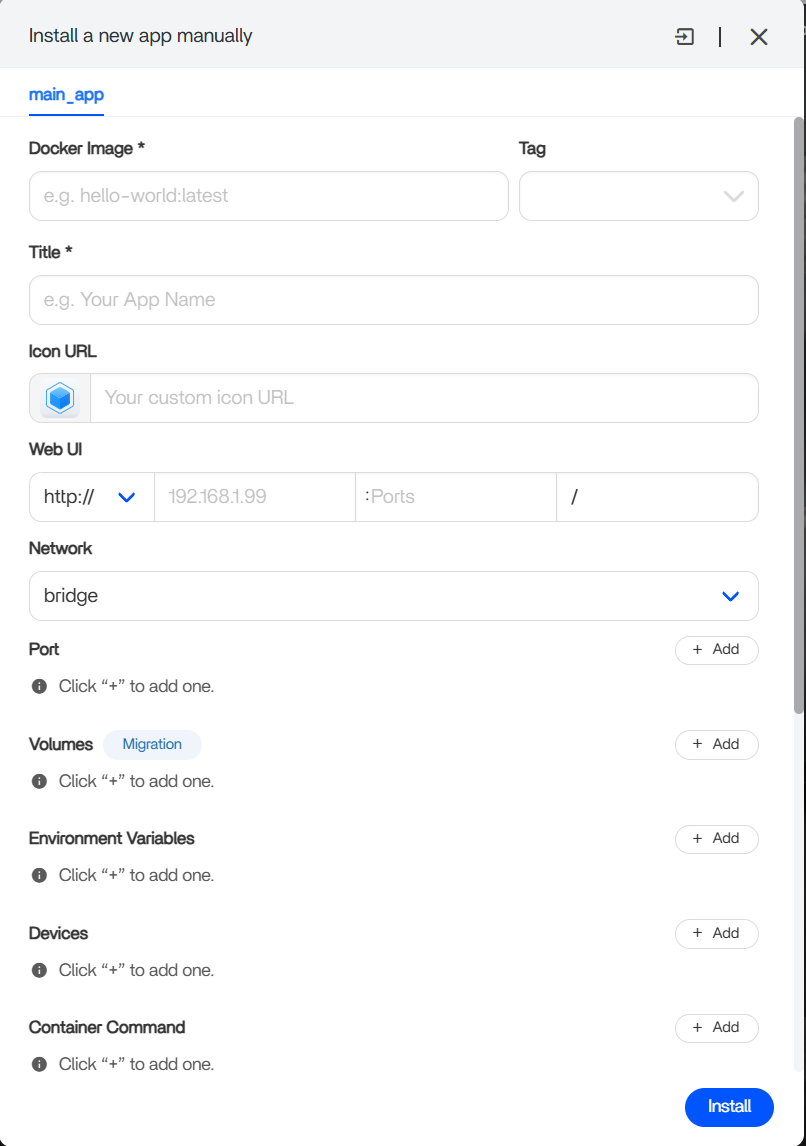
ZimaOs:
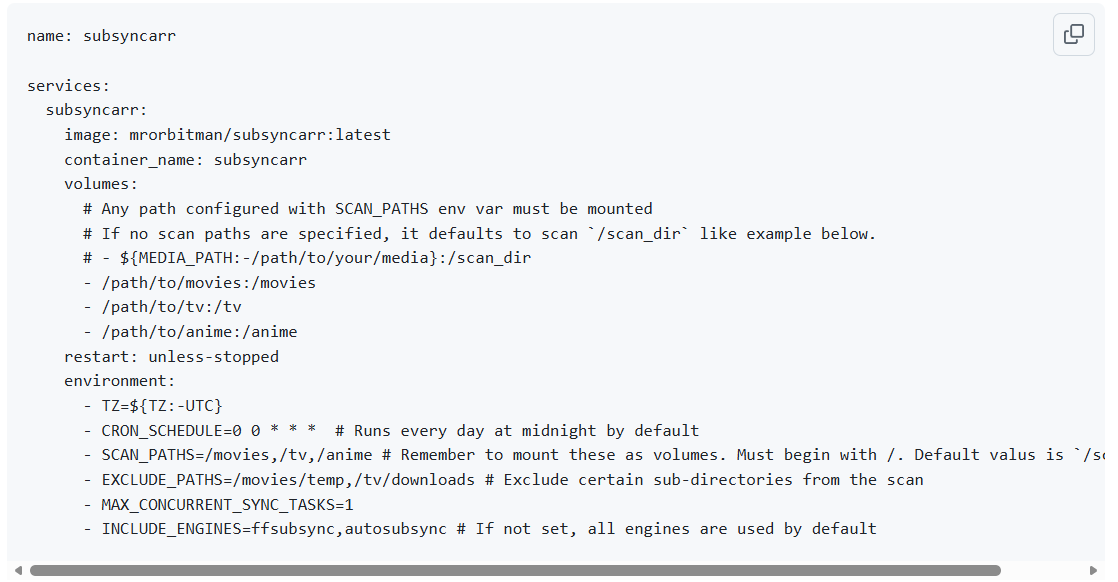
Install instructions:
I’m just not 100% what goes where and don’t want to spend many an evening messing up so if anyone has any tips/guidance or a “that’s not going to work silly” comments then please. Save me a few hours tearing my hair out (I’m bald)….

Tech savvy but new to Zima/Docker/Linux etc…

Thanks in advance!!

Hi Steve, welcome.

You are not being silly at all. The ZimaOS manual install screen is basically asking you to translate the Docker Compose example into fields.

Roughly it would be:

Docker Image

mrorbitman/subsyncarr

Tag

latest

Title

Subsyncarr

Network

bridge

For this type of app, I would leave Web UI / Ports empty unless the app documentation specifically says it has a web interface and exposes a port.

The important part is the Volumes section. That is where you map your real media folders into the container.

Example:

Host path: /your/zimaos/movies/pathContainer path: /movies
Host path: /your/zimaos/tv/pathContainer path: /tv
Host path: /your/zimaos/anime/pathContainer path: /anime

Then under Environment Variables, add the values from the Docker example, for example:

TZ=Europe/London
CRON_SCHEDULE=0 0 * * *
SCAN_PATHS=/movies,/tv,/anime

The key thing is that SCAN_PATHS must match the container paths, not the ZimaOS host paths.

So if you map:

Host path: /DATA/Media/MoviesContainer path: /movies

Then SCAN_PATHS should use:

SCAN_PATHS=/movies

Not:

SCAN_PATHS=/DATA/Media/Movies

You can leave Devices and Container Command empty unless the documentation specifically tells you to add something there.

The main thing is to make sure the host paths are the real ZimaOS media paths where your Jellyfin libraries are stored. Check the exact paths in the ZimaOS Files app or from the Jellyfin container volume mappings first.

As long as you only add this as a new container and map the media folders correctly, it should not interfere with Jellyfin. The worst case is usually that Subsyncarr cannot see the folders until the paths are corrected.

1 Like

I did think this was the case but the little distrusting (of me) part of my brain wasn’t translating it well.

Thank you for talking it down! Will have a go at this once I get my day started!

1 Like