I’m getting this error when trying to create a new stack on portainer.io
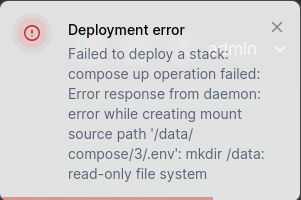
Not much to go on here but you can create the directory manually using the CLI and login in as root.
On the ZimaOS dashboard click Settings. In General, scroll down to Developer Mode and click View. Then click the arrow to the right of Web-based terminal, then enter root followed by the root password you created on setup. Create a new directory in your required location.
Then try deploying the stack again and see if that works.
I just had some relative volumes in the docker-compose.yml file.
I’m sorry I wasted your time.