Hello everyone! I’m trying to install the Home Assistant operating system on a virtual machine embedded in Zima OS.
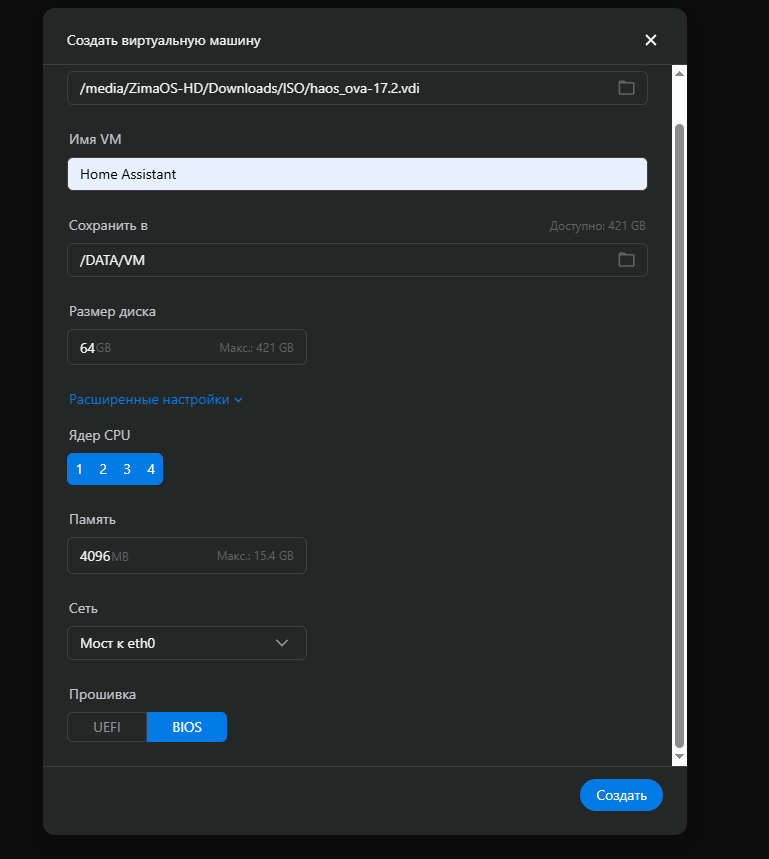
I don’t have a native Zima device, but a platform with an Intel N150 processor. I downloaded the image from the HA website, unpacked it, uploaded it to the device, selected setup, and the installation hangs every time it boots. I let the installation run overnight, but nothing works. Can anyone in the know tell me what I’m doing wrong?
I haven’t used home assistant but wondering if there is a difference between you intalling via the zvm when its available as a docker image on the app store ?
HA: Docker is very limited. Yes, it sees some of my Tuya devices, but the integration with Xiaomi is simply terrible. Half of them don’t load, some crash, or don’t install.
Unfortunately ZVM is still pretty limited and needs some work. dont think you are doing anything wrong but home assistant isnt the only OS thats still a little flakey at this moment in time to install using zvm.
Yes, I understand that ZVM is not stable, it just worked for someone, I saw a post about it on this forum, my settings are the same, but maybe there is some other nuance.
I ran Home Assistant OS on ZVM for 2 months before migrating it to bare-metal (NUC 8).
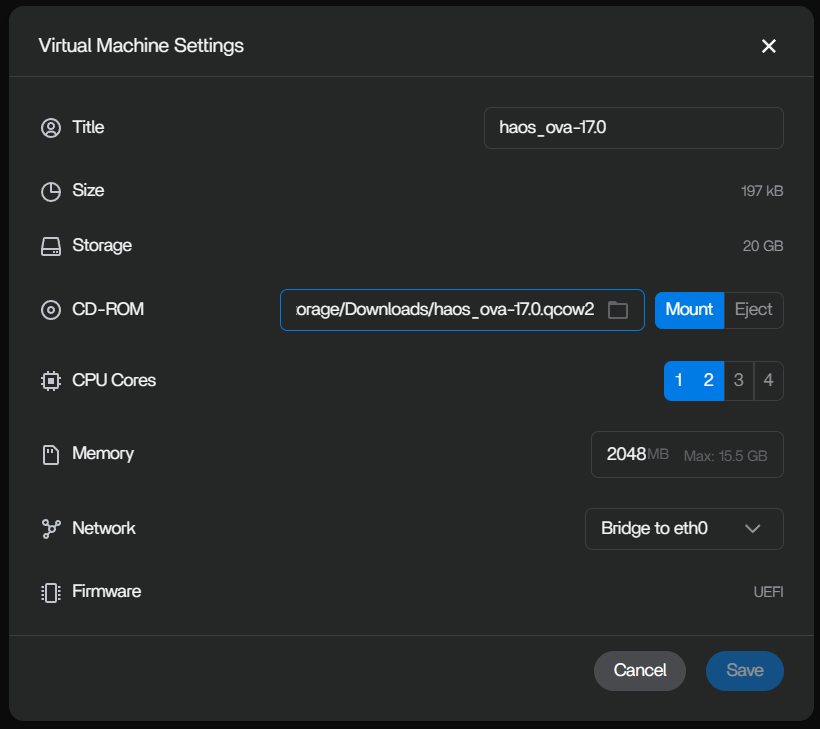
@funinthesun , looking at your screenshot I see that you used the .vdi image. I used the .qcow2 image also available here, for my setup. I also selected “UEFI” for Firmware.
I don’t know if this is your issue or not, just thought I’d share what worked for me.
This is what my settings looked like at the time (HAOS version has updated since)
I’ve been trying to find a solution to the problem with tuya for a long time. As a result, I got access to the devices through OpenHAB from the app store.
hi, just 2 words from my side: if you’ve got some N150 mini computer I guess it would work for you installing Proxmox on it and then ZimaOS and Home Assistant as a separated virtual machines in Proxmox. I currently test this solution and it works ok. AI told me this idea. This way if one app breaks you’ve got other apps still working. It may be pretty important to preserve HomeAssistant working without issues. And having HA on ZimaOS could generate some issues during f.ex. ZimaOS update process etc.
I’d probably lean toward what @Burndaddy and @matterbury mentioned here.
A couple of things stand out from the screenshots:
You’re using the .vdi image
Firmware is set to BIOS
A lot of people seem to have better luck with:
the .qcow2 HAOS image
UEFI firmware instead of BIOS
So it may not actually be “stuck”, but more a compatibility/boot issue with the image format or firmware selection.
Also, 64GB disk is much larger than HAOS normally needs. Most people are fine with 32GB unless they plan heavy addons/history storage.
Personally, if you specifically want Home Assistant OS, I’d try:
HAOS .qcow2
UEFI
2 CPU
2–4GB RAM
32GB disk
before changing anything else.
And one important thing people sometimes miss:
after creating the VM, give the first boot quite a while. HAOS can sit on a black screen for several minutes while it expands storage and initializes services.
That said, if your main goal is just running Home Assistant reliably, the App Store container version is also worth considering because it’s much simpler on ZimaOS and uses fewer resources. The downside is you don’t get the full HAOS appliance/addon style experience.
I installed the HAOS.qcow2 version in ZVM. When I start this virtual machine, it boots up and runs the HA Command Line Interface version. It says “System is Ready Use Browser or App to Configure”, and I am able to correctly process things in the HA command line interface. However, when I try to use http://homeassistant.local:8123 or http://10.147.xxx.xxx:8123 (using the ZimaOS IP address), it comes up with “Site Cannot be Reached”. I know that the ZimaOS client is running correctly, because I can use port 2283 to access immich. One of the things I was wondering: could there be a problem because I had previously run the docker version of HA in this ZimaOS setup. I deleted the docker version, but is it possible that ZimaOS is coming up with a problem because it cannot find the docker version? I am running ZimaOS on a Win11 computer. Any suggestions would be appreciated. Thank you for your help.