Hi everyone,
I’m having a bit of a headache getting Hardware Transcoding to work in my Stremio container on ZimaOS.
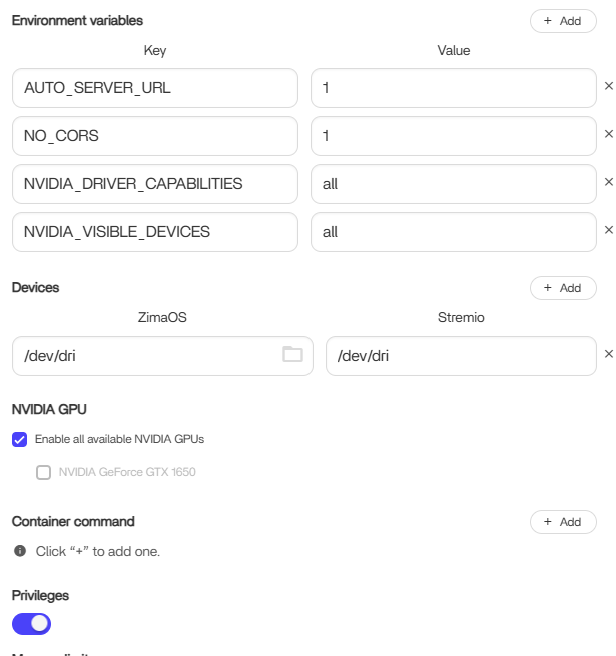
The Setup:
The Problem: In the Stremio settings/logs, the NVIDIA GPU isn’t detected, so I’m stuck with CPU-only playback which is hitting my resources hard.
What I’ve tried: I’ve checked my Docker Compose/App settings, but I suspect I might be missing specific environment variables or the deploy reservation needed for Stremio’s specific image.
Your GPU passthrough is already working correctly.
You’ve proven that because:
• nvidia-smi works on ZimaOS
• Jellyfin is using hardware transcoding successfully
That means drivers + NVIDIA container runtime are configured properly.
If Stremio cannot see the GPU, the issue is not ZimaOS.
Most Stremio container images do not include NVIDIA libraries or NVENC-enabled ffmpeg. Even if you pass:
NVIDIA_VISIBLE_DEVICES=all
NVIDIA_DRIVER_CAPABILITIES=all
the container still needs to be built with CUDA/NVENC support internally. If the image wasn’t built with that support, the GPU will never be detected.
Also note:
/dev/dri mapping is for Intel iGPU (VAAPI), not NVIDIA, so that setting won’t help here.
Conclusion:
This is an image limitation, not a passthrough problem. Jellyfin works because its image is built with GPU support. Stremio’s typically isn’t.
If GPU transcoding is required, you’d need a custom-built Stremio image with NVENC-enabled ffmpeg — assuming Stremio’s backend actually supports hardware transcoding at all.