I’m having trouble with various docker container where they cannot write in directories.
Best example is handbrake.
I want it to be able to encode files from and to the /media/sda2 ssd in my server.
I tried changing the PUID & PGID in the docker settings, to 0, to 1000, to 999 but I still get the same error of an non-writable output folder.
I’ve had similar issues with other containers
I’m not exactly an expert, and chose ZimaOS to avoid to much terminal use, but here I am now, trying to chmod my way out of no-encoding hell, and it does not work.
I’ve seen a few other subject with similar issues, and clearly it seems a way to see wich user have which permissions on a folder would be a nice addition to the Files app.
This is what drove me away from ZimaOS. I am now running Unraid on the same platform. Not super happy with Unraid, I’m not convinced it’s a good fit for me long term, but it is much more mature and has better support. I’m keeping an eye on ZimaOS though. I want to love it but I need things to work.
You mentionned that the mounting with permission is not persistent.
Is that also the case in a server which is very rarely shut down ?
If so you’re right and it would be better to format, I imagine I can do that directly with the formating tool inside ZimaOS. I’ll first have to back up all my stuff though.
Yes, even if the server is rarely shut down, exFAT permissions are applied at mount time. If the disk ever remounts (reboot, cable reseat, service restart), the uid/gid mapping resets. That’s why ext4 is the proper long-term solution for Docker workloads.
About the exit status 1 when formatting, that almost always means the disk is still mounted or in use.
Before trying again, check:
mount | grep sda2
If it’s mounted, see what’s holding it:
fuser -m /media/sda2
Stop any containers using it, then:
umount /media/sda2
Once it’s fully unmounted, the ZimaOS formatter should work.
I have already stopped all containers with volumes on the concerned drive.
grep gives:
$ mount | grep sda2
/dev/sda2 on /media/sda2 type exfat (rw,relatime,fmask=0022,dmask=0022,iocharset=utf8,errors=remount-ro)
/dev/sda2 on /var/lib/casaos_data/.media/sda2 type exfat (rw,relatime,fmask=0022,dmask=0022,iocharset=utf8,errors=remount-ro)
/dev/sda2 on /DATA/.media/sda2 type exfat (rw,relatime,fmask=0022,dmask=0022,iocharset=utf8,errors=remount-ro)
and fuser
$ fuser -m /media/sda2
1355
unmount still says that the target is busy.
EDIT for Take 2:
I tried again after a reboot. fuser indicated the PID 1356 which seems to be: root@ZimaOS:/DATA ➜ # ps -ef | grep 1356 root 1356 1 0 21:39 ? 00:00:04 /usr/bin/icewhale-files root 17298 6970 0 21:48 pts/1 00:00:00 grep 1356
So i guess what’s blocking the unmount is just the file system ?
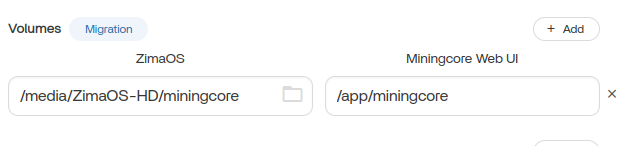
For an app, you would select or create a directory on the drive in Files in the gui then map a directory in the docker app to that directory. In the setting menu of the docker app under volumes. The example below mounts the directory /app/miningcore in the docker container to /media/Zima-OS/miningcore on the native drive path.