Hello All
after fiddling with Zima OS for one long night here is my first impression :
- Adguard dosent work + cant find a solution why he doesnt bind to my local 192.168.60.0/24 IP range but uses his private isolated network thats useless for me instead, gave up after some hours Host/Bridge etc, deleted the whole Folders in Appdata after every attempt.
- Pihole the very same , both installers are kinda broken out of the box not working I did find tons of workarounds and how to´ s but didnt get it to work until now…
- Jellyfin works after several attempts (yay)
- TimeMachine Backup doesnt work (see my other post) could not find a solution until now.
I mean I reallly would like to pay for a product that does the job but as of now I cant see that ZimaOS is in any way a thing thats more than experimental and I will need so many hours in command line and googling whats the point ? why are these very very basic docker installations not working on a fresh system without hours of ssh and cli actions one has to painfully search for ?
I reinstalled Zima 2x also changed the Drives etc. The Hardware is not new but a working fine MiniPc i5 with 8 GB Ram so Hardware should not be the troublemaker as it did work with other OS´ ses .
I can definitely understand the frustration.
One thing worth mentioning is that ZimaOS itself is mostly a management layer on top of Docker, so applications like AdGuard Home, Pi-hole, Jellyfin, Home Assistant, etc. are largely dependent on how their containers are configured rather than on ZimaOS specifically.
For AdGuard Home and Pi-hole, DNS services are a bit of a special case because they need direct access to ports 53 (and often 80/443) on your LAN. If those ports are already in use, or if the container is deployed on an isolated Docker network, they won’t behave like a traditional network DNS server. Many users end up switching those containers to host networking or adjusting port mappings, but admittedly that’s not always obvious from the App Store templates.
Jellyfin eventually working is actually a good sign that Docker networking and storage are functioning correctly underneath.
Regarding Time Machine, I’d be interested to see your other thread because Time Machine failures can be caused by several different things, including SMB configuration, permissions, storage paths, or Apple’s own requirements for network backups.
Out of curiosity, when AdGuard and Pi-hole were running, were the containers actually staying healthy and reachable from the ZimaOS dashboard, or were they failing to start altogether? That detail might help narrow down whether you’re dealing with an application configuration issue or something lower-level in the networking stack.
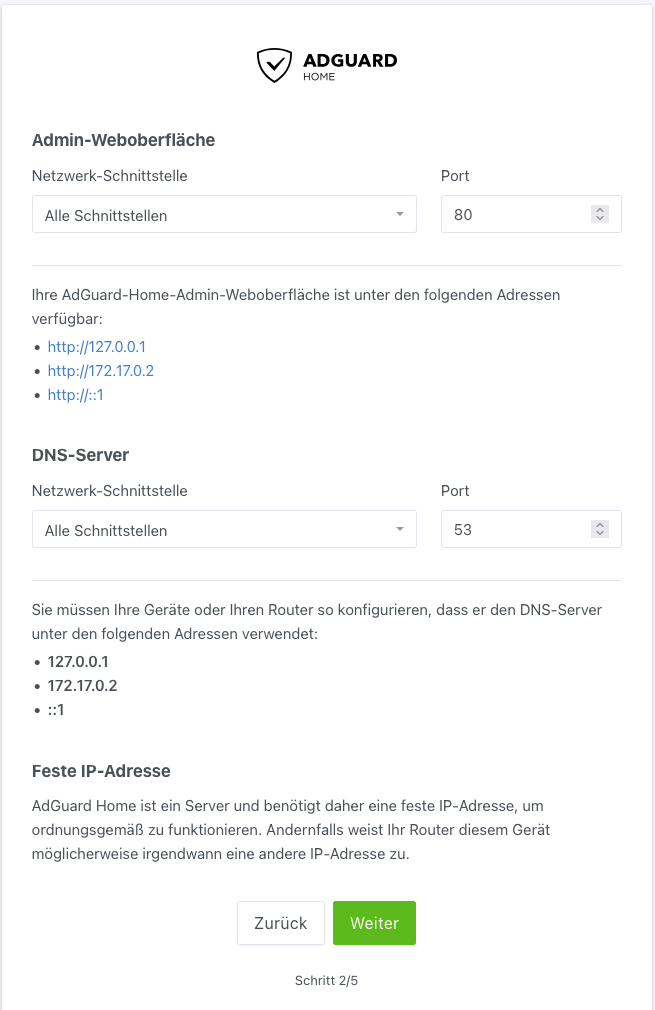
they are “healthy” just they dont want to be part of my local network (192.168.60.0/24)
after doing a standard install thats what i see :
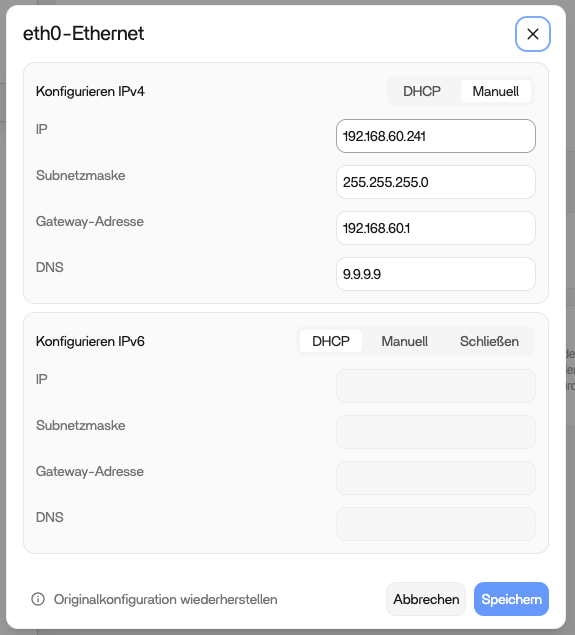
whereas my ethernet setup is
I found a how to that said change to bridged mode via
cd <app-folder-name>
nano docker-compose.yml

network_mode: host

that made my installation unreachable after i did set the IP to x.x.x.242 in the app settings (http://192.168.60.252:3001)
– Update :: this guide helped AdGuard unter ZimaOS installieren: Webinterface erreichbar machen, DNS eintragen – FRUNC
sry its german text but in general it says : Install the “Network” version (not the one thats default) run thru the setup then add tcp ports 8080 and 80 in app settings…
the setup assistant still doesnt show the 192.168.60.xxx IP but it seems like he does work.
thx for making me look again into google ^^
Thanks for coming back with the update.
What AdGuard is showing during the setup wizard is actually normal in many Docker deployments. The wizard only sees the network interfaces available inside the container, which is why it lists addresses like 127.0.0.1, 172.17.x.x, or ::1 rather than your host IP (192.168.60.241).
The important test is whether you can access the web interface and whether clients on your network can use AdGuard as their DNS server. From your update, it sounds like the network version of the app plus the additional port mappings resolved that part.
I would be cautious about editing the compose file and switching to network_mode: host unless you specifically need it. On ZimaOS, changing networking modes can sometimes create port conflicts or make an app inaccessible if the configuration no longer matches the App Store deployment.
If AdGuard is now reachable and DNS queries are being answered correctly from devices on 192.168.60.0/24, then I would consider that a successful setup, even if the installation wizard never displays the LAN IP you expected.
Out of curiosity, can you confirm whether a client device is now receiving DNS responses from AdGuard and whether ad blocking is working as expected? That would help confirm everything is functioning normally.
So I did again a fresh install  After taking a look into another Operating System to find out I did somehow ruin my TimeMachine on my MacBookPro…. He didnt want to backup onto a Truenas TimeMachine share as well. It could be the more recent OS I run on the Laptop (Sequia) because my older Mac ´Mini (Monterey) does backup just fine.
So I reinstalled ZimaOs with the exact same results : Mini works, Macbook doesnt. For now I blame the Client to not perform as expected and try to find out whats wrong with it as local USB TimeMachines do work.
There is a known TimeMachine bug thats under Sequioa (wich I dont use) that causes trouble if there are certain letters the german , french and others might use in their names (üäö ß etc).
FunFact is that my Laptop did work on my very first test Nas installation with TimeMachine over SMB but then decided not to on the second attempt. That caused me a little while to find out it might be the client as I said. So appologies from my side to blame the Server.
AdGuard works fine with the the installation instructions I posted.
1 Like
Thanks for the update, and no apology needed.
To be fair, that’s exactly why troubleshooting storage and backup issues can be so frustrating. The symptoms often look like a server problem when the root cause ends up being somewhere else in the chain.
It’s interesting that your Monterey Mac Mini continues to back up normally while the Sequoia MacBook does not, especially since you were able to reproduce the same behaviour after a completely fresh ZimaOS installation. That does point more towards a client-side issue or a change in Apple’s SMB/Time Machine implementation than a problem with the NAS itself.
The fact that the MacBook worked initially and then stopped is also a good clue. Hopefully you’ll eventually spot what changed between those tests.
Good to hear you got AdGuard working as well. Your follow-up notes about using the Network version and the additional port configuration will probably save the next person a few hours of head-scratching.