Since the latest ZimaOS update when I launch the Files I get a Error pop down that says “Error Loading”. I have restarted the machine a couple of times but no change. Everything was working fine before the update. All other apps seem to be working and I can access the files from samba share via windows. Any help would be appreciated.
Sounds like the update didn’t break your data or mounts, it’s very likely just the Files app service misbehaving after upgrade.
A few things to quickly confirm / try (non-destructive):
- Check if the Files backend is actually running
docker ps | grep -i files
If it’s restarting or missing, that explains the UI error.
- Look at the Files app logs (this is usually the smoking gun)
docker logs casaos-files --tail 100
If the container name differs, list first:
docker ps -a
- Verify your disks are still mounted correctly (since SMB works, they probably are)
mount
ls /DATA
If SMB access works and /DATA is intact, this is almost certainly a Files app / UI regression from the update, not data loss.
If you can paste the last ~50 lines from the Files container logs, it’ll be clear whether this is:
- a permissions regression
- a backend crash loop
- or a known 1.5.4 Files UI bug
If logs aren’t available, flag it as an update regression, several Files-related fixes/bugs have been bouncing between 1.5.3 > 1.5.4.
Thanks for you fast response gelbuilding, I really appreciate it. I ran docker ps --all and got the following output ;
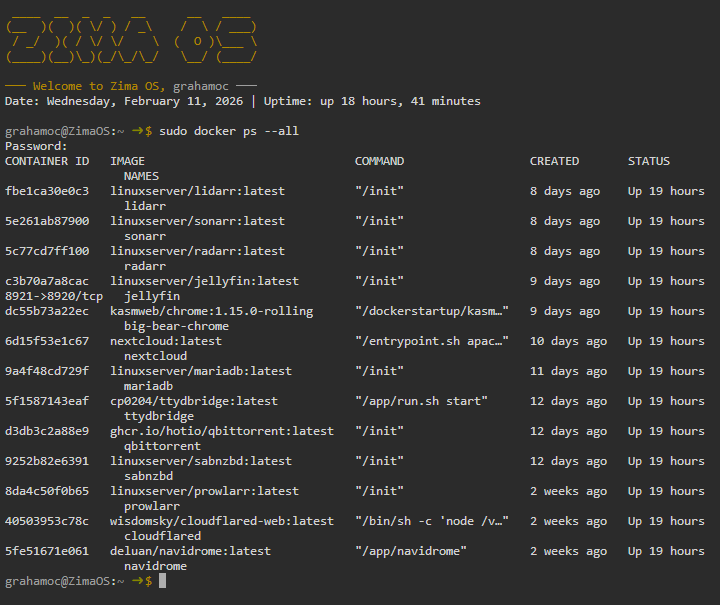
So it doesn’t look like the files container exists or is running?
That’s expected behaviour.
The Files app is not a user Docker container, so it will never appear in docker ps. There is no “files” container to start or restart.
Since all your containers are running normally and SMB access works (which confirms /DATA and mounts are fine), this points to a Files app backend/UI regression introduced by the last ZimaOS update.
Best next step is to report this to IceWhale as an update bug: Files shows “Error Loading” after update while SMB access still works.
I have been experiencing the same problem withe same Error message.
This bug appeared after current update.
1 Like
I am going through the same problem and still haven’t found a solution
1 Like
Thanks for your feedback, the problem should be: In version 1.5.4, when the system is full, the files service does not work properly, so you will see that files cannot be loaded properly. The current solutions are: 1. Free up some space on the system disk via the command line 2. Run systemctl restart icewhale-files on the command line to restart the service. If you don’t know how to operate the command line release operation in step 1, you can contact us to assist in the operation.
mv /var/lib/casaos_data/.casaos/files.db /var/lib/casaos_data/.casaos/files.db.bak
systemctl restart icewhale-files
3 Likes
What is the significance of removing files database?
This worked for me! Thanks!
This worked for me too! Thanks!
ZimaOS 1.5.4+
I’m linux savvy but unsure how to even get into the ZimaCube where to start?
figured it out and got it.
thank you!
Worked for me too, thanks