Hello,
I’m brand new to ZimaOS and have built a server from old PC parts, running Jellyfin as a media server. No other apps are installed.
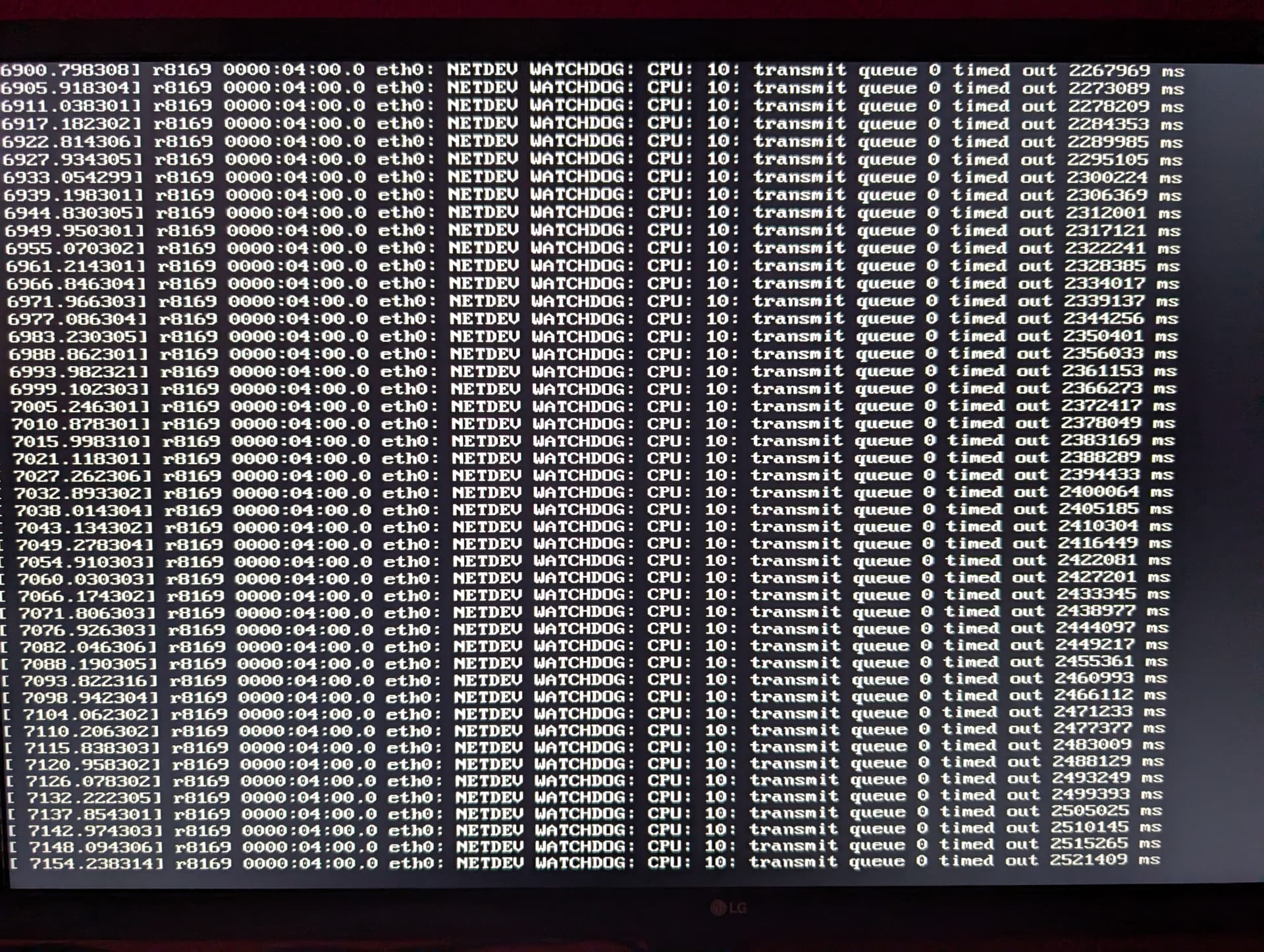
The server starts normally, and ZimaOS boots and runs without any problems. After a while, however, the server becomes inaccessible. The following message then appears on the server:
[xxxx.xxxxxx] r8169 0000:04:00.0 eth0: NETDEV WATCHDOG: CPU: 10: transmit queue 0 timed out xxxxxxx ms
Can anyone make sense of this message and suggest a solution?
Server Hardware:
Motherboard: Gigabyte AB350-Gaming 3
Processor: AMD Ryzen 5 1600X
RAM: 16 GB G.Skill Fortis Black DDR4-2400 DIMM CL15 Dual Kit
Main Drive: Samsung SSD 970 Evo Plus 250GB
MZ-V7S250BW
Graphics Card: Radeon R9 290
Various other hard drives
ZimaOS Version 1.5.0
Thank you in advance for your help.
Looking like a driver error or perhaps a bad network port. Try switching ports on both the PC and router.
Hi,
From what I can see, the message
NETDEV WATCHDOG: transmit queue 0 timed out
suggests the network interface is hanging. It looks like the system is using a Realtek NIC with the r8169 driver, which is known to be unstable under Linux. When it freezes, the OS keeps running but the network drops, which matches what you’re experiencing.
I personally think the issue is the Realtek adapter/driver.
I’ve seen this behaviour before on older boards.
What I would suggest:
Best fix:
Add an Intel PCIe network card (i210 / i350 / 82576, etc.).
These are very reliable and usually eliminate this problem completely.
Optional things you could try (not guaranteed):
• Switch from r8169 > r8168 driver
• Disable PCIe power-saving / C-states in BIOS
But from my experience, the most reliable solution is to use an Intel NIC.
Hi,
Thank you for the feedback.
I’ll try it with a new network card.
I ordered one with the Intel I210 chip.
One more question:
Can I just plug the card in and it will work without me having to do anything else?
Great choice, the Intel i210 is a solid, reliable chipset.
You should be able to simply install the card and plug in the Ethernet cable.
Linux/ZimaOS already includes the driver for it (igb), so in most cases it’s detected automatically with no extra setup.
I suggest just installing the card, moving your network cable to the new port, and rebooting, it should come up on its own.