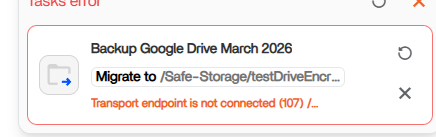
I now have a different issue, which actually already happened in the past when I was copying files into encrypted folders.
I tried to copy a local backup of my google drive (which I performed attaching directly a disk to the Zimaboard 2) from a folder to another folder (on the same RAID 1 disk) using the migrate function and retaining source files. The destination folder was created as an encrypted folder using ZimaOs
Output when I started the copy process:
● icewhale-files.service - IceWhale Files Service
Loaded: loaded (/usr/lib/systemd/system/icewhale-files.service; enabled; preset: enabled)
Active: active (running) since Mon 2026-03-02 09:13:31 GMT; 8h ago
Invocation: f9de656ec7b14ce385bb0cfb7b52b532
Main PID: 465457 (icewhale-files)
Tasks: 29 (limit: 18805)
Memory: 9.2G (peak: 9.2G)
CPU: 8min 4.901s
CGroup: /system.slice/icewhale-files.service
├─ 465457 /usr/bin/icewhale-files
├─1200699 rsync -vv --whole-file --info=progress2,stats2 --exclude .media --exclude .DS_Store --exclude Thumbs.db --exclude lost+found --exclude “System Volume Information” --exclude “$" -r “/media/Safe-Storage/Backup/Backup Google Drive March 2026/” “/media/Safe-Storage/testDriveEncryption/Backup Google Drive March 2026”
├─1200700 rsync -vv --whole-file --info=progress2,stats2 --exclude .media --exclude .DS_Store --exclude Thumbs.db --exclude lost+found --exclude “System Volume Information” --exclude "$” -r “/media/Safe-Storage/Backup/Backup Google Drive March 2026/” “/media/Safe-Storage/testDriveEncryption/Backup Google Drive March 2026”
└─1200719 rsync -vv --whole-file --info=progress2,stats2 --exclude .media --exclude .DS_Store --exclude Thumbs.db --exclude lost+found --exclude “System Volume Information” --exclude “$*” -r “/media/Safe-Storage/Backup/Backup Google Drive March 2026/” “/media/Safe-Storage/testDriveEncryption/Backup Google Drive March 2026”

Mar 02 17:57:36 ZimaBoard2 icewhale-files[465457]: {“time”:“2026-03-02T17:57:36.686708604Z”,“id”:“”,“remote_ip”:“192.168.178.90”,“host”:“192.168.178.90:90”,“method”:“GET”,“uri”:“/v2_1/files/migration/info”,“user_agent”:“Mozilla/5.0 (Windows NT 10.0; Win64; x64) AppleWebKit/537.36 (KHTML, like Gecko) Chrome/145.0.0.0 Safari/537.36”,“status”:200,“error”:“”,“latency”:15939912,“latency_human”:“15.939912ms”,“bytes_in”:0,“bytes_out”:354}
Mar 02 17:57:36 ZimaBoard2 icewhale-files[465457]: {“time”:“2026-03-02T17:57:36.709248395Z”,“id”:“”,“remote_ip”:“192.168.178.90”,“host”:“192.168.178.90:90”,“method”:“GET”,“uri”:“/v2_1/files/migration/size/user_data”,“user_agent”:“Mozilla/5.0 (Windows NT 10.0; Win64; x64) AppleWebKit/537.36 (KHTML, like Gecko) Chrome/145.0.0.0 Safari/537.36”,“status”:200,“error”:“”,“latency”:11698922,“latency_human”:“11.698922ms”,“bytes_in”:0,“bytes_out”:41}
Mar 02 17:57:36 ZimaBoard2 icewhale-files[465457]: {“time”:“2026-03-02T17:57:36.765749647Z”,“id”:“”,“remote_ip”:“192.168.178.90”,“host”:“192.168.178.90:90”,“method”:“GET”,“uri”:“/v2_1/files/migration/size/app_data”,“user_agent”:“Mozilla/5.0 (Windows NT 10.0; Win64; x64) AppleWebKit/537.36 (KHTML, like Gecko) Chrome/145.0.0.0 Safari/537.36”,“status”:200,“error”:“”,“latency”:68698298,“latency_human”:“68.698298ms”,“bytes_in”:0,“bytes_out”:46}
Mar 02 17:57:37 ZimaBoard2 icewhale-files[465457]: {“time”:“2026-03-02T17:57:37.785859605Z”,“id”:“”,“remote_ip”:“192.168.178.90”,“host”:“192.168.178.90:90”,“method”:“GET”,“uri”:“/v2_1/files/trash/stats?filter=operable”,“user_agent”:“Mozilla/5.0 (Windows NT 10.0; Win64; x64) AppleWebKit/537.36 (KHTML, like Gecko) Chrome/145.0.0.0 Safari/537.36”,“status”:200,“error”:“”,“latency”:125408693,“latency_human”:“125.408693ms”,“bytes_in”:0,“bytes_out”:102}
Mar 02 17:57:38 ZimaBoard2 icewhale-files[465457]: {“time”:“2026-03-02T17:57:38.026068278Z”,“id”:“”,“remote_ip”:“192.168.178.90”,“host”:“192.168.178.90:90”,“method”:“GET”,“uri”:“/v2_1/files/migration/size/docker_image”,“user_agent”:“Mozilla/5.0 (Windows NT 10.0; Win64; x64) AppleWebKit/537.36 (KHTML, like Gecko) Chrome/145.0.0.0 Safari/537.36”,“status”:200,“error”:“”,“latency”:1328263185,“latency_human”:“1.328263185s”,“bytes_in”:0,“bytes_out”:47}
Mar 02 17:57:43 ZimaBoard2 icewhale-files[465457]: {“time”:“2026-03-02T17:57:43.05915934Z”,“id”:“”,“remote_ip”:“192.168.178.90”,“host”:“192.168.178.90:90”,“method”:“GET”,“uri”:“/v2_1/files/share/samba”,“user_agent”:“Mozilla/5.0 (Windows NT 10.0; Win64; x64) AppleWebKit/537.36 (KHTML, like Gecko) Chrome/145.0.0.0 Safari/537.36”,“status”:200,“error”:“”,“latency”:13719326,“latency_human”:“13.719326ms”,“bytes_in”:0,“bytes_out”:30}
Mar 02 17:57:43 ZimaBoard2 icewhale-files[465457]: {“time”:“2026-03-02T17:57:43.065647679Z”,“id”:“”,“remote_ip”:“192.168.178.90”,“host”:“192.168.178.90:90”,“method”:“GET”,“uri”:“/v2_1/files/file/search”,“user_agent”:“Mozilla/5.0 (Windows NT 10.0; Win64; x64) AppleWebKit/537.36 (KHTML, like Gecko) Chrome/145.0.0.0 Safari/537.36”,“status”:200,“error”:“”,“latency”:20632630,“latency_human”:“20.63263ms”,“bytes_in”:0,“bytes_out”:30}
Mar 02 17:57:43 ZimaBoard2 icewhale-files[465457]: {“time”:“2026-03-02T17:57:43.072838249Z”,“id”:“”,“remote_ip”:“192.168.178.90”,“host”:“192.168.178.90:90”,“method”:“GET”,“uri”:“/v2_1/files/share/samba/features?feature=samba1”,“user_agent”:“Mozilla/5.0 (Windows NT 10.0; Win64; x64) AppleWebKit/537.36 (KHTML, like Gecko) Chrome/145.0.0.0 Safari/537.36”,“status”:200,“error”:“”,“latency”:634567,“latency_human”:“634.567µs”,“bytes_in”:0,“bytes_out”:31}
Mar 02 17:57:43 ZimaBoard2 icewhale-files[465457]: {“time”:“2026-03-02T17:57:43.07907639Z”,“id”:“”,“remote_ip”:“192.168.178.90”,“host”:“192.168.178.90:90”,“method”:“GET”,“uri”:“/v2_1/files/share/samba/features?feature=multichannel”,“user_agent”:“Mozilla/5.0 (Windows NT 10.0; Win64; x64) AppleWebKit/537.36 (KHTML, like Gecko) Chrome/145.0.0.0 Safari/537.36”,“status”:200,“error”:“”,“latency”:241070,“latency_human”:“241.07µs”,“bytes_in”:0,“bytes_out”:31}
Mar 02 17:57:52 ZimaBoard2 icewhale-files[465457]: 2026/03/02 17:57:52 [WAL Checkpoint Manager] Checkpoint completed: success=2, error=0, total=2
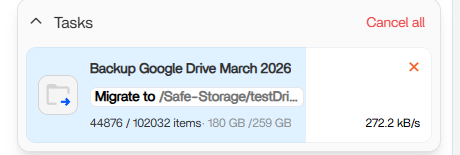
The job progressed till a bit more than 60%, but now is stuck although is not giving me any error (encrypted folders are not locking automatically). It has been like this for more than 2 hours:
This is the output of the systemctl status command in the terminal:
Loaded: loaded (/usr/lib/systemd/system/icewhale-files.service; enabled; preset: enabled)
 Active: active (running) since Mon 2026-03-02 09:13:31 GMT; 12h ago
Invocation: f9de656ec7b14ce385bb0cfb7b52b532
Main PID: 465457 (icewhale-files)
Tasks: 29 (limit: 18805)
Memory: 8.2G (peak: 13G swap: 142.8M swap peak: 146.1M zswap: 27.8M)
CPU: 1h 28min 23.696s
CGroup: /system.slice/icewhale-files.service
├─ 465457 /usr/bin/icewhale-files
├─1200699 rsync -vv --whole-file --info=progress2,stats2 --exclude .media --exclude .DS_Store --exclude Thumbs.db --exclude lost+found --exclude “System Volume Information” --exclude “$" -r “/media/Safe-Storage/Backup/Backup Google Drive March 2026/” “/media/Safe-Storage/testDriveEncryption/Backup Google Drive March 2026”
├─1200700 rsync -vv --whole-file --info=progress2,stats2 --exclude .media --exclude .DS_Store --exclude Thumbs.db --exclude lost+found --exclude “System Volume Information” --exclude "$” -r “/media/Safe-Storage/Backup/Backup Google Drive March 2026/” “/media/Safe-Storage/testDriveEncryption/Backup Google Drive March 2026”
└─1200719 rsync -vv --whole-file --info=progress2,stats2 --exclude .media --exclude .DS_Store --exclude Thumbs.db --exclude lost+found --exclude “System Volume Information” --exclude “$*” -r “/media/Safe-Storage/Backup/Backup Google Drive March 2026/” “/media/Safe-Storage/testDriveEncryption/Backup Google Drive March 2026”

Mar 02 22:01:50 ZimaBoard2 icewhale-files[465457]: {“time”:“2026-03-02T22:01:50.246216706Z”,“id”:“”,“remote_ip”:“192.168.178.90”,“host”:“192.168.178.90:90”,“method”:“GET”,“uri”:“/v2_1/files/tasks”,“user_agent”:“Mozilla/5.0 (Windows NT 10.0; Win64; x64) AppleWebKit/537.36 (KHTML, like Gecko) Chrome/145.0.0.0 Safari/537.36”,“status”:200,“error”:“”,“latency”:27242205,“latency_human”:“27.242205ms”,“bytes_in”:0,“bytes_out”:447}
Mar 02 22:01:50 ZimaBoard2 icewhale-files[465457]: {“time”:“2026-03-02T22:01:50.249649052Z”,“id”:“”,“remote_ip”:“192.168.178.90”,“host”:“192.168.178.90:90”,“method”:“GET”,“uri”:“/v2_1/files/driver”,“user_agent”:“Mozilla/5.0 (Windows NT 10.0; Win64; x64) AppleWebKit/537.36 (KHTML, like Gecko) Chrome/145.0.0.0 Safari/537.36”,“status”:200,“error”:“”,“latency”:3461747,“latency_human”:“3.461747ms”,“bytes_in”:0,“bytes_out”:1257}
Mar 02 22:01:50 ZimaBoard2 icewhale-files[465457]: {“time”:“2026-03-02T22:01:50.251027841Z”,“id”:“”,“remote_ip”:“192.168.178.90”,“host”:“192.168.178.90:90”,“method”:“GET”,“uri”:“/v2_1/files/pin”,“user_agent”:“Mozilla/5.0 (Windows NT 10.0; Win64; x64) AppleWebKit/537.36 (KHTML, like Gecko) Chrome/145.0.0.0 Safari/537.36”,“status”:200,“error”:“”,“latency”:4980623,“latency_human”:“4.980623ms”,“bytes_in”:0,“bytes_out”:476}
Mar 02 22:01:50 ZimaBoard2 icewhale-files[465457]: {“time”:“2026-03-02T22:01:50.26120357Z”,“id”:“”,“remote_ip”:“192.168.178.90”,“host”:“192.168.178.90:90”,“method”:“GET”,“uri”:“/v2_1/files/file/search”,“user_agent”:“Mozilla/5.0 (Windows NT 10.0; Win64; x64) AppleWebKit/537.36 (KHTML, like Gecko) Chrome/145.0.0.0 Safari/537.36”,“status”:200,“error”:“”,“latency”:42248141,“latency_human”:“42.248141ms”,“bytes_in”:0,“bytes_out”:30}
Mar 02 22:01:50 ZimaBoard2 icewhale-files[465457]: {“time”:“2026-03-02T22:01:50.263044255Z”,“id”:“”,“remote_ip”:“192.168.178.90”,“host”:“192.168.178.90:90”,“method”:“GET”,“uri”:“/v2_1/files/web/connect_cloud”,“user_agent”:“Mozilla/5.0 (Windows NT 10.0; Win64; x64) AppleWebKit/537.36 (KHTML, like Gecko) Chrome/145.0.0.0 Safari/537.36”,“status”:200,“error”:“”,“latency”:7631719,“latency_human”:“7.631719ms”,“bytes_in”:0,“bytes_out”:216}
Mar 02 22:01:50 ZimaBoard2 icewhale-files[465457]: {“time”:“2026-03-02T22:01:50.275939246Z”,“id”:“”,“remote_ip”:“192.168.178.90”,“host”:“192.168.178.90:90”,“method”:“GET”,“uri”:“/v2_1/files/file?path=%2Fmedia%2FZimaOS-HD&index=1&size=10000&sort=name&direction=asc”,“user_agent”:“Mozilla/5.0 (Windows NT 10.0; Win64; x64) AppleWebKit/537.36 (KHTML, like Gecko) Chrome/145.0.0.0 Safari/537.36”,“status”:200,“error”:“”,“latency”:6967389,“latency_human”:“6.967389ms”,“bytes_in”:0,“bytes_out”
Mar 02 22:01:50 ZimaBoard2 icewhale-files[465457]: {“time”:“2026-03-02T22:01:50.367707717Z”,“id”:“”,“remote_ip”:“192.168.178.90”,“host”:“192.168.178.90:90”,“method”:“GET”,“uri”:“/v2_1/files/trash/stats?filter=operable”,“user_agent”:“Mozilla/5.0 (Windows NT 10.0; Win64; x64) AppleWebKit/537.36 (KHTML, like Gecko) Chrome/145.0.0.0 Safari/537.36”,“status”:200,“error”:“”,“latency”:100532473,“latency_human”:“100.532473ms”,“bytes_in”:0,“bytes_out”:104}
Mar 02 22:01:50 ZimaBoard2 icewhale-files[465457]: {“time”:“2026-03-02T22:01:50.368980812Z”,“id”:“”,“remote_ip”:“192.168.178.90”,“host”:“192.168.178.90:90”,“method”:“GET”,“uri”:“/v2_1/files/trash?filter=operable”,“user_agent”:“Mozilla/5.0 (Windows NT 10.0; Win64; x64) AppleWebKit/537.36 (KHTML, like Gecko) Chrome/145.0.0.0 Safari/537.36”,“status”:200,“error”:“”,“latency”:102423703,“latency_human”:“102.423703ms”,“bytes_in”:0,“bytes_out”:715}
Mar 02 22:01:50 ZimaBoard2 icewhale-files[465457]: {“time”:“2026-03-02T22:01:50.409507778Z”,“id”:“”,“remote_ip”:“192.168.178.90”,“host”:“192.168.178.90:90”,“method”:“GET”,“uri”:“/v2_1/files/trash/stats?filter=operable”,“user_agent”:“Mozilla/5.0 (Windows NT 10.0; Win64; x64) AppleWebKit/537.36 (KHTML, like Gecko) Chrome/145.0.0.0 Safari/537.36”,“status”:200,“error”:“”,“latency”:15132234,“latency_human”:“15.132234ms”,“bytes_in”:0,“bytes_out”:104}
Mar 02 22:01:50 ZimaBoard2 icewhale-files[465457]: {“time”:“2026-03-02T22:01:50.409789468Z”,“id”:“”,“remote_ip”:“192.168.178.90”,“host”:“192.168.178.90:90”,“method”:“GET”,“uri”:“/v2_1/files/trash?filter=operable”,“user_agent”:“Mozilla/5.0 (Windows NT 10.0; Win64; x64) AppleWebKit/537.36 (KHTML, like Gecko) Chrome/145.0.0.0 Safari/537.36”,“status”:200,“error”:“”,“latency”:14917406,“latency_human”:“14.917406ms”,“bytes_in”:0,“bytes_out”:715}
I don’t know if you have any recommendations - I think another user also mentioned a similar issue with encrypted folders.