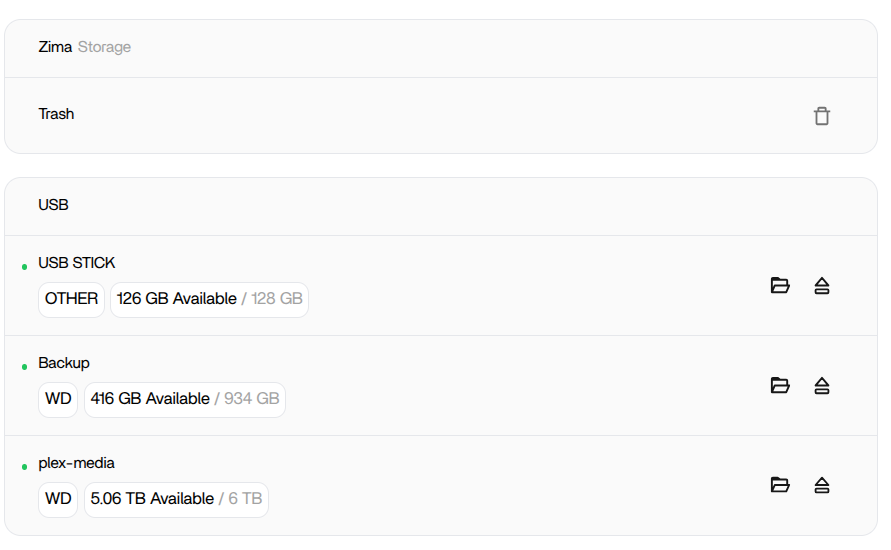
From your screenshot the USB drives are mounted correctly at the OS level (green status, capacity shown), so the issue is very likely container-side access, not storage failure.
On ZimaOS, apps like Jellyfin and Emby run inside Docker containers. They can only see paths that are explicitly mapped into the container.
Please check:
- In App → Settings → Storage / Volumes
Confirm the USB path is mapped, for example:
Host path:
/media/USB_STICK/...or/media/Backup/...
Container path:
/media(or similar)
If the USB mount is not mapped, the app cannot see it.
- Permissions on the USB drive
Via SSH run:
ls -lah /media
ls -lah /media/USB_STICK
If ownership is root-only and the container runs as non-root, it may fail access.
- Filesystem type
Run:
lsblk -f
If the USB is NTFS or exFAT, permission handling can behave differently. ext4 is safest.
Most common cause: the USB path is not added as a volume mapping in the container config.
Post:
- Your volume mappings from the Jellyfin/Emby app
- Output of
lsblk -f
Then we can pinpoint it precisely.
That worked–=new to this–Thanks
1 Like