Communication with the API failed, is NPM running correctly
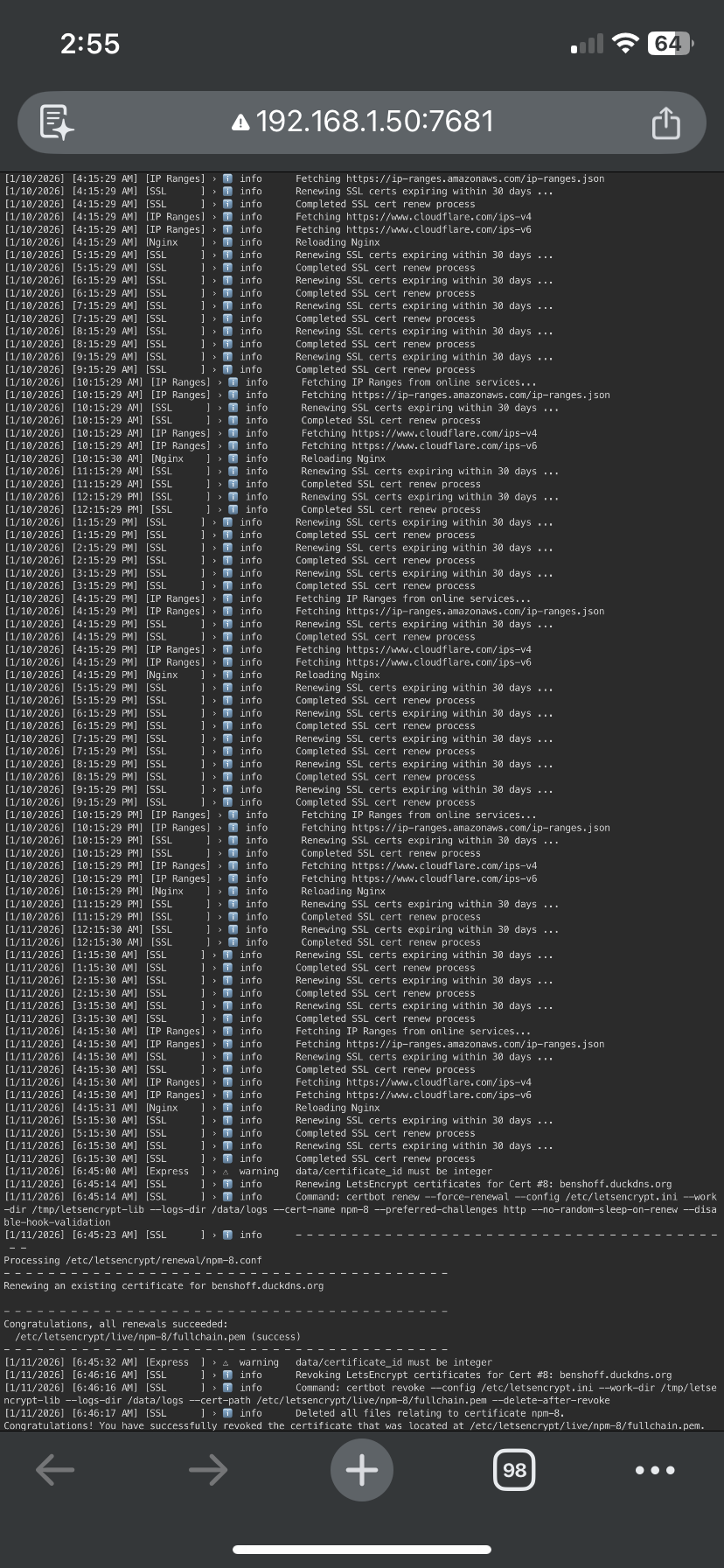
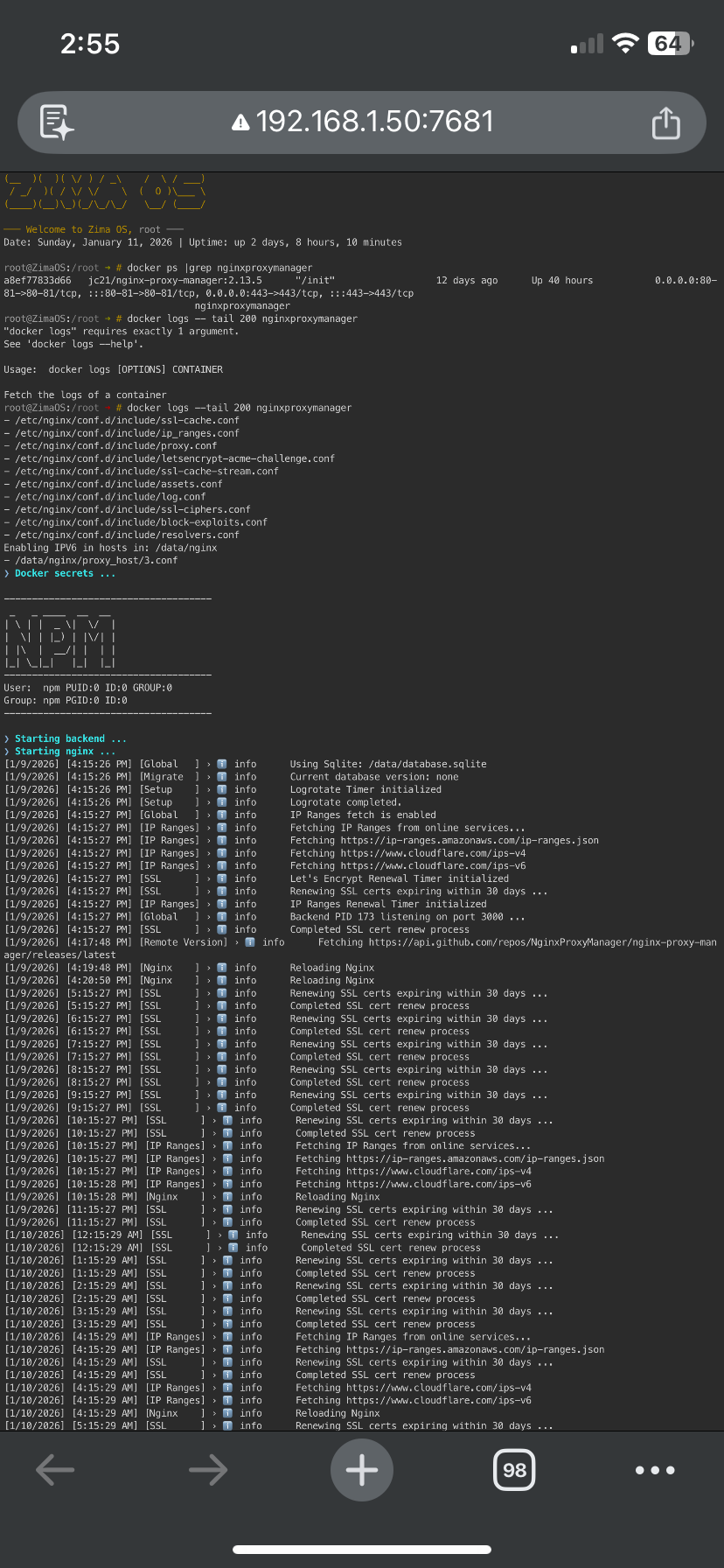
This is the latest when checking ngin proxy manager. Once this is fixed, this will be the last time I touch it.
Communication with the API failed, is NPM running correctly
This is the latest when checking ngin proxy manager. Once this is fixed, this will be the last time I touch it.
This is now 2 separate problems:
Means NPM cannot reach Jellyfin (wrong IP/port or Jellyfin restarted and got a new Docker IP).
Fix: stop using the IP and use the container name in NPM:
jellyfin8096http(or re-check Jellyfin IP again if you insist on IPs, they can change after restarts)
That means NPM container is not healthy / database not responding.
Do this via SSH:
docker ps | grep nginxproxymanager
docker logs --tail 200 nginxproxymanager
docker restart nginxproxymanager
If it still fails, restart the database container too (if you’re using one), or reboot the host.
Important rule: don’t edit NPM during outages.
Most issues after power/internet events are just containers restarting in a different order and IPs changing.
Once NPM loads normally and is forwarding jellyfin:8096, everything comes back instantly.
Based on those screenshots/logs:
Nginx Proxy Manager IS running fine.
The logs show Let’s Encrypt renewal + re-issue worked (success).
So the “API failed” message is not because NPM is dead, it’s usually because the NPM web UI can’t talk to its backend for a moment (after changes/restart), or the browser cached a stale session.
Now the real issue is still just this:
Most common reason (especially after outages/restarts):
172.17.x.x in Forward Host)In NPM Proxy Host set:
Save.
Then restart both:
docker restart jellyfin
docker restart nginxproxymanager
Test:
https://benshoff.duckdns.org
Never use 172.17.x.x IPs in NPM, they can change after restarts.
Use the container name jellyfin so it stays stable.
That’s it.
Tried what you said, and still wont load. For being thorough I am going to upload the latest report, and screenshots to you. If you ever want to setup a discord session or live session, I am game for it.
root@ZimaOS:/root ➜ # docker ps | grep nginxproxymanager
a8ef77833d66 jc21/nginx-proxy-manager:2.13.5 “/init” 12 days ago Up 4 minutes 0.0.0.0:80-81->80-81/tcp, :::80-81->80-81/tcp, 0.0.0.0:443->443/tcp, :::443->443/tcp nginxproxymanager
root@ZimaOS:/root ➜ # docker logs --tail 200 nginxproxymanager
[1/11/2026] [7:53:36 AM] [SSL ] ›  info Let’s Encrypt Renewal Timer initialized
[1/11/2026] [7:53:36 AM] [SSL ] › info Renewing SSL certs expiring within 30 days …
[1/11/2026] [7:53:36 AM] [IP Ranges] › info IP Ranges Renewal Timer initialized
[1/11/2026] [7:53:36 AM] [Global ] › info Backend PID 175 listening on port 3000 …
[1/11/2026] [7:53:36 AM] [SSL ] › info Completed SSL cert renew process
[1/11/2026] [8:53:36 AM] [SSL ] › info Renewing SSL certs expiring within 30 days …
[1/11/2026] [8:53:36 AM] [SSL ] › info Completed SSL cert renew process
[1/11/2026] [9:53:36 AM] [SSL ] › info Renewing SSL certs expiring within 30 days …
[1/11/2026] [9:53:36 AM] [SSL ] › info Completed SSL cert renew process
[1/11/2026] [10:53:36 AM] [SSL ] › info Renewing SSL certs expiring within 30 days …
[1/11/2026] [10:53:36 AM] [SSL ] › info Completed SSL cert renew process
[1/11/2026] [11:53:36 AM] [SSL ] › info Renewing SSL certs expiring within 30 days …
[1/11/2026] [11:53:36 AM] [SSL ] › info Completed SSL cert renew process
[1/11/2026] [12:53:36 PM] [SSL ] › info Renewing SSL certs expiring within 30 days …
[1/11/2026] [12:53:36 PM] [SSL ] › info Completed SSL cert renew process
[1/11/2026] [1:53:36 PM] [SSL ] › info Renewing SSL certs expiring within 30 days …
[1/11/2026] [1:53:36 PM] [SSL ] › info Completed SSL cert renew process
[1/11/2026] [1:53:36 PM] [IP Ranges] › info Fetching IP Ranges from online services…
[1/11/2026] [1:53:36 PM] [IP Ranges] › info Fetching https://ip-ranges.amazonaws.com/ip-ranges.json
[1/11/2026] [1:53:36 PM] [IP Ranges] › info Fetching https://www.cloudflare.com/ips-v4
[1/11/2026] [1:53:37 PM] [IP Ranges] › info Fetching https://www.cloudflare.com/ips-v6
[1/11/2026] [1:53:37 PM] [Nginx ] › info Reloading Nginx
[1/11/2026] [2:53:36 PM] [SSL ] › info Renewing SSL certs expiring within 30 days …
[1/11/2026] [2:53:36 PM] [SSL ] › info Completed SSL cert renew process
[1/11/2026] [3:53:36 PM] [SSL ] › info Renewing SSL certs expiring within 30 days …
[1/11/2026] [3:53:36 PM] [SSL ] › info Completed SSL cert renew process
[1/11/2026] [4:53:36 PM] [SSL ] › info Renewing SSL certs expiring within 30 days …
[1/11/2026] [4:53:36 PM] [SSL ] › info Completed SSL cert renew process
[1/11/2026] [5:53:36 PM] [SSL ] › info Renewing SSL certs expiring within 30 days …
[1/11/2026] [5:53:36 PM] [SSL ] › info Completed SSL cert renew process
[1/11/2026] [6:53:36 PM] [SSL ] › info Renewing SSL certs expiring within 30 days …
[1/11/2026] [6:53:36 PM] [SSL ] › info Completed SSL cert renew process
[1/11/2026] [6:55:25 PM] [Global ] › info PID 175 received SIGTERM
[1/11/2026] [6:55:25 PM] [Global ] › info Stopping.
❯ Configuring npm user …
0
usermod: no changes
❯ Configuring npm group …
❯ Checking paths …
❯ Setting ownership …
❯ Starting nginx …
❯ Starting backend …
[1/11/2026] [6:55:32 PM] [Global ] › info Using Sqlite: /data/database.sqlite
[1/11/2026] [6:55:33 PM] [Migrate ] › info Current database version: none
[1/11/2026] [6:55:33 PM] [Setup ] › info Logrotate Timer initialized
[1/11/2026] [6:55:33 PM] [Setup ] › info Logrotate completed.
[1/11/2026] [6:55:33 PM] [Global ] › info IP Ranges fetch is enabled
[1/11/2026] [6:55:33 PM] [IP Ranges] › info Fetching IP Ranges from online services…
[1/11/2026] [6:55:33 PM] [IP Ranges] › info Fetching https://ip-ranges.amazonaws.com/ip-ranges.json
[1/11/2026] [6:55:34 PM] [IP Ranges] › info Fetching https://www.cloudflare.com/ips-v4
[1/11/2026] [6:55:34 PM] [IP Ranges] › info Fetching https://www.cloudflare.com/ips-v6
[1/11/2026] [6:55:34 PM] [SSL ] › info Let’s Encrypt Renewal Timer initialized
[1/11/2026] [6:55:34 PM] [SSL ] › info Renewing SSL certs expiring within 30 days …
[1/11/2026] [6:55:34 PM] [IP Ranges] › info IP Ranges Renewal Timer initialized
[1/11/2026] [6:55:34 PM] [Global ] › info Backend PID 170 listening on port 3000 …
[1/11/2026] [6:55:34 PM] [SSL ] › info Completed SSL cert renew process
[1/11/2026] [6:57:24 PM] [Global ] › info PID 170 received SIGTERM
[1/11/2026] [6:57:24 PM] [Global ] › info Stopping.
❯ Configuring npm user …
0
usermod: no changes
❯ Configuring npm group …
❯ Checking paths …
❯ Setting ownership …
❯ Starting nginx …
❯ Starting backend …
[1/11/2026] [6:57:51 PM] [Global ] › info Using Sqlite: /data/database.sqlite
[1/11/2026] [6:57:53 PM] [Migrate ] › info Current database version: none
[1/11/2026] [6:57:53 PM] [Setup ] › info Logrotate Timer initialized
[1/11/2026] [6:57:53 PM] [Setup ] › info Logrotate completed.
[1/11/2026] [6:57:54 PM] [Global ] › info IP Ranges fetch is enabled
[1/11/2026] [6:57:54 PM] [IP Ranges] › info Fetching IP Ranges from online services…
[1/11/2026] [6:57:54 PM] [IP Ranges] › info Fetching https://ip-ranges.amazonaws.com/ip-ranges.json
[1/11/2026] [6:57:54 PM] [IP Ranges] › info Fetching https://www.cloudflare.com/ips-v4
[1/11/2026] [6:57:54 PM] [IP Ranges] › info Fetching https://www.cloudflare.com/ips-v6
[1/11/2026] [6:57:54 PM] [SSL ] › info Let’s Encrypt Renewal Timer initialized
[1/11/2026] [6:57:54 PM] [SSL ] › info Renewing SSL certs expiring within 30 days …
[1/11/2026] [6:57:54 PM] [IP Ranges] › info IP Ranges Renewal Timer initialized
[1/11/2026] [6:57:54 PM] [Global ] › info Backend PID 174 listening on port 3000 …
[1/11/2026] [6:57:54 PM] [SSL ] › info Completed SSL cert renew process
root@ZimaOS:/root ➜ # docker restart nginxproxymanager
Yep, I see the problem instantly.
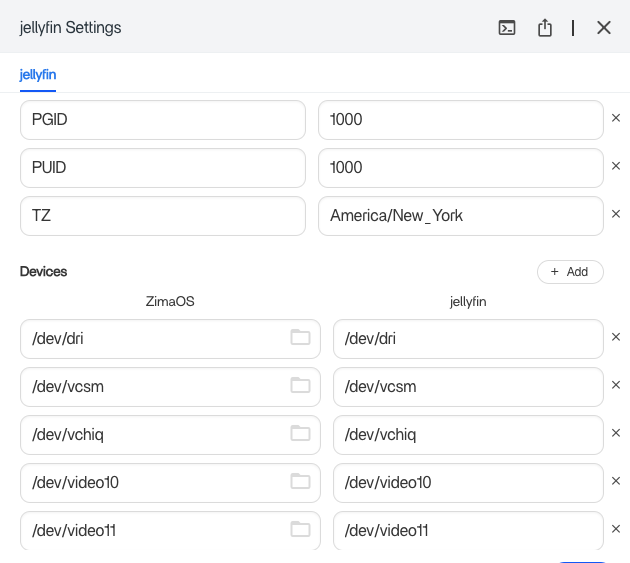
In your Jellyfin container settings, 8096 is not exposed on the host.
You have:
8097 > Container 8096So the correct local Jellyfin address is:
http://192.168.1.50:8097
But your NPM proxy host is still forwarding to 8096, so it fails > 502 Bad Gateway.
In Nginx Proxy Manager > Proxy Host set:
192.168.1.50
8097
http
Save > test:
https://benshoff.duckdns.org
Because NPM + Jellyfin are both on bridge and Zima sometimes breaks container DNS. So use host IP + host port = most reliable.
You have me confused. Now your telling me put in the ip address into ngimx and before you told me not to. I tried it both ways and still 502 bad gateway. No ssl error which is a plus. Also I can get to Jellyfin again locally. So still the battle goes on.
You’re right to call that out, I’ll make it crystal clear:
That’s what caused the confusion.
Local LAN IP (your ZimaOS box):
192.168.1.50
Public WAN IP (your ISP IP):
174.xx.xx.xx
So yes, using 192.168.1.50 inside NPM is 100% fine.
Using the WAN IP is what breaks everything.
Because NPM is still not pointing at the correct Jellyfin port.
Your Jellyfin ports show:
8097 > Container 8096So from NPM, you MUST forward to:
192.168.1.50 : 8097
Not 8096.
In NPM Proxy Host (benshoff.duckdns.org):
http192.168.1.508097Save.
Then restart both:
docker restart jellyfin
docker restart nginxproxymanager
Test:
http://benshoff.duckdns.org
(SSL can come after it works)
Then the proxy host is not saving correctly, and we verify it in 1 command:
Run:
docker exec -it nginxproxymanager curl -I http://192.168.1.50:8097
Use 192.168.1.50:8097 in NPM.
Never touch the WAN IP.
I totally understand why this feels confusing, because it looks like we keep telling you different settings. The truth is: there are 3 different “addresses” in this setup, and mixing them is what keeps breaking things.
1) Public WAN IP (changes after outages)
Example: 174.xx.xx.xx
You never put this into NPM. DuckDNS handles it automatically.
2) ZimaOS LAN IP (always local)
Example: 192.168.1.50
This is fine to use locally, but it’s not the best long-term target for NPM.
3) Docker internal IP (can change)
Example: 172.17.0.3
This can change when containers restart, which causes 502 if you rely on it.
Your own test proves NPM can’t reach Jellyfin:
docker exec -it nginxproxymanager curl -I http://192.168.1.50:8097
Recv failure: Connection reset by peer
So the issue is not SSL, and not DuckDNS.
It’s that NPM and Jellyfin are not communicating correctly on the Docker network.
Instead of chasing IPs/ports, we make Docker networking stable:
Run this via SSH:
docker network create npm_net
docker network connect npm_net nginxproxymanager
docker network connect npm_net jellyfin
docker restart nginxproxymanager
docker restart jellyfin
Then in NPM Proxy Host, set:
jellyfin8096httpSave.
This removes the moving parts:
After this, you should finally be able to “set it and forget it”.
Yes. That worked! Finally it is working after all this struggle again. Even though I got a pounding headache again, I am gonna back up those files.
Thank you so much for your help.
I am back again, and if I am back in this thread, then that means something is not working again. Jellyfin. I sent my link to a friend to find out if it was indeed working properly. benshoff.duckdns.org, and she was able to log in and such. View the contents, just couldnt play. Fine. So I put in another thread about that, and got some advice. I completed what was done. I changed the docker container to change the location of the media, as instructed. Ever since then, it has failed to come back to my domain. Docker restart jellyfin, and nginx. Nothing. I didnt change one network item. It just appears to me like it is just hanging on by a thread, and any little change, and it falls off the cliff. How can I rely on this, when I will need it starting in a few months, when I will be going out of town. Again, I can include whatever info you want. There is a lot I WANT to do, and I believe is possible. Such as play my music through alexa. Pihole, which works successfully, thank goodness, plex, which as far as I know is working properly. I’d like to enjoy the time and effort I put into this box, but so far it’s like playing with an old carbuerator, just gotta keep fiddling with the timing and adjustments till its right. I just at a loss right now. Oh, and I would test the jellyfin settings I changed for the location, if I could get to it. But it just wont open.
Understood, and you’re right to be concerned.
But based on what you wrote, this is not DuckDNS or networking again. It was working, then you changed Jellyfin (media path / container settings), and after that Jellyfin stopped responding, so NPM has nothing to forward to > you end up with your domain not loading.
So the priority is simple:
If Jellyfin doesn’t work locally, the domain will never work.
Run these via SSH:
docker ps | grep jellyfin
docker logs --tail 100 jellyfin
Then test Jellyfin directly (local):
If that does not load, Jellyfin is broken and we fix Jellyfin first.
When people “change the media location”, they usually do one of these:
Jellyfin then boots but can’t access media or config properly > it hangs / crashes.
Please don’t keep changing multiple settings at once. One small typo is enough to break Docker configs, and it’s extremely common (I’ve done it myself).
We fix this the proper way:
Jellyfin must work locally
then NPM forwards to it
then DuckDNS is just the name on top
Post the output of the 2 commands above and we’ll tell you exactly what broke.
ZimaOS login: root
Password:
(__ )( )( / ) / \ / \ / )
/ / )( / / / \ ( O )_**
()(__)_)(/_/_/ _/ (___/
─── Welcome to Zima OS, root ───
Date: Thursday, January 15, 2026 | Uptime: up 1 day, 9 hours, 12 minutes
root@ZimaOS:/root ➜ # docker ps | grep jellyfin
24bdfd8078c0 linuxserver/jellyfin:10.10.7 “/init” 2 hours ago Up 2 hours 0.0.0.0:7359->7359/tcp, :::7359->7359/tcp, 0.0.0.0:8097->8096/tcp, [::]:8097->8096/tcp, 0.0.0.0:8921->8920/tcp, [::]:8921->8920/tcp jellyfin
root@ZimaOS:/root ➜ # docker logs --tail 100 jellyfin
[mov,mp4,m4a,3gp,3g2,mj2 @ 0x55a2cf7e8480] Duplicated SDTP atom
[22:18:23] [INF] [39] MediaBrowser.MediaEncoding.Encoder.MediaEncoder: Starting /usr/lib/jellyfin-ffmpeg/ffprobe with args -analyzeduration 200M -probesize 1G -i file:“/Media/Movies/The Alto Knights 2025.mp4” -threads 0 -v warning -print_format json -show_streams -show_chapters -show_format
[22:18:31] [INF] [25] MediaBrowser.MediaEncoding.Encoder.MediaEncoder: Starting /usr/lib/jellyfin-ffmpeg/ffprobe with args -analyzeduration 200M -probesize 1G -i file:“/Media/Movies/The Day the Earth Blew Up 2025.mp4” -threads 0 -v warning -print_format json -show_streams -show_chapters -show_format
[22:18:31] [INF] [31] MediaBrowser.MediaEncoding.Encoder.MediaEncoder: Starting /usr/lib/jellyfin-ffmpeg/ffprobe with args -analyzeduration 200M -probesize 1G -i file:“/Media/Movies/The Monkey.mp4” -threads 0 -v warning -print_format json -show_streams -show_chapters -show_format
[22:18:36] [INF] [39] MediaBrowser.MediaEncoding.Encoder.MediaEncoder: Starting /usr/lib/jellyfin-ffmpeg/ffprobe with args -analyzeduration 200M -probesize 1G -i file:“/Media/Movies/Control Freak 2025.mp4” -threads 0 -v warning -print_format json -show_streams -show_chapters -show_format
[22:18:39] [INF] [6] MediaBrowser.MediaEncoding.Encoder.MediaEncoder: Starting /usr/lib/jellyfin-ffmpeg/ffprobe with args -analyzeduration 200M -probesize 1G -i file:“/Media/Movies/Presence.mp4” -threads 0 -v warning -print_format json -show_streams -show_chapters -show_format
[22:18:42] [INF] [39] MediaBrowser.MediaEncoding.Encoder.MediaEncoder: Starting /usr/lib/jellyfin-ffmpeg/ffprobe with args -analyzeduration 200M -probesize 1G -i file:“/Media/Movies/War of the Worlds 2025 Ice Cube.mp4” -threads 0 -v warning -print_format json -show_streams -show_chapters -show_format
[22:18:47] [INF] [26] MediaBrowser.MediaEncoding.Encoder.MediaEncoder: Starting /usr/lib/jellyfin-ffmpeg/ffprobe with args -analyzeduration 200M -probesize 1G -i file:“/Media/Movies/A Christmas Story Christmas.mp4” -threads 0 -v warning -print_format json -show_streams -show_chapters -show_format
[22:18:47] [INF] [26] MediaBrowser.MediaEncoding.Encoder.MediaEncoder: Starting /usr/lib/jellyfin-ffmpeg/ffprobe with args -analyzeduration 200M -probesize 1G -i file:“/Media/Movies/Free Fall.mp4” -threads 0 -v warning -print_format json -show_streams -show_chapters -show_format
[22:18:51] [INF] [39] MediaBrowser.MediaEncoding.Encoder.MediaEncoder: Starting /usr/lib/jellyfin-ffmpeg/ffprobe with args -analyzeduration 200M -probesize 1G -i file:“/Media/Movies/How to Train Your Dragon.mp4” -threads 0 -v warning -print_format json -show_streams -show_chapters -show_format
[22:18:54] [INF] [39] MediaBrowser.MediaEncoding.Encoder.MediaEncoder: Starting /usr/lib/jellyfin-ffmpeg/ffprobe with args -analyzeduration 200M -probesize 1G -i file:“/Media/Movies/I Am Legend.mp4” -threads 0 -v warning -print_format json -show_streams -show_chapters -show_format
[22:18:59] [INF] [39] MediaBrowser.MediaEncoding.Encoder.MediaEncoder: Starting /usr/lib/jellyfin-ffmpeg/ffprobe with args -analyzeduration 200M -probesize 1G -i file:“/Media/Movies/Love and Penguins.mp4” -threads 0 -v warning -print_format json -show_streams -show_chapters -show_format
[22:19:01] [INF] [21] MediaBrowser.MediaEncoding.Encoder.MediaEncoder: Starting /usr/lib/jellyfin-ffmpeg/ffprobe with args -analyzeduration 200M -probesize 1G -i file:“/Media/Movies/Love Mercy.mp4” -threads 0 -v warning -print_format json -show_streams -show_chapters -show_format
[22:19:05] [INF] [26] MediaBrowser.MediaEncoding.Encoder.MediaEncoder: Starting /usr/lib/jellyfin-ffmpeg/ffprobe with args -analyzeduration 200M -probesize 1G -i file:“/Media/Movies/M3GAN 2 0.mp4” -threads 0 -v warning -print_format json -show_streams -show_chapters -show_format
[22:19:06] [INF] [25] MediaBrowser.MediaEncoding.Encoder.MediaEncoder: Starting /usr/lib/jellyfin-ffmpeg/ffprobe with args -analyzeduration 200M -probesize 1G -i file:“/Media/Movies/M3GAN.mp4” -threads 0 -v warning -print_format json -show_streams -show_chapters -show_format
[22:19:07] [ERR] [39] MediaBrowser.Providers.Manager.ProviderManager: IOException saving to /config/data/metadata/People/A/Allison Williams/folder.jpg. Will retry saving to /config/data/metadata/library/d4/d4a6fd1338363e4006825e75e0b6db40/folder.jpg
System.IO.IOException: The process cannot access the file ‘/config/data/metadata/People/A/Allison Williams/folder.jpg’ because it is being used by another process.
at Microsoft.Win32.SafeHandles.SafeFileHandle.Init(String path, FileMode mode, FileAccess access, FileShare share, FileOptions options, Int64 preallocationSize, Int64& fileLength, UnixFileMode& filePermissions)
at Microsoft.Win32.SafeHandles.SafeFileHandle.Open(String fullPath, FileMode mode, FileAccess access, FileShare share, FileOptions options, Int64 preallocationSize, UnixFileMode openPermissions, Int64& fileLength, UnixFileMode& filePermissions, Boolean failForSymlink, Boolean& wasSymlink, Func4 createOpenException) at System.IO.Strategies.OSFileStreamStrategy..ctor(String path, FileMode mode, FileAccess access, FileShare share, FileOptions options, Int64 preallocationSize, Nullable1 unixCreateMode)
at System.IO.FileStream..ctor(String path, FileStreamOptions options)
at MediaBrowser.Providers.Manager.ImageSaver.SaveImageToLocation(Stream source, String path, CancellationToken cancellationToken)
at MediaBrowser.Providers.Manager.ImageSaver.SaveImageToLocation(Stream source, String path, String retryPath, CancellationToken cancellationToken)
[22:19:07] [ERR] [6] MediaBrowser.Providers.Manager.ProviderManager: IOException saving to /config/data/metadata/People/V/Violet McGraw/folder.jpg. Will retry saving to /config/data/metadata/library/e0/e0d9b9ea593e93cb788893b59dad4507/folder.jpg
System.IO.IOException: The process cannot access the file ‘/config/data/metadata/People/V/Violet McGraw/folder.jpg’ because it is being used by another process.
at Microsoft.Win32.SafeHandles.SafeFileHandle.Init(String path, FileMode mode, FileAccess access, FileShare share, FileOptions options, Int64 preallocationSize, Int64& fileLength, UnixFileMode& filePermissions)
at Microsoft.Win32.SafeHandles.SafeFileHandle.Open(String fullPath, FileMode mode, FileAccess access, FileShare share, FileOptions options, Int64 preallocationSize, UnixFileMode openPermissions, Int64& fileLength, UnixFileMode& filePermissions, Boolean failForSymlink, Boolean& wasSymlink, Func4 createOpenException) at System.IO.Strategies.OSFileStreamStrategy..ctor(String path, FileMode mode, FileAccess access, FileShare share, FileOptions options, Int64 preallocationSize, Nullable1 unixCreateMode)
at System.IO.FileStream..ctor(String path, FileStreamOptions options)
at MediaBrowser.Providers.Manager.ImageSaver.SaveImageToLocation(Stream source, String path, CancellationToken cancellationToken)
at MediaBrowser.Providers.Manager.ImageSaver.SaveImageToLocation(Stream source, String path, String retryPath, CancellationToken cancellationToken)
[22:19:07] [ERR] [39] MediaBrowser.Providers.Manager.ProviderManager: IOException saving to /config/data/metadata/People/A/Amie Donald/folder.jpg. Will retry saving to /config/data/metadata/library/b1/b174ccc0c6fb01b7f3b7e7b2ab870dd3/folder.jpg
System.IO.IOException: The process cannot access the file ‘/config/data/metadata/People/A/Amie Donald/folder.jpg’ because it is being used by another process.
at Microsoft.Win32.SafeHandles.SafeFileHandle.Init(String path, FileMode mode, FileAccess access, FileShare share, FileOptions options, Int64 preallocationSize, Int64& fileLength, UnixFileMode& filePermissions)
at Microsoft.Win32.SafeHandles.SafeFileHandle.Open(String fullPath, FileMode mode, FileAccess access, FileShare share, FileOptions options, Int64 preallocationSize, UnixFileMode openPermissions, Int64& fileLength, UnixFileMode& filePermissions, Boolean failForSymlink, Boolean& wasSymlink, Func4 createOpenException) at System.IO.Strategies.OSFileStreamStrategy..ctor(String path, FileMode mode, FileAccess access, FileShare share, FileOptions options, Int64 preallocationSize, Nullable1 unixCreateMode)
at System.IO.FileStream..ctor(String path, FileStreamOptions options)
at MediaBrowser.Providers.Manager.ImageSaver.SaveImageToLocation(Stream source, String path, CancellationToken cancellationToken)
at MediaBrowser.Providers.Manager.ImageSaver.SaveImageToLocation(Stream source, String path, String retryPath, CancellationToken cancellationToken)
[22:19:08] [ERR] [22] MediaBrowser.Providers.Manager.ProviderManager: IOException saving to /config/data/metadata/People/J/Jenna Davis/folder.jpg. Will retry saving to /config/data/metadata/library/b1/b1b342c0c8fd08a3c0ce8e12789ddd16/folder.jpg
System.IO.IOException: The process cannot access the file ‘/config/data/metadata/People/J/Jenna Davis/folder.jpg’ because it is being used by another process.
at Microsoft.Win32.SafeHandles.SafeFileHandle.Init(String path, FileMode mode, FileAccess access, FileShare share, FileOptions options, Int64 preallocationSize, Int64& fileLength, UnixFileMode& filePermissions)
at Microsoft.Win32.SafeHandles.SafeFileHandle.Open(String fullPath, FileMode mode, FileAccess access, FileShare share, FileOptions options, Int64 preallocationSize, UnixFileMode openPermissions, Int64& fileLength, UnixFileMode& filePermissions, Boolean failForSymlink, Boolean& wasSymlink, Func4 createOpenException) at System.IO.Strategies.OSFileStreamStrategy..ctor(String path, FileMode mode, FileAccess access, FileShare share, FileOptions options, Int64 preallocationSize, Nullable1 unixCreateMode)
at System.IO.FileStream..ctor(String path, FileStreamOptions options)
at MediaBrowser.Providers.Manager.ImageSaver.SaveImageToLocation(Stream source, String path, CancellationToken cancellationToken)
at MediaBrowser.Providers.Manager.ImageSaver.SaveImageToLocation(Stream source, String path, String retryPath, CancellationToken cancellationToken)
[22:19:08] [ERR] [21] MediaBrowser.Providers.Manager.ProviderManager: IOException saving to /config/data/metadata/People/B/Brian Jordan Alvarez/folder.jpg. Will retry saving to /config/data/metadata/library/e1/e198a01fa2945bee66dc005ca3704af1/folder.jpg
System.IO.IOException: The process cannot access the file ‘/config/data/metadata/People/B/Brian Jordan Alvarez/folder.jpg’ because it is being used by another process.
at Microsoft.Win32.SafeHandles.SafeFileHandle.Init(String path, FileMode mode, FileAccess access, FileShare share, FileOptions options, Int64 preallocationSize, Int64& fileLength, UnixFileMode& filePermissions)
at Microsoft.Win32.SafeHandles.SafeFileHandle.Open(String fullPath, FileMode mode, FileAccess access, FileShare share, FileOptions options, Int64 preallocationSize, UnixFileMode openPermissions, Int64& fileLength, UnixFileMode& filePermissions, Boolean failForSymlink, Boolean& wasSymlink, Func4 createOpenException) at System.IO.Strategies.OSFileStreamStrategy..ctor(String path, FileMode mode, FileAccess access, FileShare share, FileOptions options, Int64 preallocationSize, Nullable1 unixCreateMode)
at System.IO.FileStream..ctor(String path, FileStreamOptions options)
at MediaBrowser.Providers.Manager.ImageSaver.SaveImageToLocation(Stream source, String path, CancellationToken cancellationToken)
at MediaBrowser.Providers.Manager.ImageSaver.SaveImageToLocation(Stream source, String path, String retryPath, CancellationToken cancellationToken)
[22:19:08] [ERR] [6] Emby.Server.Implementations.Library.LibraryManager: Cannot compute blurhash for /config/data/metadata/People/J/Jen Van Epps/folder.jpg
System.IO.IOException: The process cannot access the file ‘/config/data/metadata/People/J/Jen Van Epps/folder.jpg’ because it is being used by another process.
at Microsoft.Win32.SafeHandles.SafeFileHandle.Init(String path, FileMode mode, FileAccess access, FileShare share, FileOptions options, Int64 preallocationSize, Int64& fileLength, UnixFileMode& filePermissions)
at Microsoft.Win32.SafeHandles.SafeFileHandle.Open(String fullPath, FileMode mode, FileAccess access, FileShare share, FileOptions options, Int64 preallocationSize, UnixFileMode openPermissions, Int64& fileLength, UnixFileMode& filePermissions, Boolean failForSymlink, Boolean& wasSymlink, Func4 createOpenException) at System.IO.Strategies.OSFileStreamStrategy..ctor(String path, FileMode mode, FileAccess access, FileShare share, FileOptions options, Int64 preallocationSize, Nullable1 unixCreateMode)
at Jellyfin.Drawing.Skia.SkiaEncoder.GetImageBlurHash(Int32 xComp, Int32 yComp, String path)
at Emby.Server.Implementations.Library.LibraryManager.UpdateImagesAsync(BaseItem item, Boolean forceUpdate)
[22:19:11] [ERR] [28] MediaBrowser.Providers.Manager.ProviderManager: IOException saving to /config/data/metadata/People/A/Akela Cooper/folder.jpg. Will retry saving to /config/data/metadata/library/87/8722a76108cab57b74791cefbdf66b18/folder.jpg
System.IO.IOException: The process cannot access the file ‘/config/data/metadata/People/A/Akela Cooper/folder.jpg’ because it is being used by another process.
at Microsoft.Win32.SafeHandles.SafeFileHandle.Init(String path, FileMode mode, FileAccess access, FileShare share, FileOptions options, Int64 preallocationSize, Int64& fileLength, UnixFileMode& filePermissions)
at Microsoft.Win32.SafeHandles.SafeFileHandle.Open(String fullPath, FileMode mode, FileAccess access, FileShare share, FileOptions options, Int64 preallocationSize, UnixFileMode openPermissions, Int64& fileLength, UnixFileMode& filePermissions, Boolean failForSymlink, Boolean& wasSymlink, Func4 createOpenException) at System.IO.Strategies.OSFileStreamStrategy..ctor(String path, FileMode mode, FileAccess access, FileShare share, FileOptions options, Int64 preallocationSize, Nullable1 unixCreateMode)
at System.IO.FileStream..ctor(String path, FileStreamOptions options)
at MediaBrowser.Providers.Manager.ImageSaver.SaveImageToLocation(Stream source, String path, CancellationToken cancellationToken)
at MediaBrowser.Providers.Manager.ImageSaver.SaveImageToLocation(Stream source, String path, String retryPath, CancellationToken cancellationToken)
[22:19:12] [INF] [31] MediaBrowser.MediaEncoding.Encoder.MediaEncoder: Starting /usr/lib/jellyfin-ffmpeg/ffprobe with args -analyzeduration 200M -probesize 1G -i file:“/Media/Movies/Moana 2 HD Online.mp4” -threads 0 -v warning -print_format json -show_streams -show_chapters -show_format
[22:19:13] [INF] [28] MediaBrowser.MediaEncoding.Encoder.MediaEncoder: Starting /usr/lib/jellyfin-ffmpeg/ffprobe with args -analyzeduration 200M -probesize 1G -i file:“/Media/Movies/The Lion King.mp4” -threads 0 -v warning -print_format json -show_streams -show_chapters -show_format
[22:19:14] [INF] [25] MediaBrowser.MediaEncoding.Encoder.MediaEncoder: Starting /usr/lib/jellyfin-ffmpeg/ffprobe with args -analyzeduration 200M -probesize 1G -i file:“/Media/Movies/Penguin Friend.mp4” -threads 0 -v warning -print_format json -show_streams -show_chapters -show_format
[22:19:19] [INF] [8] MediaBrowser.MediaEncoding.Encoder.MediaEncoder: Starting /usr/lib/jellyfin-ffmpeg/ffprobe with args -analyzeduration 200M -probesize 1G -i file:“/Media/Movies/Roadworthy Rescues 05.mp4” -threads 0 -v warning -print_format json -show_streams -show_chapters -show_format
[22:19:20] [INF] [31] MediaBrowser.MediaEncoding.Encoder.MediaEncoder: Starting /usr/lib/jellyfin-ffmpeg/ffprobe with args -analyzeduration 200M -probesize 1G -i file:“/Media/Movies/Roadworthy Rescues 06.mp4” -threads 0 -v warning -print_format json -show_streams -show_chapters -show_format
[22:19:22] [INF] [25] MediaBrowser.MediaEncoding.Encoder.MediaEncoder: Starting /usr/lib/jellyfin-ffmpeg/ffprobe with args -analyzeduration 200M -probesize 1G -i file:“/Media/Movies/Snow Chick - A Penguins Tale.mp4” -threads 0 -v warning -print_format json -show_streams -show_chapters -show_format
[22:19:22] [INF] [8] MediaBrowser.MediaEncoding.Encoder.MediaEncoder: Starting /usr/lib/jellyfin-ffmpeg/ffprobe with args -analyzeduration 200M -probesize 1G -i file:“/Media/Movies/Super Icyclone.mp4” -threads 0 -v warning -print_format json -show_streams -show_chapters -show_format
[22:19:51] [INF] [19] MediaBrowser.MediaEncoding.Encoder.MediaEncoder: Starting /usr/lib/jellyfin-ffmpeg/ffprobe with args -analyzeduration 200M -probesize 1G -i file:“/Media/Movies/The Magic Penguin.mp4” -threads 0 -v warning -print_format json -show_streams -show_chapters -show_format
[22:19:55] [INF] [25] MediaBrowser.MediaEncoding.Encoder.MediaEncoder: Starting /usr/lib/jellyfin-ffmpeg/ffprobe with args -analyzeduration 200M -probesize 1G -i file:“/Media/Movies/Tyler Perrys Madeas Tough Love.mp4” -threads 0 -v warning -print_format json -show_streams -show_chapters -show_format
[22:19:55] [INF] [25] MediaBrowser.MediaEncoding.Encoder.MediaEncoder: Starting /usr/lib/jellyfin-ffmpeg/ffprobe with args -analyzeduration 200M -probesize 1G -i file:“/Media/Movies/The Unbreakable Boy 2025.mp4” -threads 0 -v warning -print_format json -show_streams -show_chapters -show_format
[22:20:01] [INF] [8] MediaBrowser.MediaEncoding.Encoder.MediaEncoder: Starting /usr/lib/jellyfin-ffmpeg/ffprobe with args -analyzeduration 200M -probesize 1G -i file:“/Media/Movies/The Electric State 2025.mp4” -threads 0 -v warning -print_format json -show_streams -show_chapters -show_format
[22:20:09] [INF] [28] MediaBrowser.MediaEncoding.Encoder.MediaEncoder: Starting /usr/lib/jellyfin-ffmpeg/ffprobe with args -analyzeduration 200M -probesize 1G -i file:“/Media/Movies/A_Deadly_American_Marriage_2025.mp4” -threads 0 -v warning -print_format json -show_streams -show_chapters -show_format
[mov,mp4,m4a,3gp,3g2,mj2 @ 0x560a279a4480] Detected creation time before 1970, parsing as unix timestamp.
Last message repeated 1 times
[mov,mp4,m4a,3gp,3g2,mj2 @ 0x560a279a4480] Duplicated SDTP atom
[22:20:11] [INF] [8] MediaBrowser.MediaEncoding.Encoder.MediaEncoder: Starting /usr/lib/jellyfin-ffmpeg/ffprobe with args -analyzeduration 200M -probesize 1G -i file:“/Media/Movies/How_to_Train_Your_Dragon_2025.mp4” -threads 0 -v warning -print_format json -show_streams -show_chapters -show_format
[mov,mp4,m4a,3gp,3g2,mj2 @ 0x558f25e18480] Detected creation time before 1970, parsing as unix timestamp.
Last message repeated 1 times
[mov,mp4,m4a,3gp,3g2,mj2 @ 0x558f25e18480] Duplicated SDTP atom
[22:20:15] [INF] [17] MediaBrowser.MediaEncoding.Encoder.MediaEncoder: Starting /usr/lib/jellyfin-ffmpeg/ffprobe with args -analyzeduration 200M -probesize 1G -i file:“/Media/Movies/Snow_White_2025.mp4” -threads 0 -v warning -print_format json -show_streams -show_chapters -show_format
[22:20:17] [INF] [25] MediaBrowser.MediaEncoding.Encoder.MediaEncoder: Starting /usr/lib/jellyfin-ffmpeg/ffprobe with args -analyzeduration 200M -probesize 1G -i file:“/Media/Movies/Wizard_of_Oz__Dead_Walk.mp4” -threads 0 -v warning -print_format json -show_streams -show_chapters -show_format
[mov,mp4,m4a,3gp,3g2,mj2 @ 0x55f3a0884480] Detected creation time before 1970, parsing as unix timestamp.
Last message repeated 1 times
[mov,mp4,m4a,3gp,3g2,mj2 @ 0x55f3a0884480] Duplicated SDTP atom
[22:20:22] [INF] [6] MediaBrowser.MediaEncoding.Encoder.MediaEncoder: Starting /usr/lib/jellyfin-ffmpeg/ffprobe with args -analyzeduration 200M -probesize 1G -i file:“/Media/Movies/The Honeymooners.mp4” -threads 0 -v warning -print_format json -show_streams -show_chapters -show_format
[22:20:34] [INF] [8] MediaBrowser.MediaEncoding.Encoder.MediaEncoder: Starting /usr/lib/jellyfin-ffmpeg/ffprobe with args -analyzeduration 200M -probesize 1G -i file:“/Media/Movies/Pitch Perfect 3.mp4” -threads 0 -v warning -print_format json -show_streams -show_chapters -show_format
[22:20:38] [INF] [22] MediaBrowser.MediaEncoding.Encoder.MediaEncoder: Starting /usr/lib/jellyfin-ffmpeg/ffprobe with args -analyzeduration 200M -probesize 1G -i file:“/Media/Movies/The Internship.mp4” -threads 0 -v warning -print_format json -show_streams -show_chapters -show_format
[22:20:41] [INF] [17] MediaBrowser.MediaEncoding.Encoder.MediaEncoder: Starting /usr/lib/jellyfin-ffmpeg/ffprobe with args -analyzeduration 200M -probesize 1G -i file:“/Media/Movies/Crazy Old Lady.mp4” -threads 0 -v warning -print_format json -show_streams -show_chapters -show_format
[22:35:01] [INF] [31] Emby.Server.Implementations.IO.LibraryMonitor: Movies (/Media/Movies) will be refreshed.
[22:35:01] [INF] [33] MediaBrowser.MediaEncoding.Encoder.MediaEncoder: Starting /usr/lib/jellyfin-ffmpeg/ffprobe with args -analyzeduration 200M -probesize 1G -i file:“/Media/Movies/The Italians.mp4” -threads 0 -v warning -print_format json -show_streams -show_chapters -show_format
root@ZimaOS:/root ➜ #
Good news, Jellyfin is healthy. Your logs confirm it’s running normally and scanning your media (/Media/Movies). So Jellyfin is not the issue here.
That means the 502 Bad Gateway is 100% Nginx Proxy Manager forwarding to the wrong target.
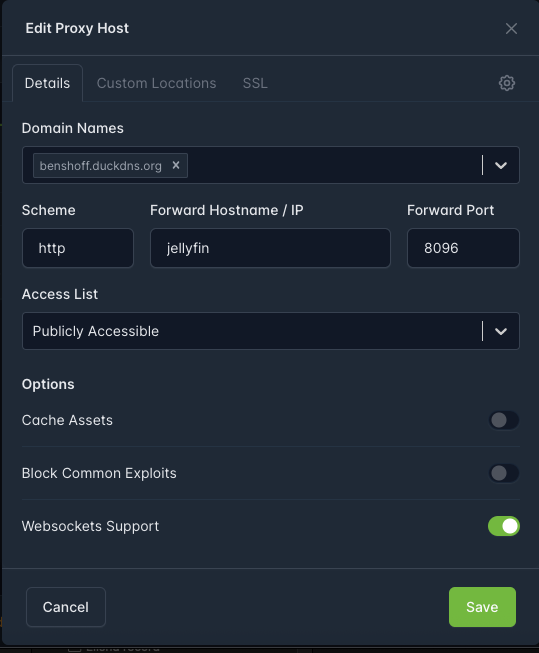
In Nginx Proxy Manager > Proxy Hosts > benshoff.duckdns.org > Details, set:
httpjellyfin8096Do not forward to:
174.xxx)Using the container name jellyfin is the most stable and won’t break after outages/restarts.
Back up these folders (this is where all settings live):
/DATA/AppData/nginxproxymanager/DATA/AppData/jellyfin/DATA/AppData/duckdnstar -czvf /DATA/zima_backup_$(date +%F).tar.gz /DATA/AppData/nginxproxymanager /DATA/AppData/jellyfin /DATA/AppData/duckdns
This will create a file like:
/DATA/zima_backup_2026-01-16.tar.gz
If you post a screenshot of your NPM Proxy Host “Details” page, I can confirm the forwarding is correct.
This shows the exact issue.
docker exec -it nginxproxymanager curl -I http://192.168.1.50:8097
and got:
curl: (56) Recv failure: Connection reset by peer
Meaning: Nginx Proxy Manager cannot reach Jellyfin at that address, so it returns 502 Bad Gateway.
Up 2 hours ... 0.0.0.0:8097->8096/tcp ... jellyfin
Save and restart both containers.
After backup it said this:
tar: /DATA/AppData/duckdns: Cannot stat: No such file or directory
tar: Exiting with failure status due to previous errors
root@ZimaOS:/root ➜
Also I got told to change it to 8097 port in the past. Its been that way, and it was working. Moved it back to 8096.
Perfect update - this actually clears things up.
You got:
tar: /DATA/AppData/duckdns: Cannot stat: No such file or directory
That simply means you do not have a folder called:
/DATA/AppData/duckdns
So the backup command failed because that path does not exist.
 Fix: first find the correct folder name:
ls -lah /DATA/AppData | grep -i duck
Whatever it shows (example: duckdns or DuckDNS etc) is what you must use in the tar command.
If nothing shows, then duckdns is not stored in AppData (or you installed it a different way).
You are mixing host port vs container port.
Your docker output shows this:
8097 -> 8096
Meaning:
In Nginx Proxy Manager your screenshot is correct:
jellyfin8096NOT 8097.
So yes: keep it on 8096 in NPM even if your browser uses 8097.
In NPM you should never point to your public IP like 174.x.x.x and you should never use 172.17.x.x manually.
Always use:
jellyfin8096That stays correct even after reboots/power outages.
Here is the output of the last command you gave me.
drwxr-xr-x 3 1000 samba 4.0K Dec 13 22:52 DuckDNS
So I will rerun the script for backup using the correct format.
even after restart of jellyfin and nginx dockers. same old 502 gateway error
thanks, that output helps a lot.
Your DuckDNS folder is case sensitive. Yours is:
/DATA/AppData/DuckDNS
So your backup command must match that exactly:
tar -czvf zima_backup_$(date +%F).tar.gz /DATA/AppData/nginxproxymanager /DATA/AppData/jellyfin /DATA/AppData/DuckDNS
A 502 from Nginx Proxy Manager means only one thing:
NPM cannot reach Jellyfin on the address/port you configured.
So let’s stop guessing and confirm it properly.
Run this:
docker exec -it nginxproxymanager curl -I http://jellyfin:8096
Expected result should be something like HTTP/1.1 200 OK or 302 Found.
If you get an error (timeout / connection refused), then NPM cannot reach Jellyfin, which causes 502.
Do NOT point NPM to:
In NPM the correct setup is always:
jellyfin8096If you paste the output of that curl command, I can tell you immediately what’s wrong in 1 step.