I am seeing a message relating to my internal storage being full.
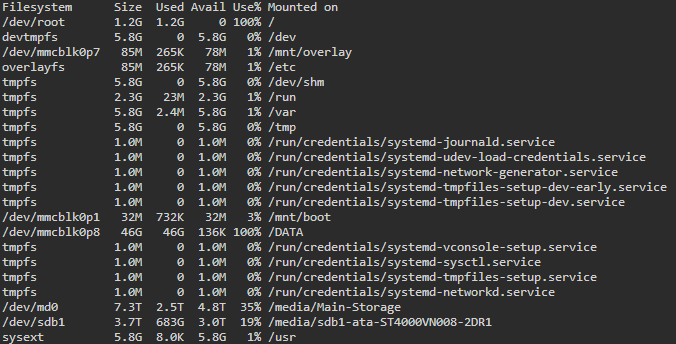
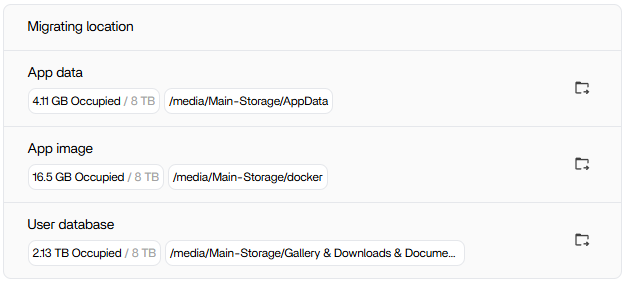
I realise this is due to the /DATA directory being marked as full, however I had already migrated all three of the areas marked as “migratable” to my RAID pool when I initially set the system up.
Not that I noticed, it has been on 1.5.0 since it was released, I think this timing relates to switching on the Search Index, but could be coincidence. Within the /DATA folder itself I can’t see anything using this volume of space.
The Search Index was a red herring. I’ve found the issue, the backup service had been setup to to send data to an external HDD via a USB interface. The drive was disconnected after a backup, but it appears the backup drive structure was recreated under the /DATA folder.
The backup appears to have been trying to run, but instead of failing due to the USB drive not being in place it filled up the /DATA instead.
A bug I imagine, as I don’t think that is desired functionality?
Would you be able to walk through the commands and syntax used to figure that out? I’m only asking because ZimaOS don’t have ncdu or any other viable tool I could think of.
I would see a lot of value in a visual tool such as TreeSizeFree or WinDirStat that would give the user the ability to quickly pinpoint what’s consuming disk space. Just food for thought there
I have a similar problem — the disk filled up in the .docker directory.
I had backups set up on my NAS.
NAS was turned off for a few days.
What should I do? Should I delete the .docker directory?
root@ZimaOS:/DATA/.docker/containers/cdb8eac113e31ca4968c9c890c1f3ee1d0379a95c9a9f47646cb00960bfb624f# ls -lh /DATA/.docker/containers/cdb8eac113e31ca4968c9c890c1f3ee1d0379a95c9a9f47646cb00960bfb624f
total 519G
-rw-r----- 1 root root 519G Oct 20 18:55 cdb8eac113e31ca4968c9c890c1f3ee1d0379a95c9a9f47646cb00960bfb624f-json.log
drwx------ 2 root root 4.0K Oct 5 12:19 checkpoints
-rw------- 1 root root 5.3K Oct 19 19:45 config.v2.json
-rw------- 1 root root 1.5K Oct 19 19:46 hostconfig.json
-rw-r–r-- 1 root root 7 Oct 19 19:45 hostname
-rw-r–r-- 1 root root 37 Oct 19 19:45 hosts
drwx–x— 2 root root 4.0K Oct 5 12:19 mounts
-rw-r–r-- 1 root root 232 Oct 19 19:45 resolv.conf
-rw-r–r-- 1 root root 71 Oct 19 19:45 resolv.conf.hash
It was Home Assistant that took all this, place. Home Assistant was not even used. I do not know what was error, but I remove container and get free space.
We will launch the application cache cleaning function in the next version, at present, you can enter the command line as root, use docker image prune -a to clean up images that are not used by containers, you can also learn about some parameters of this command to see if this command meets your expectations
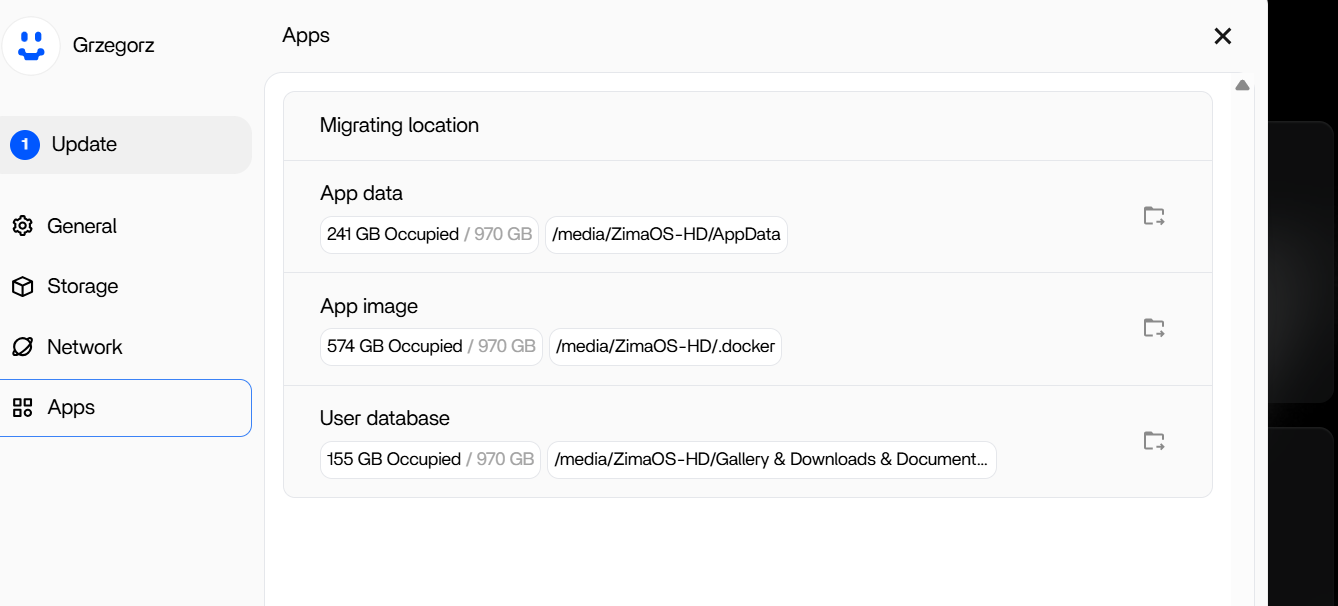
“It’s been 5 days and the problem has recurred. I don’t know what it is, but the 1000GB drive is full again. As far as I know, I have about 200GB of my own data in Immich, and the rest is generated by ZimaOS. It was supposed to be nice and easy, a simple system for an amateur like me. And yet, it turns out that within two weeks of installing the system on a mini PC, I have to take action twice using the console, about which I have no idea. Am I doing something wrong, or is this just how it is with self-hosting? Or do I simply have to find a different system solution?”
Thanks for your feedback, I need to understand the previous disk situation, after you cleaned the disk 5 days ago, how much space is left on the disk at that time, is it expected (1000-200=800G), and at the same time, some command line return information is needed to help us locate your specific problem faster du -sh /media/yourstoragename/* du -sh /media/yourstoragename/.*