Can't access ZimaOs on the front-end after i restart ZimaOS without USB backup

I have a problem.
For maintenance reasons i disconnect power from ZimaOS.
When i was done, the system didn’t present me with the login screen, but shows me the screen of creating a new account wich failed.

Before, nothing happened. And backups running flawless!
Data etc is still accessable via nfs, but the frontend is stuck somehow.

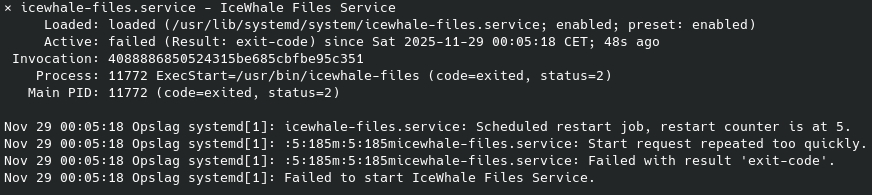
Via SSH and terminal i can see that Icewhale File service isn’t starting.
“systemctl status icewhale-files-backup.services” gives me “Unit icewhale-files-backup.services.service could not be found”

On the system was an USB drive and this is my backupdrive. I used the backup app to do so.
I did start Zima without the drive attached and Zima present me with an error en a frontend if i would like to register a user,???

My version is 1.43.

–UPDATE–

Via the terminal i update ZimaOs. I hoped that this would solve my problem.

It didn’t.
Results:

the log journal:

–UPDATE–

I have managed to install update 1.52.
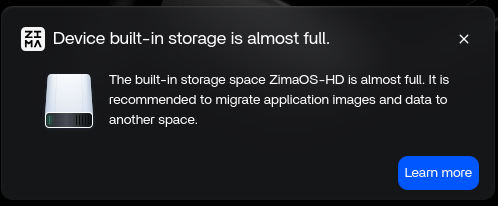
In the frontend i see the files, and yes, i got a warning that ZimaOS-HD is full, and that i should migrate.

I can’t migrate cause there is nothing in ZimaOS to migrate from the frontend say’s.
dev/root is 100% full so the problem is still there.

Still investigating.

–update–
Sadly there is no way -at least what i know of- to fix this.
Leaving me with broken ZimaOS.

The only thing left is a full install, that wipe all discs :face_with_bags_under_eyes:
Thankfully i made a backup.. .

Your ZimaOS isn’t actually broken, the system disk (ZimaOS-HD) is full.
When ZimaOS-HD hits 100%, the front-end freezes, the Files service won’t start, Docker can’t index apps, and the UI drops into the “first-boot” or “migration” screen. This is expected behaviour when the OS partition has no free space left.

Your data drives are fine.
Nothing is lost, only the OS volume is jammed.

At this point ZimaOS can’t clean itself because the migration wizard also needs free space to run, so it gets stuck.

The fix is simple:
either free space on ZimaOS-HD or reinstall ZimaOS (this does not touch your data drives). After reinstall, the UI loads normally and all apps reappear.

The problem is, that you can’t free space on the system disc, i don’t know a way to do so.
Also when you do a reinstall, all the drives are wiped because you will make a new system. There is no way that ZimaOS leaves the raiddrives untouched, because it will get formatted during re-install. Or if there is another way, please let me know.

Do you know a proper way to free space on the system drive? I didn’t have any containers left, clear al the logs, but still 100% full, leaving me re-installing the system.

You actually can reinstall ZimaOS without wiping any data drives.
The installer only touches the system disk (ZimaOS-HD). It does not format RAID arrays, HDDs, or NVMe data pools unless you manually choose those disks.

I’ve tested this multiple times:
a clean system reinstall brings the OS back, and all apps + data reappear once the backend re-indexes.

As for freeing space, when ZimaOS-HD reaches 100%, the system goes into protection mode.
At that point the OS can’t write logs, can’t rotate them, and can’t start cleanup services. That’s why manual cleanup usually doesn’t work, the partition is already locked.

So the only reliable fix is a system-only reinstall, which keeps all data volumes untouched and restores the WebUI.

This is what i didn’t know. If so, then this is gold!
Let’s see if i can manage that. Since i have new system already :smiley:, i will try again because i didn’t copy my backup to the drives yet.

I have OS installed on a computer and give it a shot. I pressume ZimaOS will tell me if i want to do a OS install only? Well come back later tot write some.

You can reinstall ZimaOS without losing any data as long as the OS disk is separate from the data disks.
In that setup, the installer touches only the system disk. RAID arrays, HDDs, and NVMe data pools stay untouched unless you explicitly select them.

This is how I always build my systems, and in every test a clean reinstall brought the OS back while Docker simply loaded the existing AppData from the data drives. The apps return once the backend syncs with Docker’s state.

If the OS and AppData share the same physical disk, then a reinstall wipes the whole device, nothing comes back. That’s the key difference.

Once ZimaOS-HD hits 100%, the system goes into protection mode and can’t clean itself.
In a multi-disk setup, the only reliable fix is a system-only reinstall, which restores the WebUI and leaves all data disks intact.

Hi, @gelbuilding . Would you please tell us how you build your system that separate the OS and the user data. If convenient, a tutorial will be helpful.

In most cases, the user won’t to modify the default settings, which is that the OS and the user data are in the same disk. And re-installing won’t bring any re-index. So, always use 3-2-1 rule to back up your data.

Look forward to your guide/tutorial about how to separate the OS and user data.

ZimaOS Disk Separation Diagram

(How my system isolates OS from AppData, Docker, and user data)

                 ┌──────────────────────────────┐
                 │        ZimaOS-HD (OS DISK)    │
                 │   17.7 GB – System Only       │
                 │                                │
                 │  /boot                         │
                 │  /etc                          │
                 │  /usr                          │
                 │  /var (system logs only)       │
                 │  ZimaOS core + services        │
                 │                                │
                 └──────────────┬─────────────────┘
                                │  (Reinstall only touches this)
                                ▼
                 ┌────────────────────────────────────────────────┐
                 │                DATA DISK: sda (4 TB)           │
                 │          AppData + Docker + User Data          │
                 │                                                │
                 │  /media/sda/AppData        (All app configs)   │
                 │  /media/sda/docker         (All Docker images) │
                 │  /media/sda/Media          (User files)        │
                 │  /media/sda/Documents      (User files)        │
                 │  /media/sda/Downloads      (User files)        │
                 │                                                │
                 │  *This disk is untouched during reinstall*     │
                 └────────────────────────────────────────────────┘
                 ┌────────────────────────────────────────────────┐
                 │                DATA DISK: sdb (4 TB)           │
                 │                 Additional storage             │
                 └────────────────────────────────────────────────┘

Boot + Reinstall Behavior

ZimaOS boots → mounts OS disk → mounts data disks
           → Docker loads state from /media/sda/docker
           → ZimaOS backend reads Docker state
           → Apps reappear automatically

Key Principle

System reinstall = affects ONLY ZimaOS-HD
Data disks (sda, sdb) = preserved and reused automatically


Hi Giorgio,
Here is exactly how my system is structured.

I always install ZimaOS with a dedicated OS disk and completely separate data disks.
You can see this clearly in the screenshots I attached:

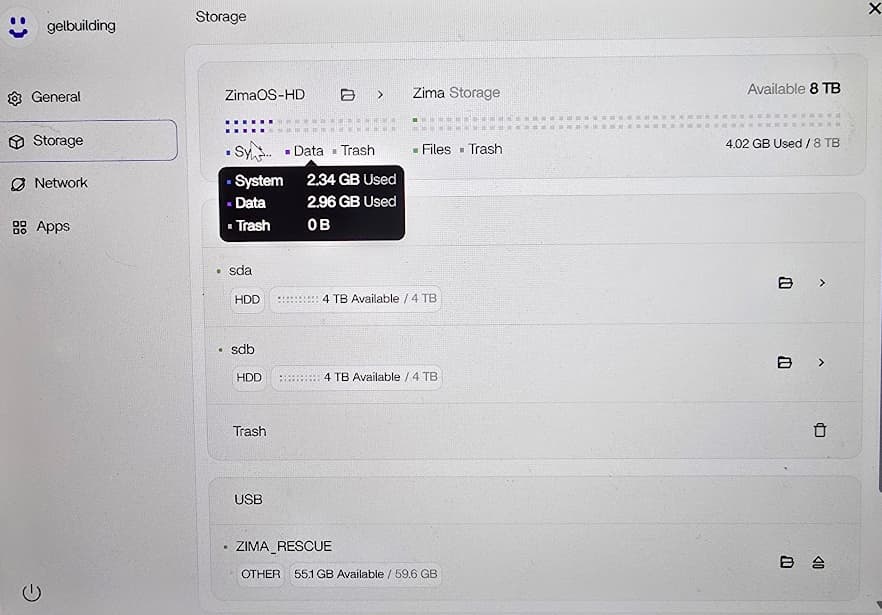
Screenshot 1:
ZimaOS-HD is a small 17.7 GB system partition.
sda and sdb are my 4 TB data disks, completely independent.

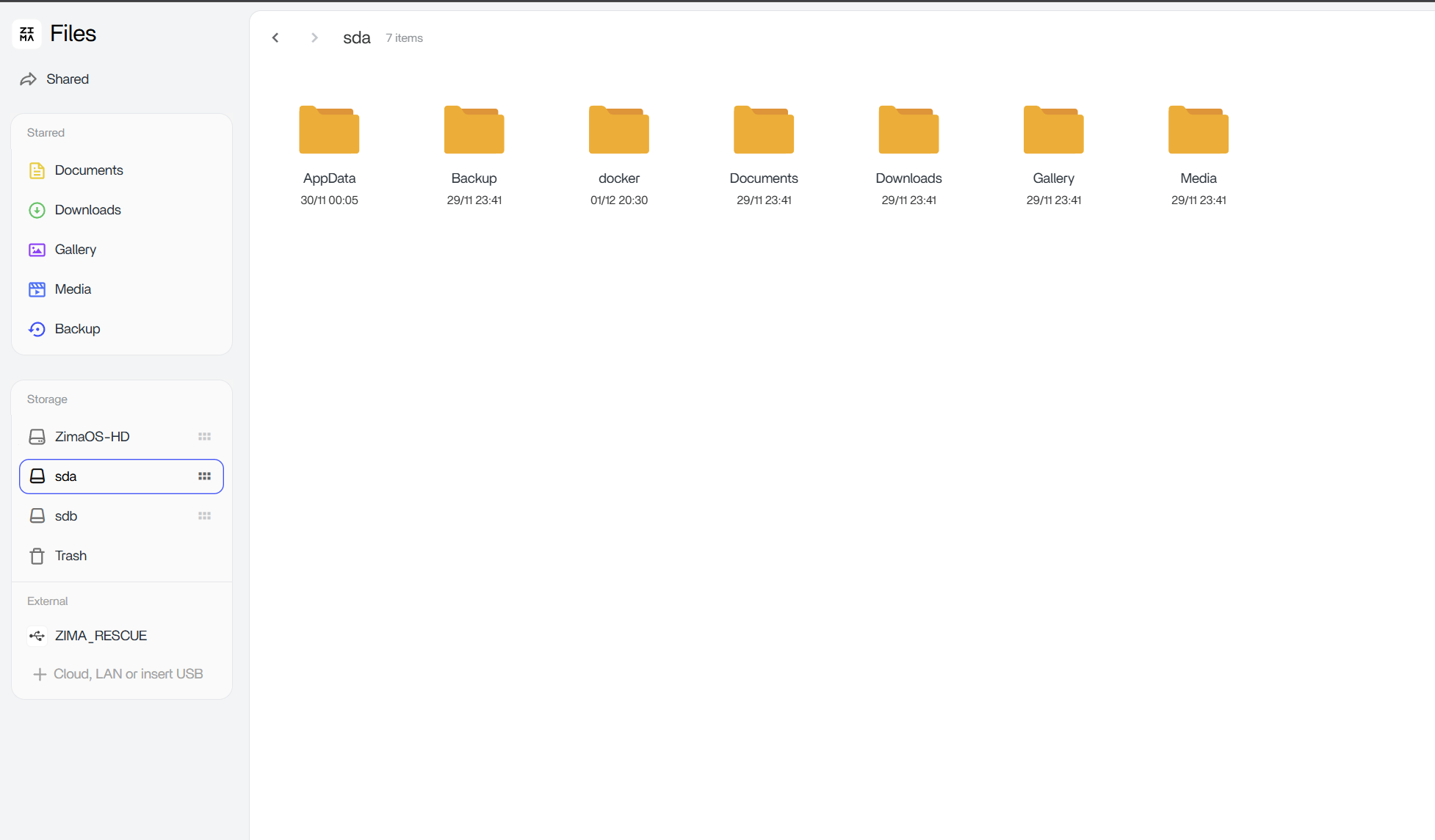
Screenshot 2:
All AppData, Docker, and user folders live on the data disk (sda), not on the OS disk.
This is the result of the migration process under Settings > Apps > Migrating location.

This layout means:

• The OS disk holds system files only
• The data disks hold AppData, Docker volumes, media, shares, backups
• A system reinstall affects only ZimaOS-HD
• The data disks remain untouched, so Docker can reload its existing state afterwards

This is why my tests show apps reappearing after reinstall, the containers and AppData never lived on the OS disk to begin with.

Most users stay on the default single-disk layout, which is why they lose everything on reinstall.
But in the separated-disk layout, reinstalling ZimaOS is safe and does not delete any user data.

2 Likes

Very interessting indeed.

As a default user i do not have an option to do that.

What do you mean with seperate disc lay-out?

Migrating means al what’s on the ZimaOS-HD will be transfered to the storage.

How come that you don’t lose data on the storage disc, because i only see option to formating discs?

Let me clarify, because there are two completely different actions in ZimaOS:


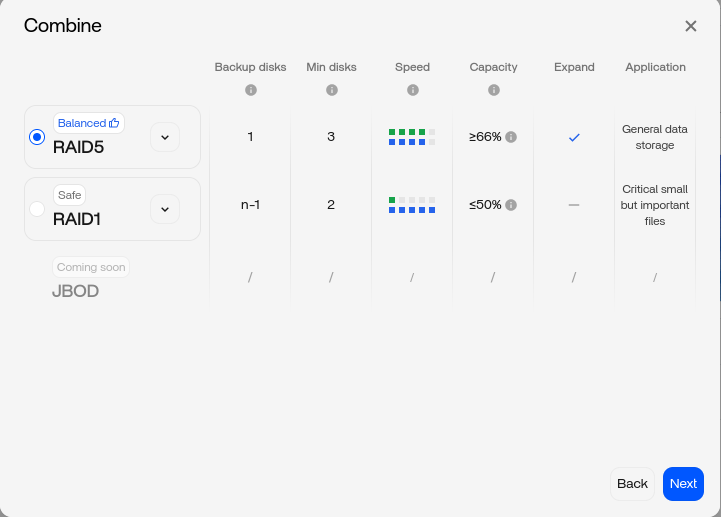
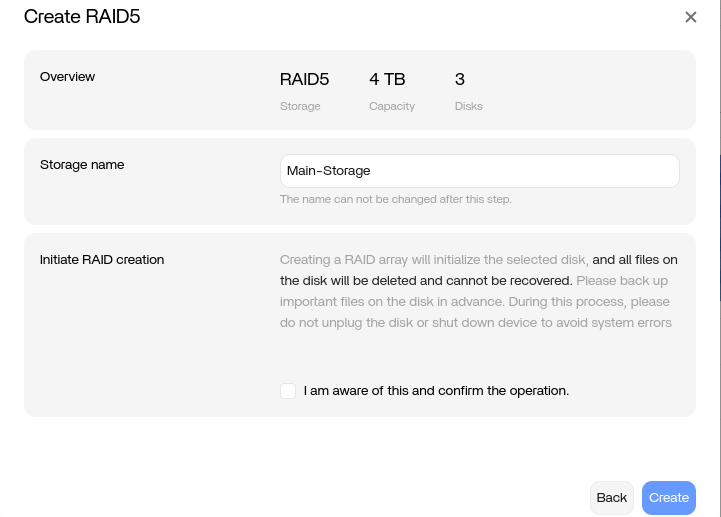
1. Creating RAID = Formats the disks

When you go to Storage > Combine / Create RAID, ZimaOS must format those disks.
This is normal and expected, RAID creation always destroys existing data.

This screen has nothing to do with the OS disk or AppData migration.


2. Migrating AppData = Does NOT format anything

Migration is done under:

Settings > Apps > Migrating Location

This operation only moves:

  • AppData
  • Docker images
  • User database

from ZimaOS-HD > your data disk
and it does not format the target disk.

Migration is simply a folder relocation, not a RAID creation and not a disk wipe.


3. What “separate disk layout” means

• ZimaOS installed on its own disk (eMMC or small SSD)
• Data disks are separate physical drives (HDDs / NVMe)
• RAID is optional, but if you create RAID, you do it on the data disks only
• After RAID is created, you migrate AppData to the RAID volume

The key point:

The OS disk is never part of the RAID.
The RAID disks are never touched during reinstall.


4. Why no data is lost

Because the system disk (ZimaOS-HD) is the only device touched during reinstall.
Your storage disks (whether single or RAID) are not selected, not formatted, and not altered.

When the OS comes back online, Docker sees its data on the storage disks and loads it.

That’s why your apps come back.

ZimaOS – OS Disk vs Data Disk + RAID + Migration

1. OS Disk (ZimaOS-HD)
┌────────────────────────────┐
│ 17 GB – System Only        │
│ ZimaOS files, services     │
└────────────────────────────┘

Reinstall affects ONLY this disk.
No user data lives here.
2. Data Disks (sda, sdb)
┌──────────┐   ┌──────────┐
│ 4 TB     │   │ 4 TB     │
└──────────┘   └──────────┘
3. Creating RAID (Optional)
Storage > Combine > RAID
> This formats the selected disks.

Result:
┌────────────────────────────┐
│ Main-Storage (RAID5/RAID1) │
│ Large data pool            │
└────────────────────────────┘
4. Migration (Safe – No Formatting)
Settings > Apps > Migrating Location

Moves:
  AppData
  Docker images
  User database

FROM: ZimaOS-HD
TO:   Main-Storage (or sda/sdb)

This is just a folder relocation.
5. Final Layout (Correct Setup)
┌────────────────────────────┐      ┌───────────────────────────────┐
│ ZimaOS-HD (OS Only)        │      │ Main-Storage / sda / sdb       │
│ Reinstall wipes only this  │      │ AppData + Docker + User Data   │
└────────────────────────────┘      └───────────────────────────────┘
6. After Reinstall
ZimaOS boots fresh >
Docker loads data from Main-Storage >
All apps reappear automatically.

Awsome, thank you for excellent clarification.

If i read it correctly:

I know that nothing will be formatted during migration.

As soon the system is online after a fresh install, then migrate the files you mentioned.
If i do a re-install again, ZimaOS “sees” the migrated files, and therfore knows its status before the reinstall. It don’t touch the storage drives and put his own files back to its ZimaOS-HD.

Is this what happens?

I’m in the process to find out :grinning_face:

Update
I don’t get it.
I have a PC, with some drives and did a re-install.
As user i must always format the storage drives.
I can’t see how to do it otherwise.

Here’s what’s happening:

You only need to format a storage drive if you used it as the OS install target, if you’re creating RAID, or if the storage drive is brand new and needs initial formatting.
In the correct layout, you never format your storage drives during reinstall.

The correct setup is:

1. Install ZimaOS on a dedicated OS disk only
(eMMC, small SSD, small NVMe)

2. After installation, migrate AppData, App Image, and User Database
(Settings > Apps > Migrating location)
to your storage drive.

3. If a disk shows “Disable,” it means the disk is already enabled.
Formatting is optional, you only use it if the drive is new or you intentionally want to wipe it.

With this layout, reinstalling ZimaOS only touches the OS disk, and your storage drives stay untouched every time.


Compact Graph

         OS Disk (Dedicated)
┌────────────────────────────┐
│ ZimaOS-HD                  │
│ System files only          │
└─────────────┬──────────────┘
              │ Reinstall wipes ONLY this
              ▼

      Storage Disk (Enabled)
┌────────────────────────────┐
│ /AppData                   │
│ /.docker                   │
│ /Documents /Media          │
│ (Shown with “Disable”)     │
│ No format required         │
└────────────────────────────┘

Just install to the OS disk, migrate afterwards, and leave the storage drive enabled — no formatting needed.

I appreciating your help very much.

My setup is an pc, not a ZimaCube or else.

I did a install as it was brand new. Put some files on the storage.
Then i did a reinstall. ZimaOS detect all the discs and i install the OS on a smal ssd drive.
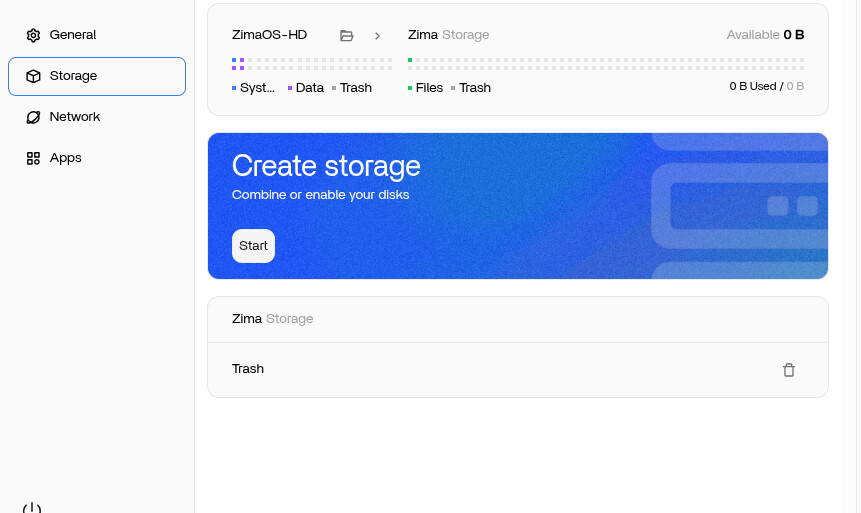
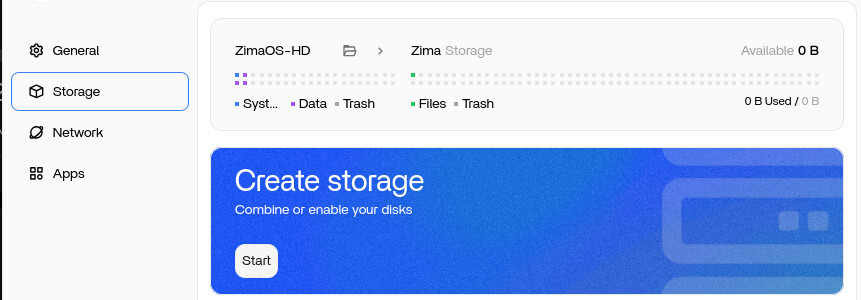
The system boots up and all i can see, is this

I don’t have any storage yet. and thats the whole point. In your example, you have already storage, and therefore there is no need to formatting.

But in the software (1.52) there is no way to make a storage without formatting or i can’t find it. There is no tool for it, or hidden methode in the software.

Beste regards.

Yes, with your setup you must create storage once, and creating storage always requires formatting the disks the first time.
After the storage is created, you simply migrate AppData, App Image, and User Database to that storage disk.
From then on, future reinstalls will not format your drives.

Right now i’m here:

image

This i didn’t see, perhaps i overlooked it (the building of the raid)
I will give this time, and follow your instructions.
After that, i do a full re-install (starting from USB drive etc, like i wan’t a new system) and see what’s happening.

So ZimaOS knows the exsistence of the drive already cause the OS looks for the migrated stuff beforehand.
Will keep you posted.

Regard.

1 Like

Yes, exactly, once the RAID finishes building and you migrate your AppData to that storage, ZimaOS will recognise the storage automatically on the next reinstall.
After that, you can reinstall from USB like a brand-new system, and ZimaOS will not ask to format the RAID again because the storage layout already exists.

Let the RAID finish, migrate your data, and then your test will work as expected.

1 Like

I’m back again.

My raid 5 was fully functional and i did the migration from ZimaOS-HD → storage discs.
After that i took my USB with the ZimaOS on it, and booted from the USB.
I let the system install in the same drive as before.

  1. Make an admin account
  2. ZimaOS knows that there a 3 disc, but stil wants to format all of them
  3. Searching for a way to migrate data from storage discs to ZimaOS.
  4. Since ZimaOS sees the disc as empty, i can’t do that.

After numerous (re)installing i think how i know what you mean and how you did it. Let me explain.
  1. Configuring raid.
    That leeds to the eneverable “formatting all the discs” and losing data. There is no way to retain it.

  2. Configuring single AND raid.
    I think that you do this. You have a seperate disc that holds the ZimaOS-HD and al of the data in it.
    When re-installing is ready, you have the ability to ENABLE the disc, thus leaving the data unharmed. The other discs can in a raid config but that’s not the case here.
    As you mentioned, you have seperate data discs, you don’t use raid.

I think i was thinking to far away, because a nas must always in a raid config. A huge misconception.

Leaving me with a final question.
After migrating all the data back to ZimaOS, you wrote that Docker noticed what apps where installed.

After a short while i see this:

image

This is the resync of Docker i pressume..

Sadly no apps that shows up.

You’re very close, but here’s the critical difference:

RAID storage cannot survive a fresh reinstall in ZimaOS.

During a reinstall from USB, ZimaOS always treats an existing RAID array as new storage and will ask to format it.
There is currently no “adopt existing RAID” option.

This is why you always end up at the Create Storage → Format screen.


My setup works because I do NOT use RAID for app data.

I use:

  • One dedicated OS disk (ZimaOS-HD)
  • One single storage disk (not in RAID)

With a single storage disk:

  • ZimaOS mounts it automatically after reinstall
  • The UI shows the Disable button (meaning the disk is active)
  • No formatting is required
  • Migrated AppData/Docker/User files remain intact

That’s why my apps and data survive a reinstall.


About “RAID5 Resyncing”

That message has nothing to do with Docker or apps.
It’s only the RAID array rebuilding itself.


Final point

If you want your apps, AppData, Docker folders and user files to survive a fresh reinstall, you must use a single storage disk.
RAID will always be wiped during reinstall.

Goodmorning.

Just to be clear.
I have 4 drives, one of them is a SDD and will hold the OS, the other is a NVME drive. The other are two HDD.

I will do the following.

  • Do a re-install where i configure the drives as seperate drives
  • The NVME will be the one who holds the migrated ZimaOS-HD, the other two drives are just single drives.
  • After installing i install some apps.
  • Then i will use the “migrate” option tot migrate to the NVME drive.
  • Do a re-install and do a migrate from the NVME to the ZIMAOs-HD and see if the former installed apps appear.

Just to make a good understanding:

You are not using the terninal to copy the files, just the option “migrate”?
Meaning that even the user.db got migrated. even if i don’t see the user.db?

In the evening i will inform the status.
If this works, i will jump a hole in the roof :smiley:

1 Like