Boot drive fills up for no reason

Is it normal???

I have a DIY NAS with an old dell optiplex, the boot drive with the OS only is on an nvme 128GB ssd and a separate raid 1 array with 2x 6TB hhds for mass storage.

The install is fresh, I might have installed and uninstalled a couple of apps but I still have to use seriously this nas and the boot drive is almost full ffs!

This might be the 3rd or 4th installation I have formatted and reinstalled just for testing purposes. Since with the 1st tests and having the os and apps installed on the ssd the latter gets filled extremely quickly it was Gemni’s suggestion to move everything on the raid array except for the os.

I did that and lo and behold everytime I install and app it creates a dedicated folder in the AppData folder on both the ssd and the raid array, is tis normal and how can I get around this? I’m not planning on buyng a bigger ssd for the moment, I’m fine having the apps running on the raid only.
Hi Drex,

I’m fairly new to ZimaOS as well, but I ran into similar issues as you.

Just curious as to how you migrated your App Data/ App image/ User database folders?

I made the mistake of using the small “Migrate” button that appears in the upper-right of the File manager screens.

But in reality, I should have used the Migration buttons that appear in Settings→Apps.

That screen will show where those folders are located and will also Migrate them to wherever you want.

You may very well have done it this way too, and there’s something else going on with your setup. But I know for me, the whole migrating of these three folders threw me for a loop, too. There’s just not enough information to be found on the subject. But since I did it this way my ZimaOS HD has remained a measly 8gb.

image

Hope you get it sorted. :slight_smile:

Yes I’ve done it through the App menu.

Right now I gave up and format and reinstalled fresh with standard paths.

I’m still supervising the situation. Boot drive is still holding.

1 Like

This is riddiculous, I have formatted and reinstalled the OS so many times to tryout different setups but I still get the 128 GB boot ssd drive full for NO reason.

I literally have only one app installed, Immich and a 2000 test photos and I made it clear when I was custom installing it to stay my raid.

I don’t understand what the ssd is getting filled with, I’m tempted to get rid of it, there’s no point, even financially to get a bigger ssd only to get that one filled for no reason too and I keep reading that most users run ZimaOS on a 32-64 GB USB drive ffs!

Hi, sorry for the frustrating experience.
Could you please send us a screenshot of your system drive usage information?

Also, have you used the backup feature before? That detail may help us figure out what is filling up the SSD.

Thanks.

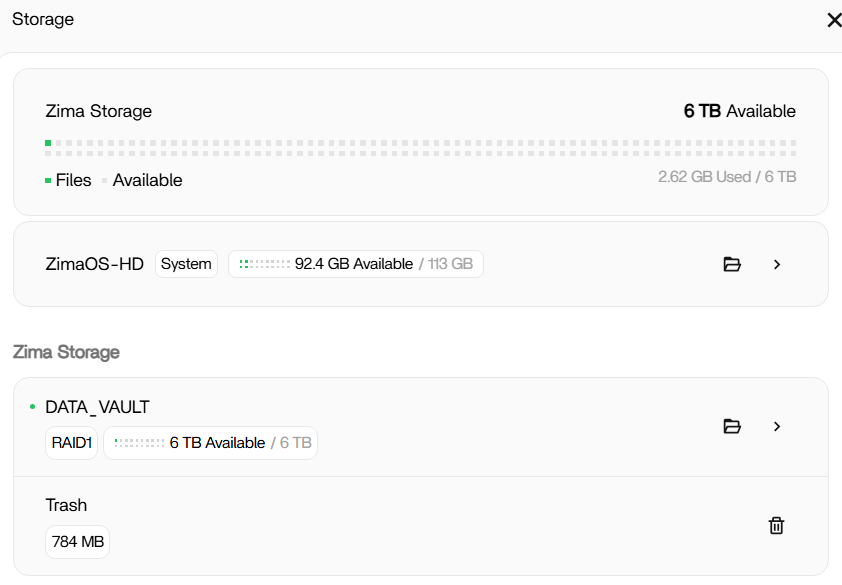
Sure. Here is my storage situation. It’s a NAS still in test phase, no critical data inside untill I figure out how this os works for me.

Yes I use the built in backup feature why? I backup to another local NAS and to my onedrive.