lsicpi will give you the output of all PCI connected controllers and devices, ranging from USB to network controllers all the up to GPU’s, HBA’s and the CPU’s themselves. When you include the extended verbose sub-command (-vv) it is going to return you even more additional context for more advanced debugging and verifications, which is exactly what you’re trying to do here.
Now, each controller will be assigned to a “code” depending on which domain, bus, slot and function they have. Here’s what a Amazon.com: M.2 to SATA 3.0 Adapter [6-Port], RIITOP M.2 NVMe to 6 Ports SATA III Expansion Card Adapter 6Gbps with Chipset ASM1166 : Electronics is read as by lspci:
05:00.0 SATA controller: ASMedia Technology Inc. ASM1166 Serial ATA Controller (rev 02)
The PCI identification is read as [domain]:[bus]:[slot].[function] in which case we have 05:00.0 for that M2. to 6x SATA ASM1166 adapter controller. Now if I do include the extended verbose option it should give me the following:
Full lspci output
lspci -s 05:00.0 -vv
05:00.0 SATA controller: ASMedia Technology Inc. ASM1166 Serial ATA Controller (rev 02) (prog-if 01 [AHCI 1.0])
        Subsystem: ZyDAS Technology Corp. Device 2116
        Control: I/O+ Mem+ BusMaster+ SpecCycle- MemWINV- VGASnoop- ParErr+ Stepping- SERR+ FastB2B- DisINTx+
        Status: Cap+ 66MHz- UDF- FastB2B- ParErr- DEVSEL=fast >TAbort- <TAbort- <MAbort- >SERR- <PERR- INTx-
        Latency: 0, Cache Line Size: 64 bytes
        Interrupt: pin A routed to IRQ 112
        IOMMU group: 20
        Region 0: Memory at dd182000 (32-bit, non-prefetchable) [size=8K]
        Region 5: Memory at dd180000 (32-bit, non-prefetchable) [size=8K]
        Expansion ROM at dd100000 [disabled] [size=512K]
        Capabilities: [40] Power Management version 3
                Flags: PMEClk- DSI+ D1- D2- AuxCurrent=0mA PME(D0+,D1-,D2-,D3hot+,D3cold+)
                Status: D0 NoSoftRst- PME-Enable- DSel=0 DScale=0 PME-
        Capabilities: [50] MSI: Enable+ Count=1/1 Maskable- 64bit+
                Address: 00000000fee00000  Data: 0000
        Capabilities: [80] Express (v2) Endpoint, IntMsgNum 0
                DevCap: MaxPayload 256 bytes, PhantFunc 0, Latency L0s unlimited, L1 unlimited
                        ExtTag+ AttnBtn- AttnInd- PwrInd- RBE+ FLReset- SlotPowerLimit 75W TEE-IO-
                DevCtl: CorrErr+ NonFatalErr+ FatalErr+ UnsupReq+
                        RlxdOrd+ ExtTag+ PhantFunc- AuxPwr- NoSnoop+
                        MaxPayload 256 bytes, MaxReadReq 512 bytes
                DevSta: CorrErr- NonFatalErr- FatalErr- UnsupReq- AuxPwr+ TransPend-
                LnkCap: Port #0, Speed 8GT/s, Width x2, ASPM L0s L1, Exit Latency L0s <4us, L1 <64us
                        ClockPM+ Surprise- LLActRep- BwNot- ASPMOptComp+
                LnkCtl: ASPM Disabled; RCB 64 bytes, LnkDisable- CommClk+
                        ExtSynch- ClockPM- AutWidDis- BWInt- AutBWInt-
                LnkSta: Speed 8GT/s, Width x2
                        TrErr- Train- SlotClk+ DLActive- BWMgmt- ABWMgmt-
                DevCap2: Completion Timeout: Not Supported, TimeoutDis- NROPrPrP- LTR-
                         10BitTagComp- 10BitTagReq- OBFF Not Supported, ExtFmt- EETLPPrefix-
                         EmergencyPowerReduction Not Supported, EmergencyPowerReductionInit-
                         FRS- TPHComp- ExtTPHComp-
                         AtomicOpsCap: 32bit- 64bit- 128bitCAS-
                DevCtl2: Completion Timeout: 50us to 50ms, TimeoutDis-
                         AtomicOpsCtl: ReqEn-
                         IDOReq- IDOCompl- LTR- EmergencyPowerReductionReq-
                         10BitTagReq- OBFF Disabled, EETLPPrefixBlk-
                LnkCap2: Supported Link Speeds: 2.5-8GT/s, Crosslink- Retimer- 2Retimers- DRS-
                LnkCtl2: Target Link Speed: 8GT/s, EnterCompliance- SpeedDis+
                         Transmit Margin: Normal Operating Range, EnterModifiedCompliance- ComplianceSOS-
                         Compliance Preset/De-emphasis: -6dB de-emphasis, 0dB preshoot
                LnkSta2: Current De-emphasis Level: -3.5dB, EqualizationComplete+ EqualizationPhase1+
                         EqualizationPhase2+ EqualizationPhase3+ LinkEqualizationRequest-
                         Retimer- 2Retimers- CrosslinkRes: unsupported
        Capabilities: [100 v1] Advanced Error Reporting
                UESta:  DLP- SDES- TLP- FCP- CmpltTO- CmpltAbrt- UnxCmplt- RxOF- MalfTLP-
                        ECRC- UnsupReq- ACSViol- UncorrIntErr- BlockedTLP- AtomicOpBlocked- TLPBlockedErr-
                        PoisonTLPBlocked- DMWrReqBlocked- IDECheck- MisIDETLP- PCRC_CHECK- TLPXlatBlocked-
                UEMsk:  DLP- SDES- TLP- FCP- CmpltTO- CmpltAbrt- UnxCmplt- RxOF- MalfTLP-
                        ECRC- UnsupReq- ACSViol- UncorrIntErr+ BlockedTLP- AtomicOpBlocked- TLPBlockedErr-
                        PoisonTLPBlocked+ DMWrReqBlocked- IDECheck- MisIDETLP- PCRC_CHECK- TLPXlatBlocked-
                UESvrt: DLP+ SDES+ TLP- FCP+ CmpltTO- CmpltAbrt- UnxCmplt- RxOF+ MalfTLP+
                        ECRC- UnsupReq- ACSViol- UncorrIntErr+ BlockedTLP- AtomicOpBlocked- TLPBlockedErr-
                        PoisonTLPBlocked- DMWrReqBlocked- IDECheck- MisIDETLP- PCRC_CHECK- TLPXlatBlocked-
                CESta:  RxErr- BadTLP- BadDLLP- Rollover- Timeout- AdvNonFatalErr- CorrIntErr- HeaderOF-
                CEMsk:  RxErr- BadTLP- BadDLLP- Rollover- Timeout- AdvNonFatalErr+ CorrIntErr+ HeaderOF+
                AERCap: First Error Pointer: 00, ECRCGenCap- ECRCGenEn- ECRCChkCap- ECRCChkEn-
                        MultHdrRecCap- MultHdrRecEn- TLPPfxPres- HdrLogCap-
                HeaderLog: 00000000 00000000 00000000 00000000
        Capabilities: [130 v1] Secondary PCI Express
                LnkCtl3: LnkEquIntrruptEn- PerformEqu-
                LaneErrStat: 0
        Kernel driver in use: ahci
        Kernel modules: ahci
But the information that you’re probably really looking for is being shown under the Capabilities section, specifically under LnkCap and LnkSta which stands for “Link Capacity” and “Link State”, respectively. In my case this is what I have:
LnkCap: Port #0, Speed 8GT/s, Width x2, ASPM L0s L1, Exit Latency L0s <4us, L1 <64us
…
LnkSta: Speed 8GT/s, Width x2
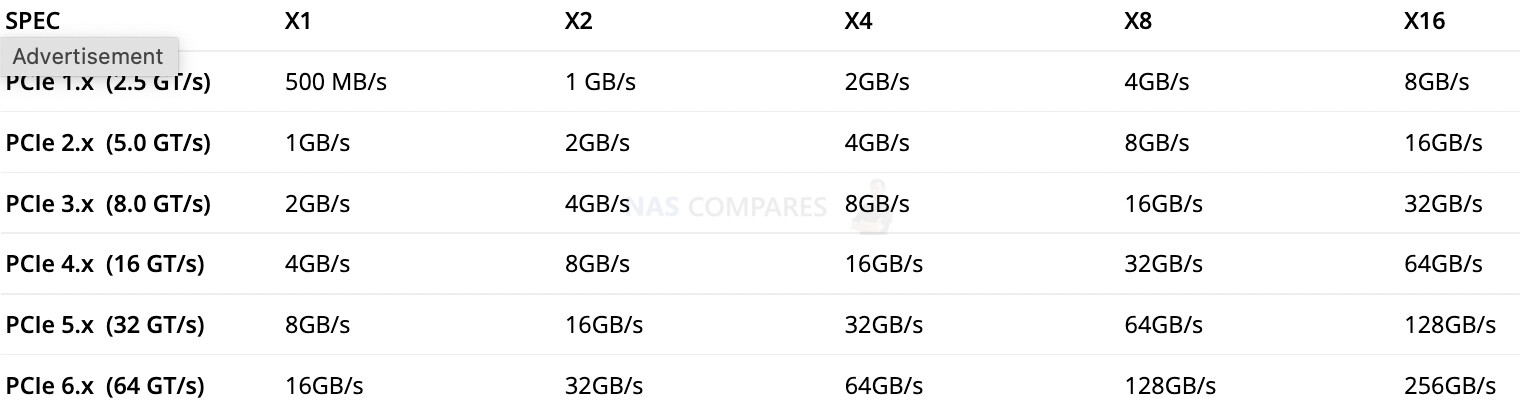
And if you check the GT/s to GB/s comparative chart below to PCIe 3.0 x2, which is exactly what the ASM1166 media controller is specified under the manufacturer specs, it should account for 4GB/s of bandwidth:
In your case, since it runs at 16GT/s, you simply multiply your PCIe 4.0 rated bandwidth for each additional lane they read as - eg. x1, x2, x4, x8, etc.