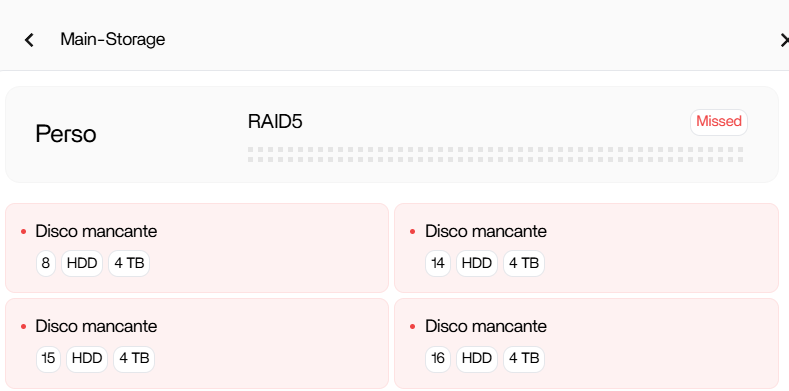
Again issues with raid 5 and array lost

Hi all!

SO last year i opened this topic below, now i lost all the array again and i dont know why., i replaced just 1 disk and PUFF! why does it doesnt see the other 3? why it doesnt ask just to rebuild the array with the new disk? thanks for your help!

H610M H V3 DDR4 mother board

i7 1270p

LSI 9217-8i It Mode

4 sasa 4tb disks

https://community.zimaspace.com/t/raid-5-array-lost-all-data-gone-no-worries-was-a-test-nas/6081

That’s definitely not how RAID5 should behave. Replacing one disk shouldn’t wipe the whole array like that.

From what you’re describing (and the screenshot), it doesn’t look like the data is gone, it looks like ZimaOS just isn’t recognising the array properly anymore. Especially with the changes in 1.6.0 around RAID detection, this feels more like a metadata / reassembly issue than an actual failure.

Main thing right now:
don’t click anything like “initialize”, “enable”, or create a new array, that’s how data actually gets wiped.

Let’s first see what the system actually sees underneath the UI.

Can you run these in the Web Terminal and paste the full output:

lsblk -f
blkid
cat /proc/mdstat

That’ll tell us:

  • if all 4 drives are still detected
  • if the RAID info is still on the disks
  • whether the array is just inactive vs actually broken

Also worth saying, your setup (LSI 9217-8i in IT mode) is solid, so this is very unlikely to be hardware. This is almost certainly ZimaOS just not reassembling the array correctly.

Send the outputs and we’ll take it from there.

1 Like

Thanks for the quick reply! First of all, i have to say that data isn’t important, i have already backup everything on a Syno Nas

Date: Saturday, March 28, 2026 | Uptime: up 1 minute

M@ZimaOS:~ âžś $ lsblk -f
NAME FSTYPE FSVER LABEL UUID FSAVAIL FSUSE% MOUNTPOINTS
loop0 squashfs 4.0
loop1 squashfs 4.0
loop2 squashfs 4.0
loop3 squashfs 4.0
loop4 squashfs 4.0
loop5 squashfs 4.0
loop6 squashfs 4.0
loop7 squashfs 4.0
sda linux_raid_member 1.2 zimaos:fc5616382c017331 4450fc8d-807f-7bc5-8197-45630eab958f
sdb linux_raid_member 1.2 zimaos:fc5616382c017331 4450fc8d-807f-7bc5-8197-45630eab958f
sdc ddf_raid_member 01.00.00 Dell \x10
sdd linux_raid_member 1.2 zimaos:fc5616382c017331 4450fc8d-807f-7bc5-8197-45630eab958f
nbd0
nbd1
nbd2
nbd3
nbd4
nbd5
nbd6
nbd7
zram0
zram1
zram2
nvme0n1
├─nvme0n1p1 vfat FAT16 casaos-boot 62EB-BDA7 31.2M 2% /mnt/boot
├─nvme0n1p2 squashfs 4.0
├─nvme0n1p3 squashfs 4.0 0 100% /
├─nvme0n1p4
├─nvme0n1p5
├─nvme0n1p6
├─nvme0n1p7 ext4 1.0 casaos-overlay 1f72baaf-fb48-445f-b7d5-f3a29506655c 77.5M 0% /var/lib/zerotier-one
│ /var/lib/rauc
│ /mnt/overlay
└─nvme0n1p8 ext4 1.0 casaos-data 647033eb-4b22-424e-842d-00bccefbae3c 124.6G 44% /var/log
/var/lib/libvirt
/var/lib/icewhale
/var/lib/extensions
/var/lib/docker
/var/lib/casaos
/var/lib/bluetooth
/opt
/media
/DATA
/var/lib/casaos_data
nbd8
nbd9
nbd10
nbd11
nbd12
nbd13
nbd14
nbd15
M@ZimaOS:~ âžś $ blkid
/dev/nvme0n1p7: LABEL=“casaos-overlay” UUID=“1f72baaf-fb48-445f-b7d5-f3a29506655c” BLOCK_SIZE=“1024” TYPE=“ext4” PARTLABEL=“casaos-overlay” PARTUUID=“f1326040-5236-40eb-b683-aaa100a9afcf”
/dev/nvme0n1p3: BLOCK_SIZE=“131072” TYPE=“squashfs” PARTLABEL=“casaos-system0” PARTUUID=“8d3d53e3-6d49-4c38-8349-aff6859e82fd”
/dev/nvme0n1p1: SEC_TYPE=“msdos” LABEL_FATBOOT=“casaos-boot” LABEL=“casaos-boot” UUID=“62EB-BDA7” BLOCK_SIZE=“512” TYPE=“vfat” PARTLABEL=“casaos-boot” PARTUUID=“b3dd0952-733c-4c88-8cba-cab9b8b4377f”
/dev/nvme0n1p8: LABEL=“casaos-data” UUID=“647033eb-4b22-424e-842d-00bccefbae3c” BLOCK_SIZE=“4096” TYPE=“ext4” PARTLABEL=“casaos-data” PARTUUID=“a52a4597-fa3a-4851-aefd-2fbe9f849079”
/dev/nvme0n1p2: BLOCK_SIZE=“131072” TYPE=“squashfs” PARTLABEL=“casaos-kernel0” PARTUUID=“26700fc6-b0bc-4ccf-9837-ea1a4cba3e65”
/dev/sdd: UUID=“4450fc8d-807f-7bc5-8197-45630eab958f” UUID_SUB=“40b8c28e-16c4-cd63-0b70-a0b2e0285bcb” LABEL=“zimaos:fc5616382c017331” TYPE=“linux_raid_member”
/dev/sdb: UUID=“4450fc8d-807f-7bc5-8197-45630eab958f” UUID_SUB=“e2573d93-c7ad-4ef4-0485-4e4b837427aa” LABEL=“zimaos:fc5616382c017331” TYPE=“linux_raid_member”
/dev/loop6: BLOCK_SIZE=“131072” TYPE=“squashfs”
/dev/loop4: BLOCK_SIZE=“131072” TYPE=“squashfs”
/dev/sdc: UUID=“Dell ^P” TYPE=“ddf_raid_member”
/dev/loop7: BLOCK_SIZE=“131072” TYPE=“squashfs”
/dev/sda: UUID=“4450fc8d-807f-7bc5-8197-45630eab958f” UUID_SUB=“32e98157-8e49-3b5b-cb1d-0c3191ca008e” LABEL=“zimaos:fc5616382c017331” TYPE=“linux_raid_member”
/dev/loop5: BLOCK_SIZE=“131072” TYPE=“squashfs”
/dev/loop1: BLOCK_SIZE=“131072” TYPE=“squashfs”
/dev/loop2: BLOCK_SIZE=“131072” TYPE=“squashfs”
/dev/loop0: BLOCK_SIZE=“131072” TYPE=“squashfs”
/dev/loop3: BLOCK_SIZE=“131072” TYPE=“squashfs”
M@ZimaOS:~ âžś $ cat /proc/mdstat
Personalities :
unused devices:

from my basic knowledge i have to do something like

mdadm --assemble --scan

?

Ahh yep, that output explains it straight away.

You’ve got 3 drives that still belong to your old RAID (linux_raid_member), but the new/replaced drive (sdc) is showing as DDF / Dell RAID, not Linux RAID.

So basically the array isn’t “gone”, it’s just mismatched. ZimaOS can’t reassemble it because one disk is speaking a completely different RAID format.

That’s why nothing shows in /proc/mdstat and the UI says everything is missing.

Since you’ve already got a backup, this isn’t worth trying to repair, the clean move is just rebuild the array properly after wiping that disk.

For future, whenever you replace a drive, always wipe it first, otherwise old RAID metadata (like this Dell/DDF stuff) can confuse the whole array.

So yeah, not hardware, not your controller, just mixed metadata.