found i was on 1.4.2 and it never prompted to update to the beta or 1.4.4 so i had to find and old thread in here that should how to ssh wget the update file and force an update then reboot so on the next update can we cook-in a manual update along with system updates and then another for app updates.
so 2 separate places system updates and app updates. with system updates add the option to grab the file from git and install it whit a reboot.
Is this what you want?
sudo -i

version=1.4.4

mkdir /DATA/.ota/offline -p

cd /DATA/.ota/offline

wget https://casaos.oss-cn-shanghai.aliyuncs.com/IceWhaleTech/zimaos-rauc/releases/download/$version/zimaos_zimacube-$version.raucb

rauc install zimaos_zimacube-$version.raucb

rm zimaos_zimacube-$version.raucb

reboot
Useful steps for entering CLI: Settings-> General-> Developer mode view-> SSH Access → enable → Web-based terminal
Input your dashboard username to log into the CLI.
Run these commands one-by-one after logging in.
Look forward to your feedback.
yeah i was wondering if there could be an option in settings to copy download url and it would do the rest for you and reboot
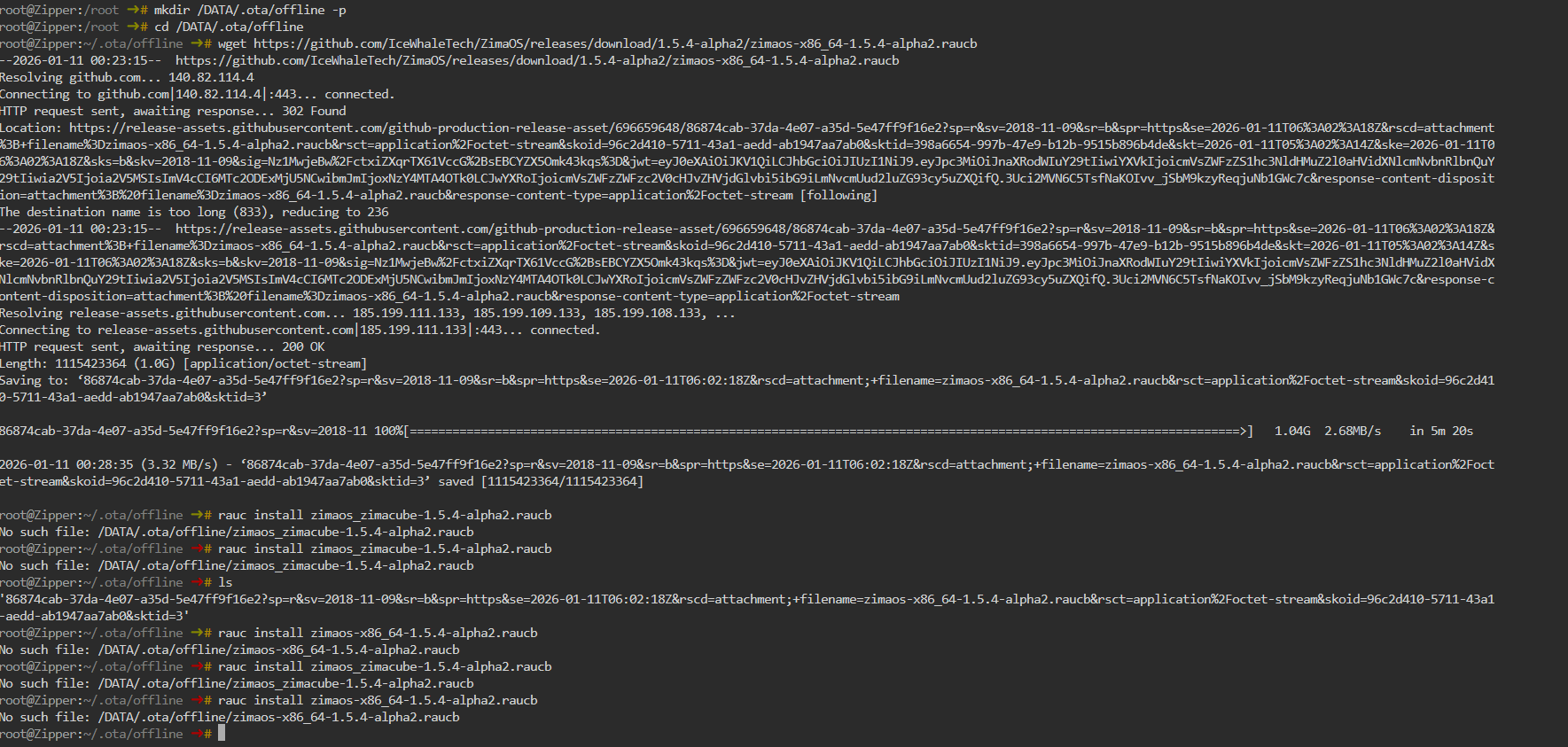
have these commands changed? i cant force an update and i dont have and update notification
What went wrong
Your wget followed the GitHub redirect, and GitHub saved the file using the redirect URL string as the filename:
So instead of saving:
zimaos-x86_64-1.5.4-alpha2.raucb
…it saved something insane like:
86874cab-37da-4e07-a35d-5e47ff9f16e2?sp=...&filename=zimaos-x86_64-1.5.4-alpha2.raucb...
That’s why rauc install zimaos-x86_64-1.5.4-alpha2.raucb says:
No such file , because that clean filename doesn’t exist.
Fix (2 commands)
1) Rename the downloaded file properly
Run this inside /DATA/.ota/offline:
cd /DATA/.ota/offline
mv *alpha2.raucb* zimaos-x86_64-1.5.4-alpha2.raucb
2) Install it
rauc install zimaos-x86_64-1.5.4-alpha2.raucb
Optional: Better download command for next time
To force the correct filename automatically:
wget -O zimaos-x86_64-1.5.4-alpha2.raucb https://github.com/IceWhaleTech/ZimaOS/releases/download/1.5.4-alpha2/zimaos-x86_64-1.5.4-alpha2.raucb
thank you going to try this now. they also need to add an option for when zima doesnt pick up the latest updates to make this easier