Hi after update to 1.5.3 my nvidia card is seen al test i did positif caard seen but Openwebui and stable diffusion it uses normal ram an cpu in the beta my gpu did work HELP
I believe your RTX3090 is being detected by the system, but after updating to ZimaOS 1.5.3, the Docker GPU passthrough (NVIDIA runtime) is no longer being applied to your containers.
That’s why OpenWebUI / Stable Diffusion fall back to CPU + RAM, even though the GPU shows up in hardware checks.
I suggest you check these 3 things first:
- Confirm the GPU is visible in Linux
nvidia-smi
- Confirm Docker sees the GPU runtime
docker info | grep -i nvidia
- Confirm the containers are actually started with GPU access
- For Docker Compose they must include:
runtime: nvidia(older method) ordeploy.resources.reservations.devicesGPU section (newer method)- plus environment like
NVIDIA_VISIBLE_DEVICES=all
If your containers don’t include that GPU configuration, they will always run CPU-only.
I suggest you paste:
- output of
nvidia-smi - your Stable Diffusion / OpenWebUI docker compose (or screenshots of the GPU settings)
and we can point out the exact missing line.
±----------------------------------------------------------------------------------------+
| NVIDIA-SMI 580.105.08 Driver Version: 580.105.08 CUDA Version: 13.0 |
±----------------------------------------±-----------------------±---------------------+
| GPU Name Persistence-M | Bus-Id Disp.A | Volatile Uncorr. ECC |
| Fan Temp Perf Pwr:Usage/Cap | Memory-Usage | GPU-Util Compute M. |
| | | MIG M. |
|=========================================+========================+======================|
| 0 NVIDIA GeForce RTX 3090 On | 00000000:07:00.0 Off | N/A |
| 0% 28C P8 22W / 350W | 1MiB / 24576MiB | 0% Default |
| | | N/A |
±----------------------------------------±-----------------------±---------------------+
±----------------------------------------------------------------------------------------+
| Processes: |
| GPU GI CI PID Type Process name GPU Memory |
| ID ID Usage |
|=========================================================================================|
| No running processes found |
±----------------------------------------------------------------------------------------+
I believe your GPU is actually working fine, because nvidia-smi confirms the RTX 3090 is detected and drivers/CUDA are loaded.
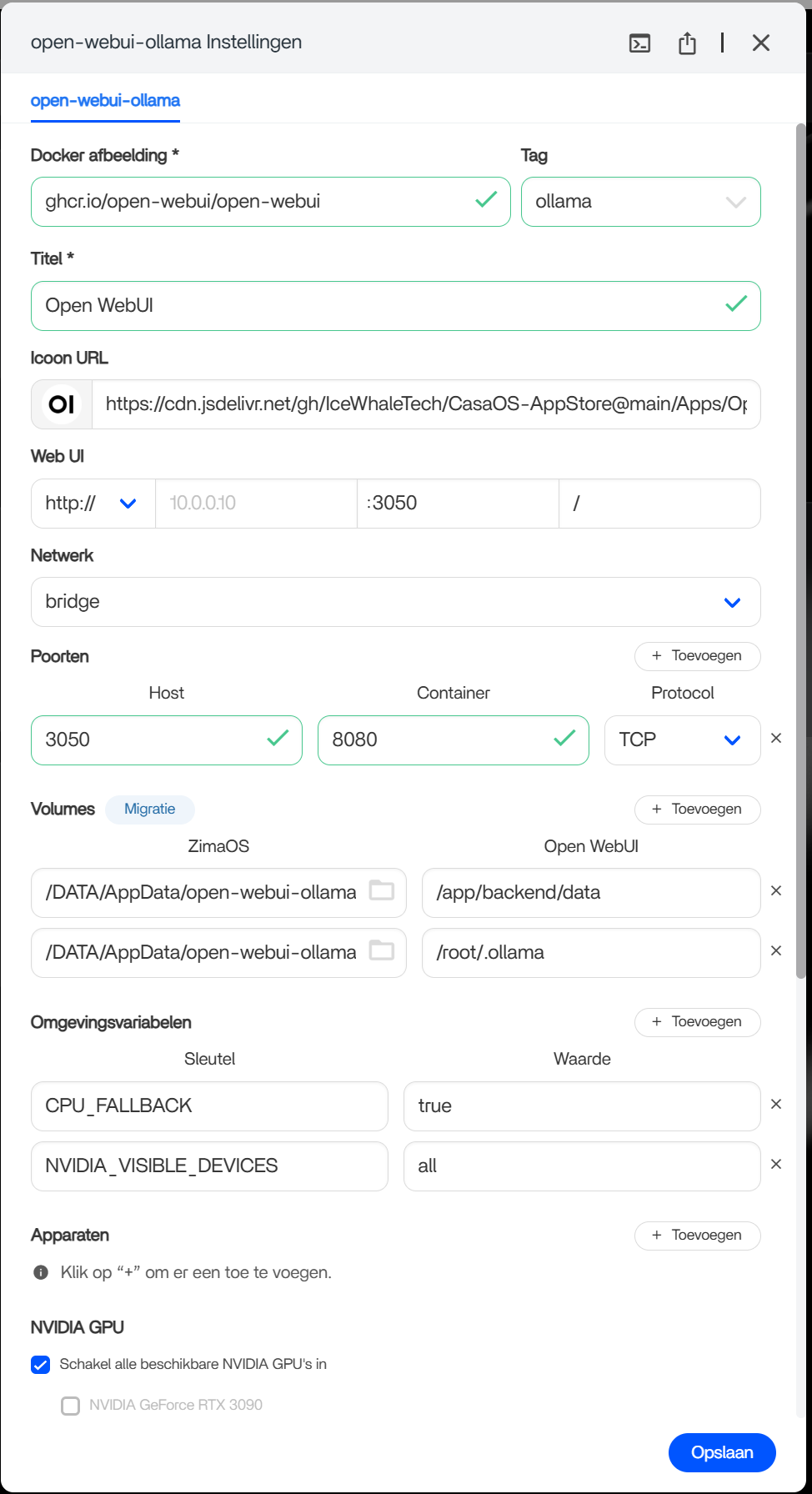
The reason OpenWebUI / Stable Diffusion is running on CPU/RAM is visible in your screenshot:
You have CPU_FALLBACK=true set in the container environment variables.
That will force (or allow) CPU mode even when the GPU is available.
What I suggest
- Remove
CPU_FALLBACK=true(or set it tofalse) - In the GPU section, I suggest also ticking the actual “RTX 3090” device (not only “enable all GPUs”)
- Restart the container
Also important: OpenWebUI itself is only the UI. The GPU workload must be enabled on the backend container (Ollama / Stable Diffusion container). If only OpenWebUI has GPU enabled, nvidia-smi will still show no processes.
After restart, run:
nvidia-smi
You should see a running process once you generate something.
nothing worked zima os new install hope that that does the trick
no stable diffusion installs but cannot start so zimba cube goes offlin for a while
Hi cor, thanks for the update.
If a fresh ZimaOS install still doesn’t fix it, then I believe this is not just your compose settings.
And the new detail is important:
Stable Diffusion installs but cannot start, and the ZimaCube goes offline for a while
That usually points to a system-level crash / resource lockup, most commonly:
- GPU driver/runtime crash
- NVIDIA container runtime not behaving
- memory pressure / kernel hang when the SD container starts
What I suggest (quick isolation test)
Before touching anything else, let’s confirm whether Docker can actually run GPU workloads.
Run these 2 commands and paste the output:
nvidia-smi
docker run --rm --gpus all nvidia/cuda:12.4.1-base-ubuntu22.04 nvidia-smi
Expected: the second command should print the same GPU info inside Docker.
- If this fails or hangs = NVIDIA runtime issue in ZimaOS 1.5.3 (not Stable Diffusion)
- If this works = Stable Diffusion container config / image issue
Then we need the SD crash logs
Please paste:
docker logs --tail 200 stable-diffusion
and
dmesg -T | tail -120
If the cube goes offline, the dmesg output right after it comes back is the key.
Hi cor, thanks, this log is useful.
I believe your GPU driver is loading, but something is wrong with the NVIDIA module options on 1.5.3. These lines are a red flag:
nvidia: unknown parameter ‘nvidia_uvm’ ignored
nvidia: unknown parameter ‘nvidia_modeset’ ignored
nvidia: unknown parameter ‘nvidia_drm’ ignored
That usually means ZimaOS is applying an invalid NVIDIA config, and it can cause GPU containers (Stable Diffusion) to fail or even make the system hang/restart networking.
I suggest we do 2 checks:
- Confirm Docker GPU actually works:
docker run --rm --gpus all nvidia/cuda:12.4.1-base-ubuntu22.04 nvidia-smi
- Paste the Stable Diffusion container logs (this is the key):
docker ps -a | grep -i stable
Then run (replace NAME with the container name you see):
docker logs --tail 200 NAME
If the CUDA test fails on a fresh install, I believe this is a ZimaOS 1.5.3 NVIDIA runtime/driver integration bug and it needs IceWhale to fix it (your dmesg already shows the bad NVIDIA parameters).
tankx this is not working
ZIMA help sucks that every time a update er is other things fail
Quick clarification.
The command didn’t work because NAME was just a placeholder. Docker needs the actual container name.
Please do this:
- List containers:
docker ps -a
- If you’re unsure which one is Stable Diffusion, just post the output from
docker ps -aand we’ll give you the exact command with the correct name included. - Then run:
docker logs --tail 200 <container_name>
Your earlier dmesg already shows NVIDIA loading with invalid parameters.
The container logs are what allow correct corrective steps, not guessing.
Once we see those, we can be precise.
1.5.4 beta1 the rtx3090 is again oke
1 Like