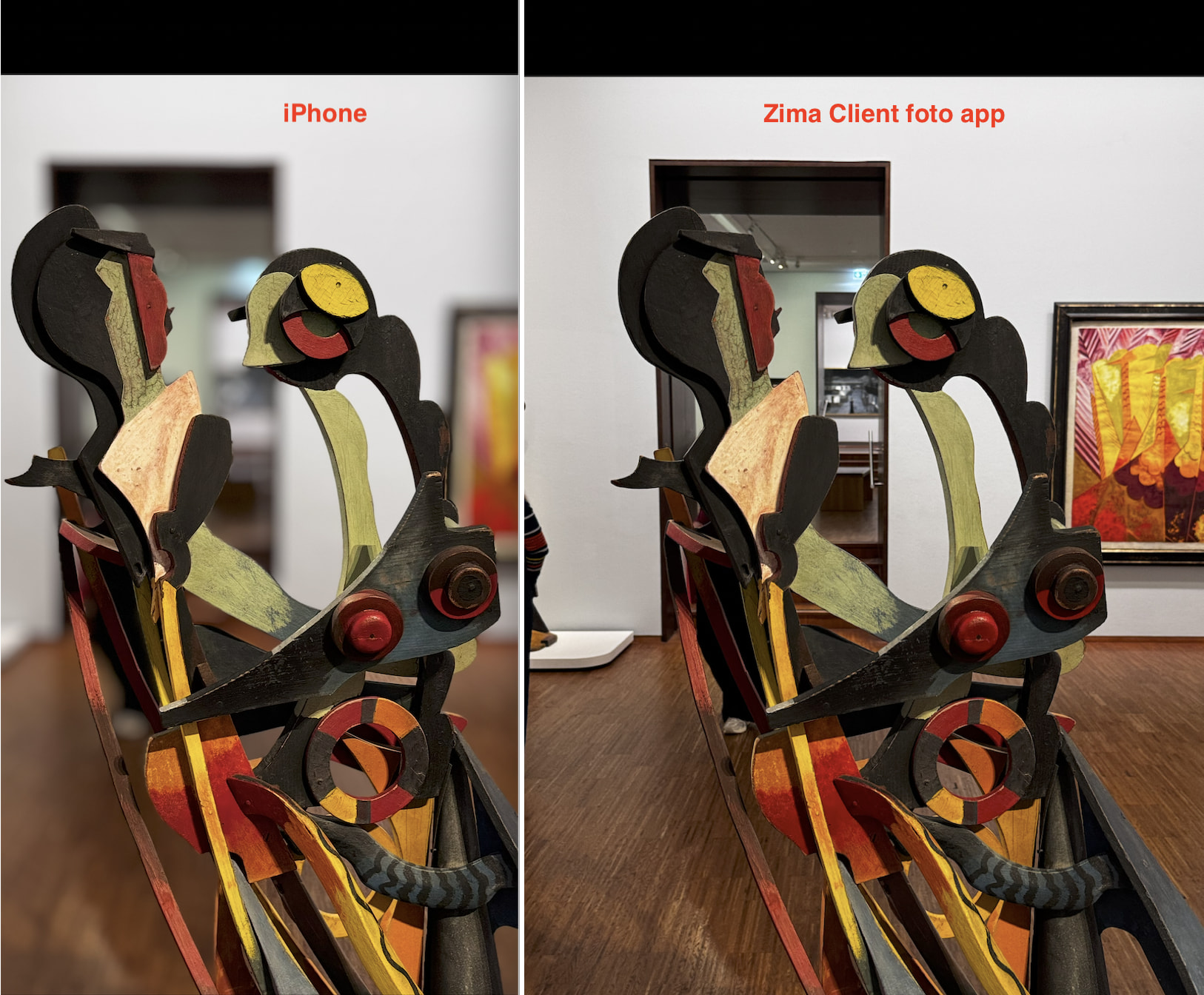
I’m using Zima Client on my iPhone to back up my photos to ZimaOS, and I’ve noticed an issue with photos that have photographic effects applied directly by the iPhone camera at the time of capture.
I’m attaching an image showing two versions of the exact same photo:
Left: the photo as it appears in the iPhone Photos app, with the Photographic Style applied by the camera when the picture was taken.
Right: the same photo as backed up by Zima Client to my NAS, but without the applied Photographic Style and automatic cropping.
In other words, Zima Client appears to be backing up the original, unprocessed image rather than the final version produced by the camera. This is not an effect applied later by manually editing the photo in the Photos app; the Photographic Style was selected directly in the camera settings when the picture was taken.
Is this the expected behaviour of Zima Client, or is there a way to make it back up the final, camera-processed version as displayed in the iPhone Photos app?
I’d like my NAS backup to preserve the photos as they were intended to look when captured, including the photographic effects applied in-camera.
Has anyone else experienced this issue or found a workaround?
Hi, thanks for the detailed explanation! Currently, Zima Client backs up the photo resources returned by Apple’s Photos API without explicitly requesting the final rendered version shown in the Photos app.
We can look into adding an option to back up the rendered version. However, if only the rendered image is retained, it may not be possible to recover all the original image information, such as areas removed by cropping. If the original resources are still available in Photos, the original version can still be restored. Apple’s editing model explains this distinction.
Would backing up only the rendered version work for you, or would you prefer to keep both the original and rendered versions?
I understand the reasoning from a backup perspective. However, it feels a bit strange to open the Photos app in ZimaOS (or view the photos through the iPhone client) and find the unprocessed versions of the photos, rather than the versions one would normally expect to see — the ones displayed in the iPhone Photos app.
In my case, I would probably prefer to have the rendered version backed up, preserving all available metadata (EXIF, etc.).
Ideally, the original file could be retained for backup purposes, while the rendered version would be displayed by default in the ZimaOS Photos app. Would something like this be possible?
Alternatively, it would be great to have the option to choose which version to transfer, or to back up both versions.
After discussing this with our product and development teams, we’ll update the backup behavior so that only the latest edited version of each photo is backed up. Thanks for sharing your feedback—it helps us improve ZimaOS Photos!
Just to clarify one important detail: will this also work for photos that have already been backed up?
For example, if a photo is initially backed up to ZimaOS and I subsequently edit it in the iPhone Photos app, will Zima Client detect the changes and update the already backed-up file with the latest edited version?
In other words, will subsequent edits made on the iPhone trigger an update of the corresponding photo on ZimaOS, or will the new behavior only apply to photos backed up for the first time?
In the next release, this change will only apply to photos being backed up for the first time. Later edits on your iPhone won’t automatically update the copies already backed up to ZimaOS.
We’ll consider supporting this as an advanced feature in the future.
That’s great news! Thanks for the clarification and for considering this as a possible future feature. I think it would be a very useful addition, and I hope to see further developments on this in the future.