Despite updating to the latest BIOS and ZimaOS, I’m still not able to access the first SSD in the drive 7 SSD expander. All four drives show up like this in the UI:
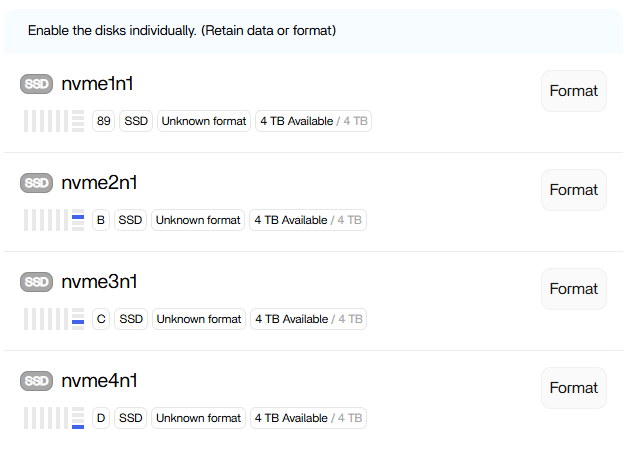
All drives appear under lspci and lsblk:
09:00.0 Non-Volatile memory controller: Micron/Crucial Technology P3 Plus NVMe PCIe SSD (DRAM-less) (rev 01)
0a:00.0 Non-Volatile memory controller: Micron/Crucial Technology P3 Plus NVMe PCIe SSD (DRAM-less) (rev 01)
0b:00.0 Non-Volatile memory controller: Micron/Crucial Technology P3 Plus NVMe PCIe SSD (DRAM-less) (rev 01)
0c:00.0 Non-Volatile memory controller: Micron/Crucial Technology P3 Plus NVMe PCIe SSD (DRAM-less) (rev 01)
nvme4n1     259:0    0   3.6T  0 disk
nvme1n1     259:1    0   3.6T  0 disk
nvme2n1     259:3    0   3.6T  0 disk
nvme3n1     259:11   0   3.6T  0 disk
But I noticed in /etc/casaos/local-storage.conf there was a discrepancy…
admin@ZimaCube:~ ➜ $ cat /etc/casaos/local-storage.conf
[common]
RuntimePath = /var/run/casaos

[app]
LogPath     = /var/log/casaos
LogSaveName = local-storage
LogFileExt  = log
DBPath      = /var/lib/casaos/db
ShellPath   = /usr/share/casaos/shell

[server]
USBAutoMount      = True
EnableMergerFS    = false
SataStartNumber   = 0
NVME              = 07:00.0,0a:00.0,0b:00.0,0c:00.0
DiskSleepWaitTime = 0
The first NVME address is 07:00.0 but lspci shows it at 09:00.0. When I updated local-storage.conf and rebooted, the drive now appears in the UI.